Implementing RAG (2)

In the previous post we looked at the need for Retrieval Augmented Generation (RAG). In this post we understand how to implement it.

Figure 1 shows RAG architecture. Its major components include:

  • Embedding Model: To convert query and proprietary data text into vectors for vector search.
  • Vector DB: To store and search vectorised documents
  • Large Language Model (LLM): For answering User’s query based on retrieved documents
  • Proprietary Data Store: source of ‘non-public’ data
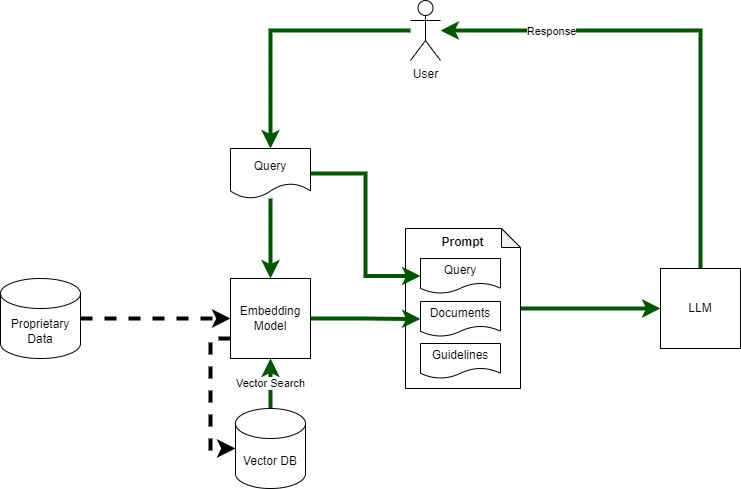
Figure 1: Outline of RAG Architecture

I used python to create a simple app to explore RAG – using my blog posts as the proprietary ‘data source’ that we want to use for answering questions. Component mapping shown in Figure 2 and described below.

  • Embedding Model: Sentence-Transformers (python sentence_transformers)
  • Vector DB: Milvus with python client (pymilvus)
  • LLM: GPT-4 (gpt-4-0613) via Open AI API client (python)
  • Proprietary Data Source: blog posts – one text file per blog post
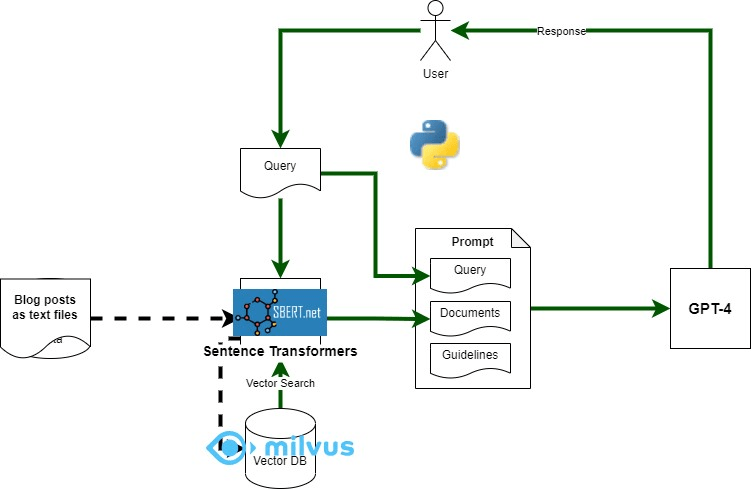
Figure 2: Components used to implement RAG

I used the dockerised version of Milvus, it was super easy to use, remember to reduce the logging level as the logs are quite verbose. Download the docker compose file from here: https://milvus.io/docs/install_standalone-docker.md

Sentence Transformers (sentence_transformers), Python Milvus client (pymilvus), and OpenAI (openai) Python Client can all be installed using pip.

RAG Implementation Code

The main RAG implementation is here: https://github.com/amachwe/rag_test/blob/master/rag_main.py

The logic is straight forward. We have a list of queries covering topics relevant to the blog post and topics that are not relevant to make sure we can run some experiments on the output.

We execute each query against GPT-4 twice. Once with attached documents retrieved from the vector database (using the same query) and once without any attached documents.

We then vectorise the RAG and Non-RAG response from the language model and compare them to get a similarity score.

The data from each run is saved in a file named ‘run.csv’.

We also log the response from the language model as well.

Vector DB Build Code

The code to populate the vector db with documents can be found here:

https://github.com/amachwe/rag_test/blob/master/load_main_single.py

For this test I created a folder with multiple text files in it. Each text file corresponds to a single blog post. Some posts are really small and some are quite long. The chunking is at the sentence level. I will investigate other chunking methods in the future.

Running the Code

To run the code you will first need to populate the vector db with documents of your choice.

Collection name, schema, and indexes can be changed as needed. In this respect the Milvus documentation is quite good (https://milvus.io/docs/schema.md).

Once the database has been loaded the RAG test can be run. Make sure collection name and OpenAI keys are updated.

In the next post we look at the results and start thinking about how to evaluate the output.

Fun With RAG (1)

A short series on RAG – which is one of the most popular methods for working with LLMs whilst minimising the impact of training bias and hallucinations.

Retrieval Augmented Generation (RAG) involves supplementing the information stored within a large language model (LLM) with information retrieved from an external source for answering questions with improved accuracy and references for validation.

RAG is especially important when we want to answer questions accurately without retraining the LLM on the dataset of interest. This decoupling from retraining allows us to update data independently of the model.

The Source of LLM’s Knowledge

Let us understand a bit more about the above statement regarding the training of LLMs. Generally, training involves multiple stages with different types of data involved in each stage.

The first stage involves large datasets consisting of Wikipedia, books, manuals, and anything else that we can find on the Internet. This is like parents telling their children to read a wide variety of text to improve their knowledge, vocabulary, and comprehension. This usually results in a generic ‘language model’ also known as a foundation LLM. The main problem with such a model is that while it knows a lot about constructing language it has not learnt how to say construct language to support a chat.

The second and subsequent stages involve fine-tuning a foundation model to specialise it to handle specific tasks such as having a ‘chat’ (e.g., ChatGPT) or helping search for information. Now the data used to train during fine-tuning is quite different from what is used in the first stage and includes human feedback and curated datasets. This is similar to a college student reading a coursebook, they already know the language structures and form. The data is usually specialised to reflect the tasks it is being fine tuned for. A lot of the ‘understanding’ of what is a proper response is learnt at this stage.

Key Concept
Therefore as a finished product the LLM has patterns and data from the following sources: the Internet - including books, Wikipedia, and manuals, human feedback on its responses, and specialised curated datasets suitable for the tasks it was developed for.

The Gap

The LLM as a finished product is quite useful. It is able to perform many useful tasks, and use its capability of language formation to respond with the correct syntax and format. For example, if you ask GPT4 to write a poem it will us the correct alphabets and format.

The Scenario

But imagine you were running a company that sold electronic gadgets. Customer and colleague feedback indicates that even though you have a set of Frequently Asked Questions and well structured product guides, it still takes time to get to specific pieces of information. You discover customers are calling to get the agents to summarise and explain parts of the guide. This process is far from simple and often leads to confusion as each agent summarises in a different way and sometimes the less experienced agents provide erroneous information.

Obviously, you get very excited about the power of LLMs and build a business case for how we can save agent time, enable customer self-serve, and increase first-time-correct using LLMs to explain/summarise/guide the agents and the customers. You setup a proof of concept to test the technology and create an environment with your favourite cloud provider to try out some LLMs. This is where you hit the first issue. While the LLMs you are trying have generic knowledge about electronics and can answer common questions, they have no way of answering specific questions because either that data did not form part of the training set or there was not enough of it, or that data did not exist on the public Internet when training was being carried out.

As an example: say the customer wants information about a recently released laptop. LLM will be able answer questions like: ‘what is usb-c’ or ‘tell me about how to clean laptop screens’ as there is a lot of information on the Internet about these topics. But if we ask specific questions like: ‘what is the expected battery life of the laptop’ the LLM will not be able to answer since this laptop model did not exist when the LLM was trained. You want the LLM to say ‘sorry I don’t know’ but it is difficult to identify that unless you can tabulate what you do know.

The worst case is that LLM has partial or related data for say the laptop brand or some other laptop model and it uses that to create a response that sounds genuine but is either incorrect or baseless. This can increase the frustration experienced by the customers and agents.

Key Concept 
The LLM does not have enough knowledge to answer the question. There are other cases where it may have partial knowledge, incorrect knowledge, or it may 'think' it has enough based on links with unrelated knowledge items. But because the LLM is compelled to generate, it will generate some response. This gap in knowledge between what it needs to respond correctly vs what it knows is where RAG comes in.