Looking Beyond Next-token Generation

The output produced by Large language models seems even more incredible given the fact that they predict the next token (i.e., next bit of text) based on provided input (prompt) and the tokens generated so far.

The human brain does not work like this. We constantly evaluate, re-write, and re-think as we work. We also use hierarchical planning (e.g., breaking down a document into sections and sub-sections) and other methods to ‘think’ about text at various levels of detail.

LLMs on the other hand can only move forward one token at a time. There is no ‘reverse and rewrite’ mode (as yet).

So it would make sense for people to investigate generating a sequence of tokens rather than just the next token and to see if this has an impact on the quality of the output (which to be fair is already quite amazing).

This is exactly what a research team with members working in Meta have done. The paper is titled: Better & Faster Large Language Models via Multi-token Prediction

Why Multiple Tokens?

First let us understand what we mean by generating multiple tokens. Assuming we have the following prompt: “Calculate 4+6”.

A single token prediction LLM with provide the following sequential output (hidden from us because of convenience methods provided by transformers library):

  • prompt -> <space>
  • prompt + <space> -> 1
  • prompt + <space>1 -> 0
  • prompt + <space>10 -> .
  • Final output: <space>10.

A multi-token prediction with length four might work as below (pipes separate tokens generated in parallel):

prompt -> <space>|1|0|.

Final output: <space>10.

Figure 1 shows the architecture that includes 4 heads to generate n=4 next tokens in parallel.

It is immediately clear if we have this kind of n token generation we are going to get massive speedup in inference at the cost of additional resource (for the extra heads). Also this will make training harder and resource intensive. To get to next-token generation the model can discard heads 2, 3, and 4.

Figure 1: Model architecture for n=4 token generation (source: the paper linked above)

Why Does This Work?

In their results they show significant improvements in Code related tasks and other benchmarks. The key thing to understand is that when we train using multiple-heads we are passing lot of ‘hidden’ information about token choices.

As they state in the paper, and we humans know intuitively: “Not all token decisions are equally important for generating useful texts from language models”.

Imagine when you are presented some text to read. Your brain knows the words it can skip without impacting your understanding of the text. These words may impart stylistic variation (e.g., first voice vs third-person voice) but do not add much to your understanding. These can be thought of as style tokens.

Then there will be some words that will grab your attention because they define the message in the text. These tokens they call choice points and they define the semantic properties of the text.

In a similar way LLMs have to generate (one token at a time – without any reverse-rewrite) the sequence of style tokens and choice point tokens that provides a correct response to the prompt.

Now you can probably begin to understand how LLMs can go off-track. If mistakes are made in the early choice point tokens then it is difficult to recover (as it cannot go back and reselect a different choice point). If mistakes are made in style tokens then recovery may still be possible.

When we train using multiple heads (even if we discard them during inference) we are teaching the LLM about relationships between next n tokens. And the key thing (as they show in the paper) – during training the correlated choice point tokens are weighed together with larger values than the style tokens.

In simple words two tokens that in the generation are related and add meaning to the text are given more importance than those that do not.

This looking-ahead property during training ensures that we already have a mental map (a tiny one) of what then next few words may look like when we are generating.

But n = ?

A valid question would be – what should be the value of n. In other words how big a mental map should be build during the training.

One reasonable answer would be – depends on the task – complex tasks may require bigger mental maps.

For most of the tasks they experiment with n = 4 seems to be the optimal value (except one task where it is 6). Another interesting result is that performance seems to drop at higher values of n. This is also understandable as if we try and think too far ahead we may find many ‘next steps’ and find it difficult to select the correct one.

Talking with your Data (SQL) Part 2: Testing GitHub Copilot

In the previous post I investigated a text-to-SQL LLM to enable ‘talking to your data’. In this post I am running the same use-case to test the SQL generation capability of GitHub Copilot (GHC) using the plugin for VS Code. This uses the personal edition of GitHub Copilot.

One drawback of using GHC is that we cannot integrate with the backend data source to execute the generated SQL because at the time of writing there is no API-based access available.

Instead if we use the VS Code plugin – we can include the schema definition and other artefacts as we chat with the model. The model takes these included artefacts into consideration when it responds.

This type of ‘copilot’ integration is suitable for an analyst tool that is suitable for both non-technical and technical users. The conversational interface can be used to outline the questions which result in query generation and execution. The technical user can quickly build complex queries.

I expect this to be a generally available capability as all major database providers are integrating some kind of ‘copilot’ / gen-ai assisted querying tool in their product.

Creating the Synthetic Data

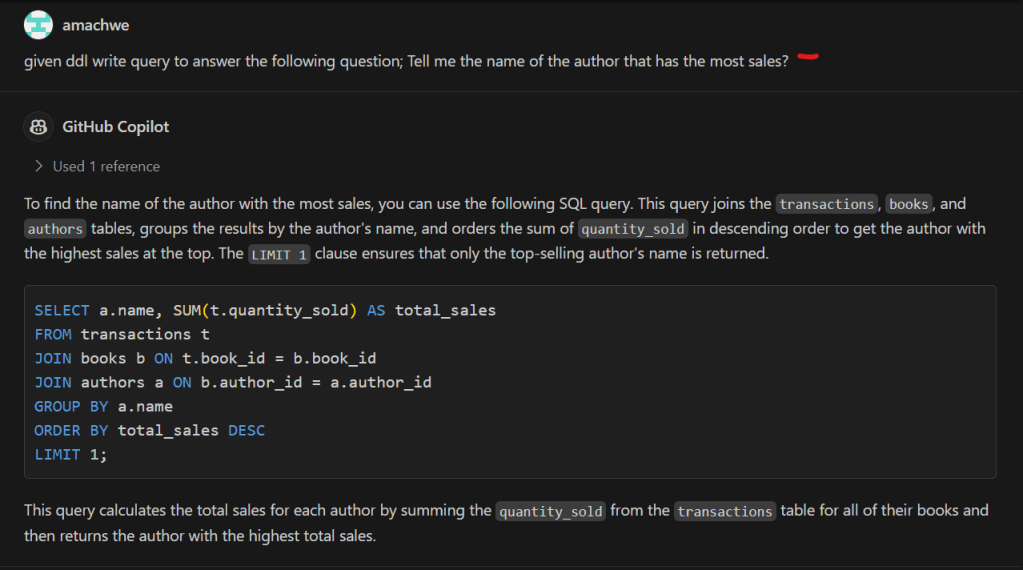
In the screenshot below we can see the VS Code GitHub Copilot chat plugin. On the left hand side we have the data schema file open (yellow bracket). This is automatically taken by GHC as a reference (red line) when we ask a question (above the red line).

In its response GHC first explains the required conditions (white bracket) and then it provides the SQL code that we can execute (green line).

The resulting query is absolutely correct.

Asking Questions

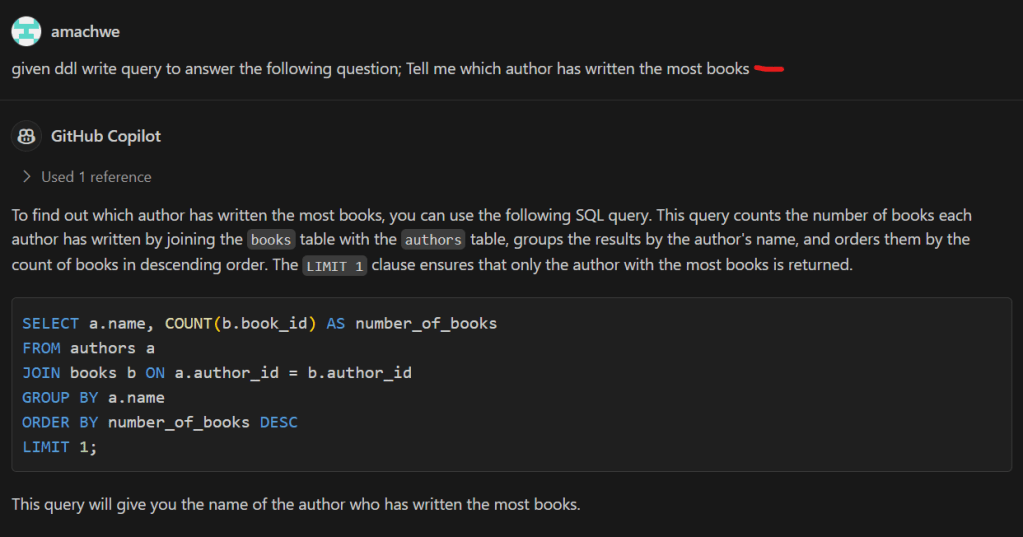
We ask the same questions as in the previous post (red lines in the screenshots). This is quite easy as the only reference we need is the data schema file as above which is taken automatically by GHC. The responses from GHC explain the logic behind the response, then show the generated SQL query, and finally the expected result. All the queries are correct!

Tell me the name of the author that has the most sales?
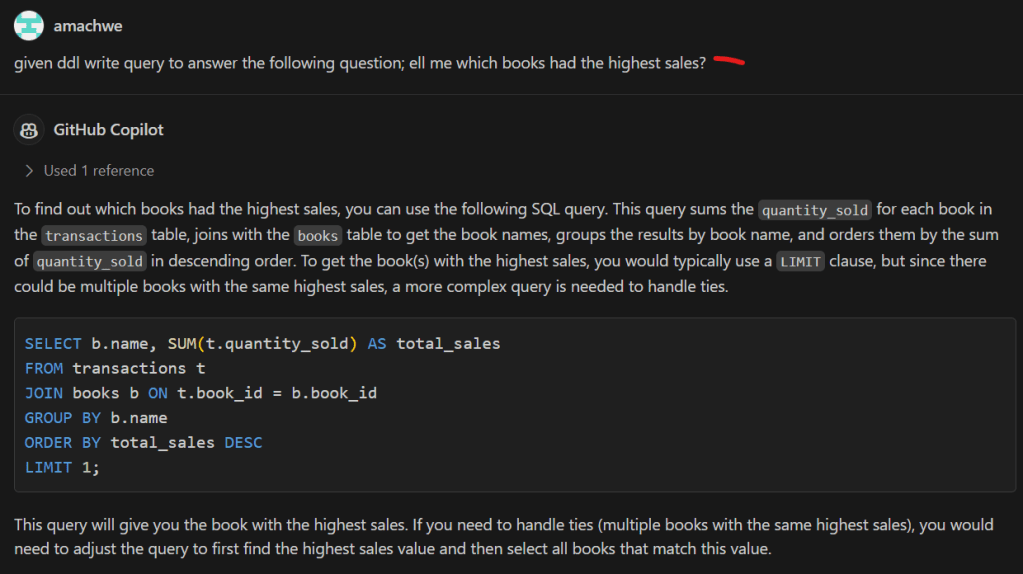
Tell me which books had the highest sales?
Tell me which author has written the most books?

Denormalising the Data

Data denormalisation is often required for analytics at scale to avoid expensive join operations and to keep the queries simple.

GitHub Copilot (GHC) is able to denormalise the schema quite easily as well. In the image below it provides the DDL for the denormalised version.

Denormalise the bookstore tables.

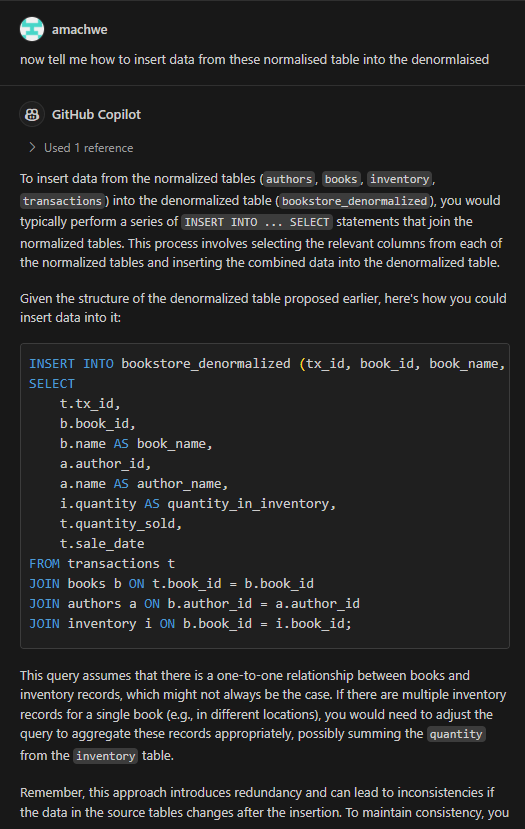
And the fun doesn’t stop there… if I ask GHC to provide a script to extract data from the normalised version of the tables to the denormalised table, it can do that as well!

Insert data into the denormalised structure.

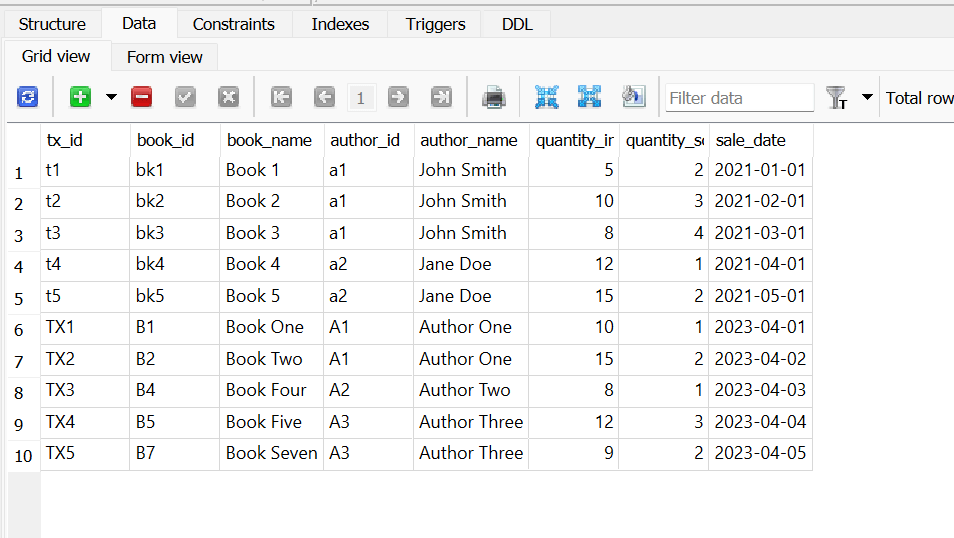
Here is the result after I run the above insert statement. Now this is not the complete data because as the astute reader will observe – in the denormalised table definition all the values cannot be null. Therefore the insert statement has taken that into account and brought over only those books that have transactions against them (see the Transactions table below).

Data injected into the denormalised table.
The Transaction table from the normalised schema.

Talking with your Data (SQL)

This post is about testing text-to-SQL generation capabilities with human in the loop. The broader use-case is around being able to talk with your data for generating insights.

The results will blow your mind!

So instead of creating dashboards around questions (e.g., which product had the highest sales in the previous 3 months?) you could ask any question and an automated system would go and query the right data to return a response in a human understandable way.

Model: For this post I am using the Defog text-to-SQL model (8 billion parameters) based on Llama-3 from Hugging Face: defog/llama-3-sqlcoder-8b. This is a relatively new model (mid-May 2024).

Infrastructure: the model is running locally and takes about 30gigs of RAM for the prompts I used. I use a SQLite 3 database as a backend.

Model Deployment: I have created a python flask web-server (read more here) that allows me to deploy any model once when the server starts and then access it via a web-endpoint.

Software: A python web-client for my model server that takes care of prompting, workflow, human-in-the-loop, and the integration with other components.

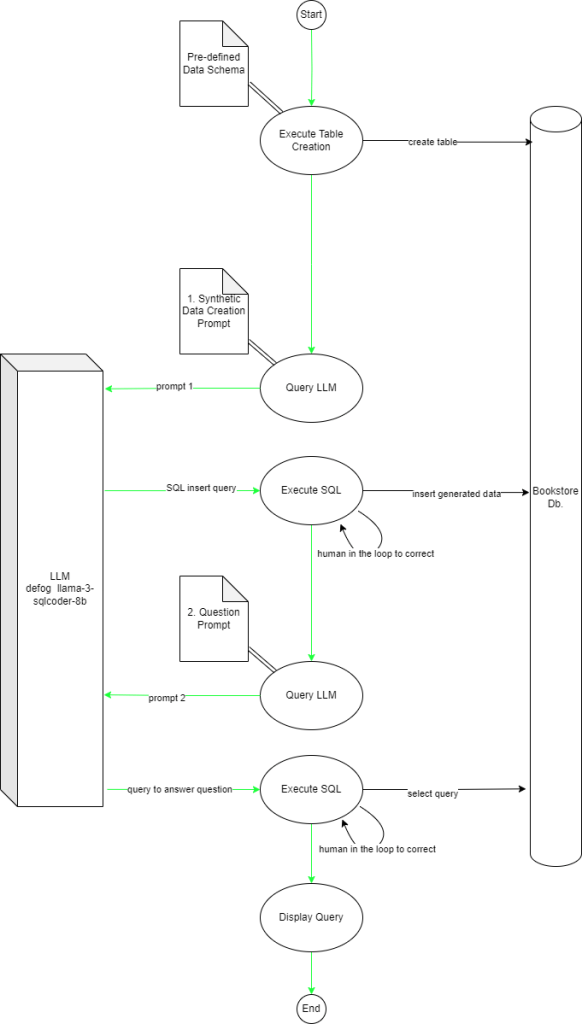
Figure 1 shows the flow of the main app and its interactions with the LLM and the SQL database.

Figure 1: Flow of the application (green arrow) and interactions with the LLM and Database.

Challenges to overcome: This is a complex use-case that covers synthetic data creation based on schema, Insert, and Select use-cases against a multi-table database. This requires the LLM to:

  1. Understand the Data Definition (in SQL)
  2. Correctly generate synthetic data based on the definition
  3. Correctly generate the insert statements (in the correct order as the foreign keys have a not null clause)
  4. Understand the user’s question
  5. Convert the question into a valid SQL query with joins and other operations as required

Keep in mind that this is not a gazillion parameter GPT-4o or Gemini. This is not even the larger variant of the sqlcoder model with 34 billion parameters. This is the humble 8b parameter version!

The Schema: The schema simulates a book store with four tables – authors, books, inventory, and transactions. The relationships are as follows:

  1. Author (1) -> (*) Books
  2. Books (1) -> (1) Inventory
  3. Books (1) -> (1) Transactions

Synthetic data is generated for all the tables based on directions given in the first Prompt (prompt 1).

The question (Which Author wrote the most books?) requires a join between the Author and Books tables.

The Stages

Posting some snippets of the output here, the full code can be found on my Github repo.

Creating the Tables

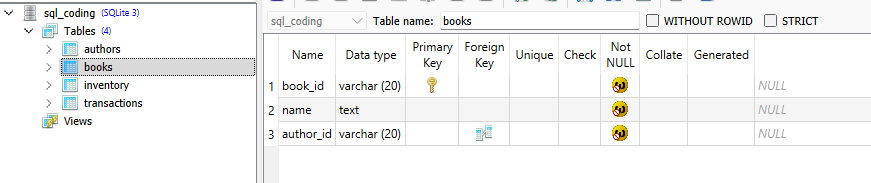
A simple data definition (DDL) script that is run by the python client.

create table authors (author_id varchar(20) primary key not null, name text not null);

create table books (book_id varchar(20) primary key not null, name text not null, author_id varchar(20) not null, FOREIGN KEY(author_id) REFERENCES authors(author_id));

create table inventory (inv_id varchar(20) primary key not null, book_id varchar(20) not null, quantity int not null, FOREIGN KEY(book_id) REFERENCES books(book_id));

create table transactions(tx_id varchar(20) primary key not null, book_id varchar(20) not null, quantity_sold int not null, sale_date date not null, FOREIGN KEY(book_id) REFERENCES books(book_id));

We can see the output above with the full structure of the books table. I am using SQLite Studio to view the structure and data only, all changes are made programmatically. This is still using python sqlite libraries so nothing magical yet.

Creating and Inserting Synthetic Data

For the next step (creating and inserting synthetic data) we bring in the LLM (sqlcoder). The prompt used can be seen in Figure 2. The ddl placeholder just injects the above create SQL statements to provide information about the structure of tables and relationships between them. We also define the number of records per table and some other constratins.

Figure 2: Prompt for generating synthetic data.

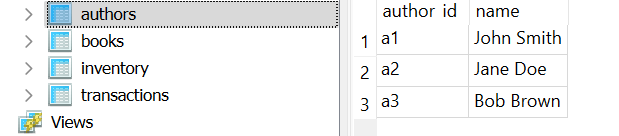
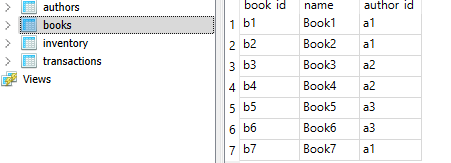
The LLM returns the following response to the above prompt. We can see the constraints for number of records and number of books per author are respected.

INSERT INTO authors (author_id, name) VALUES ('a1', 'John Smith'), ('a2', 'Jane Doe'), ('a3', 'Bob Brown');

INSERT INTO books (book_id, name, author_id) VALUES ('b1', 'Book1', 'a1'), ('b2', 'Book2', 'a1'), ('b3', 'Book3', 'a2'), ('b4', 'Book4', 'a2'), ('b5', 'Book5', 'a3'), ('b6', 'Book6', 'a3'), ('b7', 'Book7', 'a1');

INSERT INTO inventory (inv_id, book_id, quantity) VALUES ('i1', 'b1', 5), ('i2', 'b2', 3), ('i3', 'b3', 4), ('i4', 'b4', 2), ('i5', 'b5', 6), ('i6', 'b6', 8), ('i7', 'b7', 9);

INSERT INTO transactions (tx_id, book_id, quantity_sold, sale_date) VALUES ('t1', 'b1', 2, '2022-01-01'), ('t2', 'b2', 1, '2022-01-02'), ('t3', 'b3', 3, '2022-01-03'), ('t4', 'b4', 4, '2022-01-04'), ('t5', 'b5', 5, '2022-01-05');

Below we can see a screenshot from SQLiteStudio after the generated insert statements were run. We can see the SQL generator has clearly picked out the schema of each table and the relationships between them just from the data

The stage is now set for us to move to ‘talking to your data’.

Asking A Few Questions

The first question we ask is: Tell me which author has written the most books?

If you are familiar with the Spider 1.0 challenge from Yale (for Text-to-SQL) this above question is a medium complexity one because the model has to correctly identify the need for a join and populate the current table and field names given the schema.

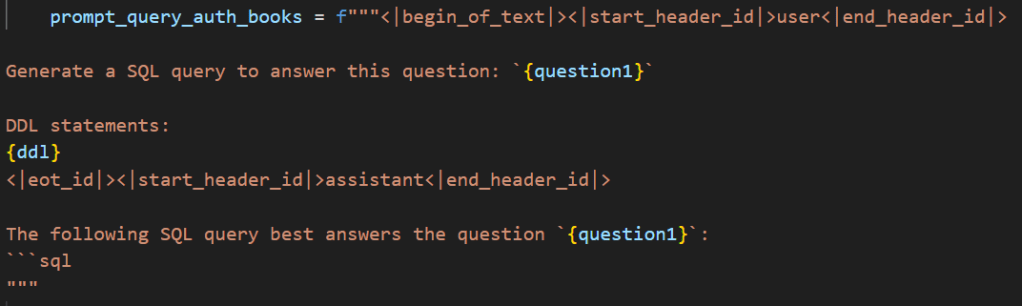
The prompt template is given below. The placeholder question1 is what we use for questions. In this case I created two separate prompts but the structure is exactly the same and we can easily convert it into a function that takes in a question as a string and outputs the filled template.

Figure 3: Prompt template for a question.

The entry below shows the SQL query generated by the model and the Query Output when that query is executed.

SQL Query:
WITH BookCounts AS (SELECT a.name, COUNT(b.book_id) AS book_count FROM authors a JOIN books b ON a.author_id = b.author_id GROUP BY a.name) SELECT name, book_count FROM BookCounts ORDER BY book_count DESC LIMIT 1;

Query Output: ('John Smith', 3)

The Query output gives the correct answer.

The next question is: Tell me which books had the highest sales?

Now the key point about this query is that I am not talking about the book that sold the most, instead I am talking about the ‘books’. The model recognises this. We use the same template as above but just replace the text in the question1 placeholder with the above question.

SQL Query:
WITH TotalSales AS (SELECT b.book_id, SUM(t.quantity_sold) AS total_sales FROM transactions t JOIN books b ON t.book_id = b.book_id GROUP BY b.book_id) SELECT bs.book_id, bs.total_sales FROM TotalSales bs ORDER BY bs.total_sales DESC NULLS LAST LIMIT 5;

Query Output:
('b5', 6)
('b4', 4)
('b2', 3)
('b1', 2)
('b3', 1)

The Query output once again gives the correct output. The model has interpreted the need to give the top n results. In fact the model has gone a step further and set n to ‘5’, so it returns the top 5 books in terms of sales using a join between the transaction and books table.

The final question is: Tell me which author has the most sales?

Looking at Spider 1.0 this would come in the Hard category.

This time I wanted to check a question that requires more than one join and a group operation. So in this case you need to join the transactions and books table and then group and join the result to the authors table to cater for the fact that a single author may have written multiple books.

SQL Query:
WITH TotalSales AS (SELECT b.author_id, SUM(t.quantity_sold) AS total_quantity_sold FROM transactions t JOIN books b ON t.book_id = b.book_id GROUP BY b.author_id), RankedAuthors AS (SELECT a.author_id, a.name, ts.total_quantity_sold, RANK() OVER (ORDER BY ts.total_quantity_sold DESC) AS sales_rank FROM authors a JOIN TotalSales ts ON a.author_id = ts.author_id) SELECT ra.name, ra.total_quantity_sold FROM RankedAuthors ra WHERE ra.sales_rank = 1;

Query Output:
('Jane Doe', 6)

Once again the result is correct! Amazing stuff as promised! I have tried this demo more than 20 times and it worked flawlessly.

The code for the SQL LLM Server https://github.com/amachwe/gen_ai_web_server/blob/main/sql_coding_server.py

The code for the SQL LLM Server client: https://github.com/amachwe/gen_ai_web_server/blob/main/sql_coding_client.py

Have fun!