Think of a coffee machine. The automated kind with water, milk, coffee and chocolate inside. That is lazy evaluation.
In such a coffee machine we have a ‘store’ of water, milk, coffee and other ingredients but these are not mixed and processed to produce a specific type of coffee till the request comes in. This is Lazy Evaluation.
What the machine does not do is keep the milk froth ready, keep the water boiling etc. this would be Greedy Evaluation.
So what…
Lazy evaluation can help save time, cost, and resources. We do not need to use up memory to store intermediate results as the whole processing becomes one large task execution graph. This is applicable for any area where there are a set of tasks that need to be combined based on incoming request.
From the coffee shop, to amazon warehouses, to your software program.
Developing agents and multi-agent systems seems to be more about a lone-wolf developer standing up a whole fleet of agents (cue your favourite OpenClaw story).
But what if as an organisation you want to have a multi-agent system built with developers working across different teams?
In that scenario, all the agents you need in your multi-agent system (MAS) are not going to show up all at once in perfect sync. For a (hopefully) short time it will appear fragmented before the agents start coming online giving it some shape.
This post is about how you can stub out agents to ensure teams are decoupled.
This post is divided into two sections. The first one describes what a stub can look like and the other how these stubs fit based on specific orchestration scenarios.
This type of stub is just a bridge over the gap. The primary benefit is to ensure you can test any kind of routing and orchestration to this agent (not from it). This also allows you to see the shape of your multi-agent system and ensure you have placeholders to map on-paper architecture to code.
Usage: The name an description are minimum bits of information you need to agree with the team responsible for the agent build. This must be done as a part of the MAS design and agent-to-skill mapping.
Deterministic Stub
We may want to create a deterministic stub for the situation where we know the major scenarios we want to stub for and can create a rule-based decision tree. For example, in case these agents are part of a sequence and are taking in structured input and producing structured output. Such rule-based stubs will then be replaced by a flexible/robust understanding and decisioning system (e.g., LLM, ML-model) in production.
Usage: First decide what scenarios you want to use the stub based on the requirements for the agent. Decide whether you want to test the happy path or the unhappy path or both. The problem to solve then is to create some simple rules that map the input to specific outputs. This will require coordination with the team developing the actual agent and the goals/tasks assigned to the agent. The stub can also be used to support session state update testing (plumbing for the system).
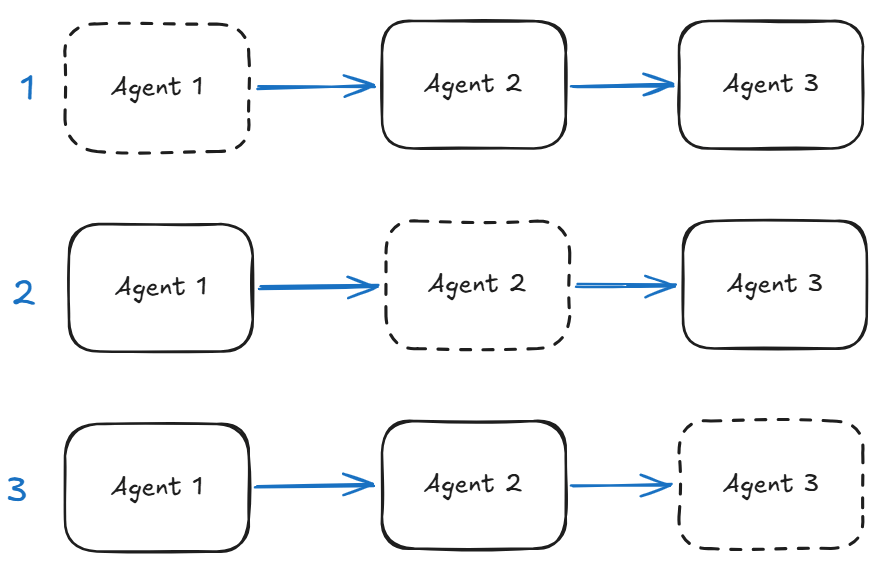
In the figure below if we are missing an agent in a Sequential workflow that we need to stub then we have three scenarios.
Agent missing at the start of the flow – the stub will need to create output that drives the rest of the flow. This can be done based on specific flow scenarios (e.g., customer details passed in a structured format). This is a critical stub as it can either protect the downstream agents or push them off track.
State: the stub can be used to initialise session state.
Agent missing in the middle of the flow – the stub will need to deal with input from the upstream agent as well as produce output to continue the scenario. We need to localise the behaviour of the stubbed agent.
State: the stub can be used to propagate state changes downstream aligning with the specific use-case.
Agent missing at the end of the flow – this stub needs to capture the end state of the flow for whatever is waiting at the other end. We have to be careful as these types of stubs can misrepresent the entire flow.
State: the stub can be used to finalise state change at the end of the flow.
Agents in a sequence and stubs represented by dashed line.
Basic variant of the Deterministic Stub is shown below with all the different ‘action’ options:
Just generate some content based on a rule (append ‘Hello world’).
This is when you find it difficult to create code that maps inputs to outputs but still need to stub out at the comprehension behaviour of the agent.
Usage: Ensure you focus on the inputs and outputs while stubbing out the comprehension aspect of the real agent. Be careful you do not add decisioning behaviours to the stub otherwise you will create a system that is tuned to the stub behaviour and may behave differently when the stub is replaced with the real agent.
You are able to relate the input with the output using one of the methods below:
some sort of semantic search (e.g., vector search) where the index gives semantic mapping to the test output to use and ML-model is used to understand the input.
prompt a light-weight LLM to understand the input and map to one of the pre-set outputs without exercising its own decisioning capabilities.
Example
I show an example of how such an ‘intelligent’ stub can be developed using the first approach (semantic search). For this we have used a set of ‘key intents’ aligned with the use-case, an embedding model to simulate the comprehension of the agent and a simple similarity score to surface the intent based on the input.
The stubs shown in this post can be used as sub-agents or within the deterministic workflows supported by ADK (looping, sequential, parallel). In the next post I will attempt to build out the deterministic workflow examples.
Below is the full example for sub-agents.
from typing import AsyncGenerator

from google.adk.agents.llm_agent import LlmAgent
from google.adk.agents import BaseAgent, InvocationContext
from google.adk.models.lite_llm import LiteLlm
from typing_extensions import override
from google.adk.events import Event, EventActions
from google.genai.types import Content, Part
import random
import numpy as np
from sentence_transformers import SentenceTransformer, util

import logging
logging.basicConfig(level=logging.INFO)
logger = logging.getLogger(__name__)

MODEL = LiteLlm(model="ollama_chat/qwen3.5:2b")

class StubAgent(BaseAgent):
    def __init__(self, name:str, description:str, sub_agents=[]):
        super().__init__(name=name, description=description, sub_agents=sub_agents)

    @override
    async def _run_async_impl(self, ctx: InvocationContext) -> AsyncGenerator[Event, None]:
        print("Activating StubAgent with context:", ctx)
        logger.info(f"{self.name} received context: {ctx}")
        yield Event(turn_complete=True, author=self.name)


class DeterministicStubAgent(BaseAgent):
    integration: str = "Stub_Agent_Integration"
    def __init__(self, name: str, description: str, sub_agents=[]):
        super().__init__(name=name, description=description)


    @override
    async def _run_async_impl(self, ctx: InvocationContext) -> AsyncGenerator[Event, None]:
        # Get the input message from the context
        logger.info(f"{self.name} received context: {ctx}")
        input_message = ctx.user_content.parts[0].text if ctx.user_content and ctx.user_content.parts else ""
        print(f"Received input message: {input_message}")
        # Add "Hello world" to the message

        modified_message = f"Hello world {input_message}"
        print(f"Modified message: {modified_message}")

        hop_count = ctx.session.state.get("hop_count", 0)
        state_delta = {"hop_count": hop_count + 1
        }

        invocation_id = f"{hop_count}_{random.randint(1000, 9999)}"


        if hop_count>=2 and hop_count<5:
            # Transfer to another cheaper agent after 2 hops
            action = EventActions(state_delta=state_delta,transfer_to_agent=self.integration)
            event = Event( invocation_id=invocation_id, author=self.name, content = Content(role="assistant", parts=[Part(function_call={"name": "transfer_to_agent", "args": {"agent_name": self.integration}})]), actions=action)

        elif hop_count>=5:
            print("Turn completed")
            action = EventActions(state_delta=state_delta,turn_complete=True)
            event = Event( invocation_id=invocation_id, author=self.name, content = Content(role="assistant", parts=[Part(text=modified_message)]), actions=action)

        else:
            action = EventActions(state_delta=state_delta)
            event = Event( author=self.name, content = Content(role="assistant", parts=[Part(text=modified_message)]), actions=action)


        yield event

class IntelligentStubAgent(BaseAgent):
    model: SentenceTransformer = SentenceTransformer('all-MiniLM-L6-v2')
    key_intents: list[str] = ["Integration", "Differentiation", "Algebra", "Geometry", "Trigonometry"]
    encoded_intents: list[np.ndarray]  = []

    def __init__(self, name: str, description: str, sub_agents=[]):
        super().__init__(name=name, description=description)
        self.encoded_intents = [self.model.encode(intent) for intent in self.key_intents]


    @override
    async def _run_async_impl(self, ctx: InvocationContext) -> AsyncGenerator[Event, None]:

        # Get the input message from the context
        logger.info(f"{self.name} received context: {ctx}")
        input_message = ctx.user_content.parts[0].text if ctx.user_content and ctx.user_content.parts else ""
        print(f"Received input message: {input_message}")
        # Add "Hello world" to the message

        encode = self.model.encode(input_message)  # Just to simulate some processing

        similarities = [1 - util.cos_sim(encode, intent) for intent in self.encoded_intents]
        best_intent_index = np.argmin(similarities)
        best_intent = self.key_intents[best_intent_index]

        modified_message = f"Identified intent: {best_intent} for input: {input_message}"

        event = build_event( name=self.name, content=f"Detected intent: {modified_message}", state_delta={"identified_intent": best_intent})

        yield event

def build_event(name:str, content:str, turn_complete:bool=False, transfer_to_agent:str=None, state_delta:dict={})->Event:
    action = EventActions(state_delta=state_delta, transfer_to_agent=transfer_to_agent)
    invocation_id = f"{name}-{random.randint(1, 99999)}"
    event = Event( invocation_id=invocation_id, author=name, content = Content(role="assistant", parts=[Part(text=content)]), actions=action, turn_complete=turn_complete)
    return event


instruction = """
You are an autonomous agent that takes a complex maths problem and breaks it down into smaller steps to solve it.
You have access to a set of agents for each branch of maths.
"""


stub_agent_1 = StubAgent(name="Stub_Agent_Integration", description="Agent that can do Integration problems")
stub_agent_2 = DeterministicStubAgent(name="Stub_Agent_Differentiation", description="Agent that can do Differentiation problems")
stub_agent_3 = IntelligentStubAgent(name="Stub_Agent_Intelligent", description="Agent that can identify the branch of maths")

root_agent = LlmAgent(name="Root_Agent", description="Root agent for handling conversation and classification of problem", instruction=instruction, model=MODEL, sub_agents=[stub_agent_1, stub_agent_2, stub_agent_3])
Output:
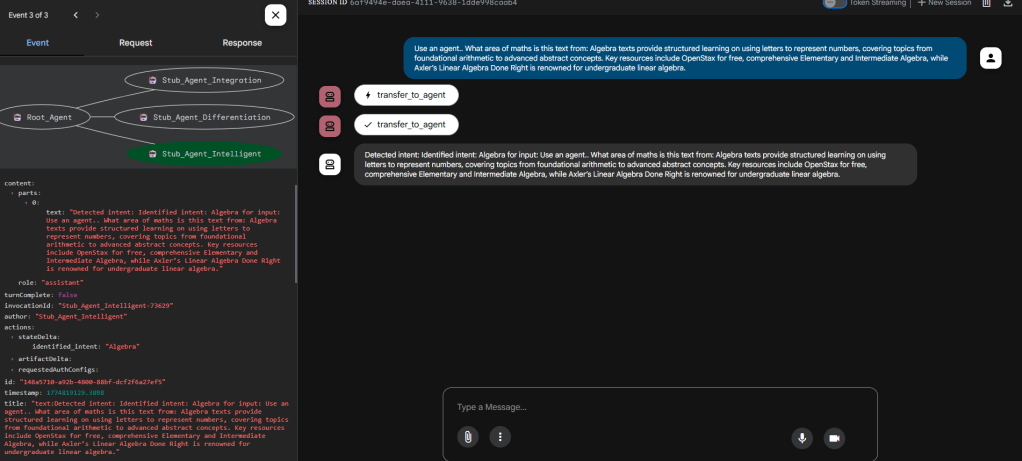
Intelligent Stub in action
In the above the intent has been correctly identified and now can be used to pull out a specific response from a test list. ADK web tracing shows that the Intelligent stub was called.
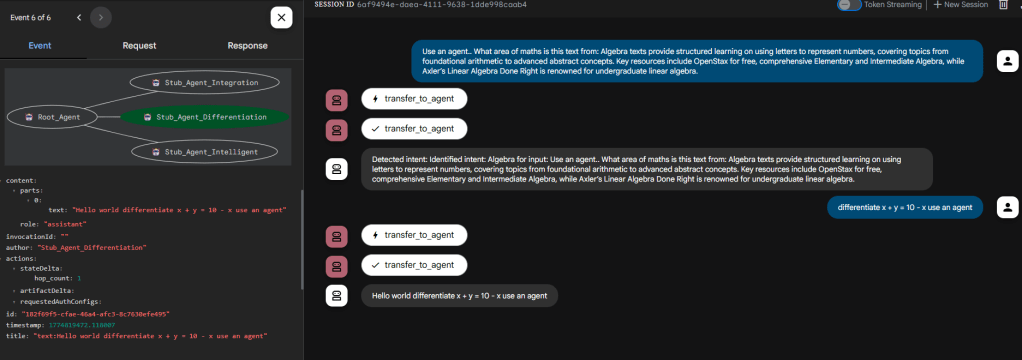
Deterministic Stub in action
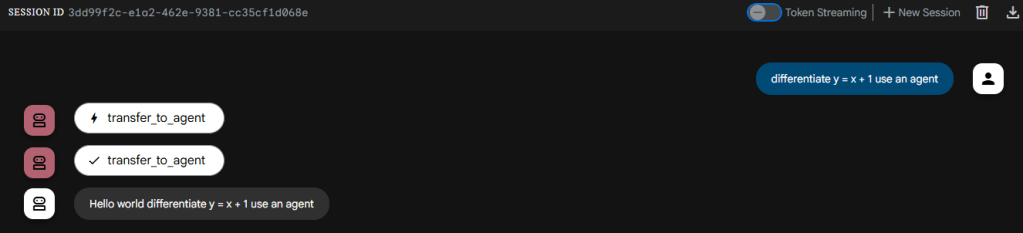
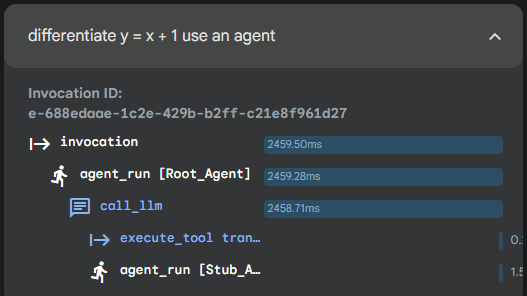
In the above the flow has been directed to the deterministic agent which as appended ‘Hello world’ to the output correctly. Confirmed using the ADK web tracing.
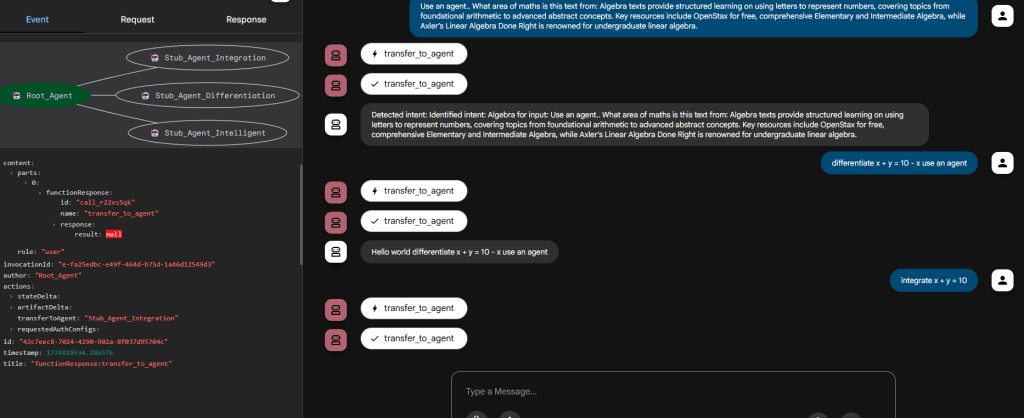
Dumb Stub (not) in action
In the above we don’t see anything interesting (given this is a Dumb stub) except that the Root Agent correctly routed to it based on the description provided to the dumb stub. This can be extremely useful when you have a large set of sub-agents and not all of them are available to test the routing result of your root agent instructions.
Disclaimer:This post will refer to examples and scenarios that I have personally tested using ADK web. I have also extended my testing to GCP Agent Engine where possible. In practice ADK web and Agent Engine are different platforms so prepare to be surprised if something works in ADK web but not with Agent Engine. I will attempt to highlight where I have come across such issues. Agent Engine code at the bottom of the post.
The recent updates on ADK 2.0 (here), which is in Alpha release currently, point toward the framework offering greater control for orchestration through the introduction of a graph construct. This also ensures it attempts to fight back against the likes of LangGraph.
Why Customise?
The reason for this post is around the above question. Currently, most examples for ADK solve the orchestration between agents using a composition of one of 5 ‘core’ patterns:
Sub-agent
Agent-as-Tool
Three deterministic workflow patterns (Sequential, Parallel, and Loop).
The deterministic workflow patterns are all based around an ‘Agent’ that is not driven by a LLM. Instead it is driven by code.
To actually implement an agent in ADK the most common starting point is LlmAgent. This is an out-of-the-box implementation of the ReACT agent architecture.
But there are several scenarios that require you to build a custom agent (at least till we have ADK 2.0 out). Some of these are outlined below:
When stubbing out agents.
When you require fine-grained orchestration control (e.g., using ML to decide what happens next based on the output of the previous agent).
When we want to create our own style of agent (e.g., those based on ML-models and deterministic decisioning) and not use LlmAgent.
How to Customise?
The basic outline for a ‘blank’ agent is as follows:
yield# when you are ready to complete execution then yield an Event here.
The key aspects to focus on:
name and description in the initmethod: required to identify your agent and to describe it for upstream agents.
_run_async_impl method: this is where the logic of this custom agent goes.
The Logic of the Agent
The _run_async_impl which has been overridden in the above snippet is an async method. This means it is not a ‘blocking’ method instead it is called from within an event loop.
Insight: ADK by-default executes agents in an async manner even if to the consumer it looks like a synchronous call.
The InvocationContext object is the magic object that contains all the information available for our custom agent to understand the task it is being asked to perform and any additional data/context provided. It also provides information about the current ‘state’ of the interaction including conversational context.
A given context spans one full turn starting with the external input into the multi-agent system (e.g., user’s message) and ends with the final response of the multi-agent system (e.g., response back to the user). The context is therefore made up of multiple agent calls which in turn can be made up of several custom calls, LLM calls, or tool calls.
Given the yield construct we are expected to formulate our agent as a generator of events. Which brings us to the Event construct within ADK.
Insight: An ADK agent, from a programmatic perspective, is nothing but a generator of events that influences what downstream agents see. If no Events are generated by your agent then it is invisible to the other agents in the system.
Event Class
The Event Class is the most important class to understand because this is what allows your agent to surface itself in the event stream that is one Multi-agent system execution turn. If your agent doesn’t yield any Event objects it will be invisible to the other agents just like an employee that never sends an email, types a line of code, or attends a meeting.
So what is an Event?
An Event in ADK is an immutable record representing a specific point in the agent’s execution. It captures user messages, agent replies, requests to use tools (function calls), tool results, state changes, control signals, and errors. [https://google.github.io/adk-docs/events/]
The Event class has two required attributes:
Author: author of the event (e.g., agent name).
Invocation Id: even though the documentation states it as a required, your agent will still work without adding invocation id to events because in the code for the Event class it has a default empty string value. Agent Engine: this is required and must be unique and generated per processing stage.
Other attributes of interest:
content: represented by the Content object which is the ‘output’ of your agent. Content object can represent complex content types such as text, file data, code etc.
partial/turn_complete: boolean values that signal the completeness of the response.
actions: type of EventActions such as:
state_delta/artefact_delta: indicating update of state/artefact with given delta.
transfer_to_agent: indicating action to transfer to the indicated agent.
escalate: indicating an escalation to the indicated agent.
Implementing an Agent that Provides a Static Response
Remember our custom agent can only communicate via Events. In this section let us create a basic agent that generates a response using a deterministic method. In this case it responds by appending ‘Hello world’ to the query provided by the upstream agent.
In the agent above we first access the incoming request via the InvocationContext -> user_content structure and store it in input_message and then create a modified message (append ‘Hello world’).
Then we construct and yield the Event object that contains the deterministic response generated by our custom agent within the content structure.
The above snippet also shows you the starting and endpoints of your custom flow. Start is accessing upstream content that you may want to respond to and the end is the generation of an Event that contains your response/output.
To run the deterministic agent with a LLM-driven agent:
MODEL=LiteLlm(model="ollama_chat/qwen3.5:2b")
instruction="""
You are an autonomous agent that takes a complex maths problem and breaks it down into smaller steps to solve it.
You have access to a set of agents for each branch of maths.
"""
stub_agent_1=StubAgent(name="Stub_Agent_Integration",description="Agent that can do Integration problems")
stub_agent_2=DeterministicStubAgent(name="Stub_Agent_Differentiation",description="Agent that can do Differentiation problems")
root_agent=LlmAgent(name="Root_Agent",description="Root agent for handling conversation and classification of problem",instruction=instruction,model=MODEL,sub_agents=[stub_agent_1,stub_agent_2])
When you run the above as a sub-agent to the root agent this is what the interaction and trace looks like:
Example with EventActions
If you are going to the trouble of creating a custom agent your need will be beyond content generation. You may need to inform other agents about some session level operational information (e.g., cost incurred or agent-hop-count update) or indicate some change in state to the wider application.
The content block is not suitable for this as it is about the content flow. There is a separate ‘state’ structure in the context that exists at the session level which can be used to store temporary state information. Given this is at the session level and not persisted do not use this to store complex bits of information. The session state is not a data store!
  @override
  async def _run_async_impl(self, ctx: InvocationContext) -> AsyncGenerator[Event, None]:
      # Get the input message from the context
      logger.info(f"{self.name} received context: {ctx}")
      input_message = ctx.user_content.parts[0].text if ctx.user_content and ctx.user_content.parts else ""
      print(f"Received input message: {input_message}")
      # Add "Hello world" to the message

      modified_message = f"Hello world {input_message}"
      print(f"Modified message: {modified_message}")
      hop_count = ctx.session.state.get("hop_count", 0)
      state_delta = {"hop_count": hop_count + 1
      }
      action = EventActions(state_delta=state_delta)
      yield Event( author=self.name, content = Content(role="assistant", parts=[Part(text=modified_message)]), actions=action)
In the snippet above we add a hop_count session state variable to maintain a log of how many times this agent has been called per session. The real world use of this would be to ration the use of ‘expensive’ agents.
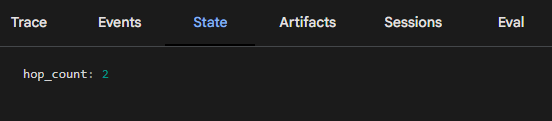
If you are using ADK web to test and learn then you can use the ‘State’ tab on the right to explore how this state variable increments every time our custom agent is used in a given session. Below we can see it has been used twice in the session.
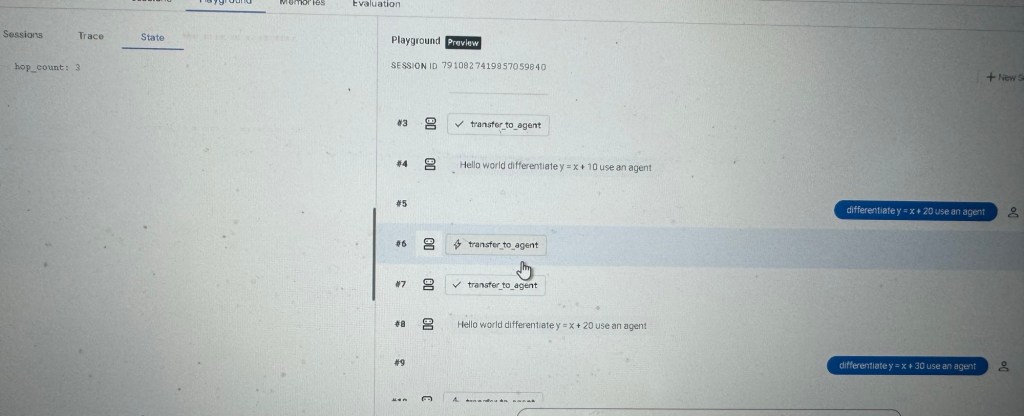
In another session it has been used thrice.
The image below shows Agent Engine deployment with some tweaks to the code.
Conclusion
We have gone through some important information around how to build your own custom ADK agent with code snippets. We have spoken about the overall structure and how to construct simple Events.
We then extended this to work with EventActions specifically how we can perform state-updates to share session level information with other agents.
We will build on this knowledge to develop sophisticated custom agents and to carry out common tasks such as stubbing agents for testing multi-agent systems.
Code Tested with Agent Engine
from typing import AsyncGenerator

from google.adk.agents.llm_agent import LlmAgent
from google.adk.agents import BaseAgent, InvocationContext
from google.adk.models.lite_llm import LiteLlm
from typing_extensions import override
from google.adk.events import Event, EventActions
from google.genai.types import Content, Part
import random

import logging
logging.basicConfig(level=logging.INFO)
logger = logging.getLogger(__name__)

class StubAgent(BaseAgent):
    def __init__(self, name:str, description:str, sub_agents=[]):
        super().__init__(name=name, description=description, sub_agents=sub_agents)

    @override
    async def _run_async_impl(self, ctx: InvocationContext) -> AsyncGenerator[Event, None]:
        print("Activating StubAgent with context:", ctx)
        logger.info(f"{self.name} received context: {ctx}")
        yield Event(turn_complete=True, author=self.name)


class DeterministicStubAgent(BaseAgent):
    integration: str = "Stub_Agent_Integration"
    def __init__(self, name: str, description: str, sub_agents=[]):
        super().__init__(name=name, description=description)


    @override
    async def _run_async_impl(self, ctx: InvocationContext) -> AsyncGenerator[Event, None]:
        # Get the input message from the context
        logger.info(f"{self.name} received context: {ctx}")
        input_message = ctx.user_content.parts[0].text if ctx.user_content and ctx.user_content.parts else ""
        print(f"Received input message: {input_message}")
        # Add "Hello world" to the message

        modified_message = f"Hello world {input_message}"
        print(f"Modified message: {modified_message}")

        hop_count = ctx.session.state.get("hop_count", 0)
        state_delta = {"hop_count": hop_count + 1
        }

        invocation_id = f"{hop_count}_{random.randint(1000, 9999)}"


        if hop_count>=2 and hop_count<5:
            # Transfer to another cheaper agent after 2 hops
            action = EventActions(state_delta=state_delta,transfer_to_agent=self.integration)
            event = Event( invocation_id=invocation_id, author=self.name, content = Content(role="assistant", parts=[Part(function_call={"name": "transfer_to_agent", "args": {"agent_name": self.integration}})]), actions=action)

        elif hop_count>=5:
            print("Turn completed")
            action = EventActions(state_delta=state_delta,turn_complete=True)
            event = Event( invocation_id=invocation_id, author=self.name, content = Content(role="assistant", parts=[Part(text=modified_message)]), actions=action)

        else:
            action = EventActions(state_delta=state_delta)
            event = Event( invocation_id=invocation_id, author=self.name, content = Content(role="assistant", parts=[Part(text=modified_message)]), actions=action)


        yield event


MODEL = LiteLlm(model="ollama_chat/qwen3.5:2b")
#Note: used Gemini Flash 2.5 when testing with Agent Engine.

instruction = """
You are an autonomous agent that takes a complex maths problem and breaks it down into smaller steps to solve it.
You have access to a set of agents for each branch of maths.
"""

stub_agent_1 = StubAgent(name="Stub_Agent_Integration", description="Agent that can do Integration problems")
stub_agent_2 = DeterministicStubAgent(name="Stub_Agent_Differentiation", description="Agent that can do Differentiation problems")

root_agent = LlmAgent(name="Root_Agent", description="Root agent for handling conversation and classification of problem", instruction=instruction, model=MODEL, sub_agents=[stub_agent_1, stub_agent_2])
The Retrieval part of RAG requires topic specific data to be retrieved from a knowledge store based on the user’s query.
More focussed the retrieval better grounded will be the generation.
Hidden Complexity of Using Vectors
In Vectorised RAG the retrieval part uses a vector database to store chunks of knowledge and a vector search query to retrieve relevant chunks for the model or agent.
The part of using a vector database is where the hidden complexity lies and this is best explained with a story.
When I started my Masters in 2002 we had a module called Research Methods. I was not aware of any of the core concepts and found the lectures difficult to follow. Search engines were not as powerful or AI-enabled as today. One had to expand ones vocabulary with appropriate technical and domain specific terms to retrieve knowledge to then discover related concepts. Keep doing this rinse and repeat till you map out the topic.
The above story describes how I created a mental index of this new topic ‘Research Methods’ and used that to ground my coursework.
For vectorised RAG we depend on what are known as embedding models to convert text containing knowledge into a vector which is then stored in a vector database. The hope is that the model understands the concepts within that topic and relationships between them. This is implemented, during model training, by exposing the model to real text so that it can learn the statistical patterns within the training text.
Retrieval uses the same embedding model to create the query vector from user’s query text to find ‘related’ knowledge from the vector database.
Now we come to the critical part:
Jut by observing statistical patterns with the training text I can build out a concept space. But there is no way to guarantee that I am a master of that concept space. We humans cannot squash all the concepts into our brains (e.g., an aerospace engineer will have concepts and relationships in their head that a marine engineer may not have even though there will be a high degree of overlap in the concept space).
It is highly unlikely that a relatively small model can contain all the concepts at a level of detail to be useful. Therefore, the vectorisation of different documents may be less or more effective based on how deeply the embedding model was trained on that topic.
For example, if the embedding model was trained without knowledge of Charles Dickens or his works then from a vector creation point of view ‘Bleak House’ will be closer to ‘sad house’ than ‘Charles Dickens’. In fact the concept of Charles Dickens may not be in the embedding model at all and therefore the vectors produced may be based on plain English concept of the word.
Another famous example is given the query ‘apple’ – which of the words in the list should the resulting vector be closest to: [‘orange’, ‘iphone’]. Depending on how the embedding model used to vectorise the query and the words in the list we may see different results.
Impact of training bias: if the model has been trained on knowledge about Apple products like the iPhone then we expect the query to be close to ‘iphone’. If the model has been trained on basic English language then the query may appear closer to ‘orange’. Furthermore, ‘iphone’ and ‘orange’ must be far away from each other unless the model knows about the new ‘orange iPhone’.
Just like my Research Methods example above how you build out a concept map of a topic depends on what sources you have included in your learning.
This is the hidden complexity of vectorisation as an approach. You are completely dependent on the embedding model to help map out the topic space and then retrieve specific concepts.
General purpose embedding models will not capture domain or topic specific concepts.
That is what links the embedding model to the use-case. That is why for medical AI applications you get specialised Medical embedding models (like MedEmbed-small-v0.1).
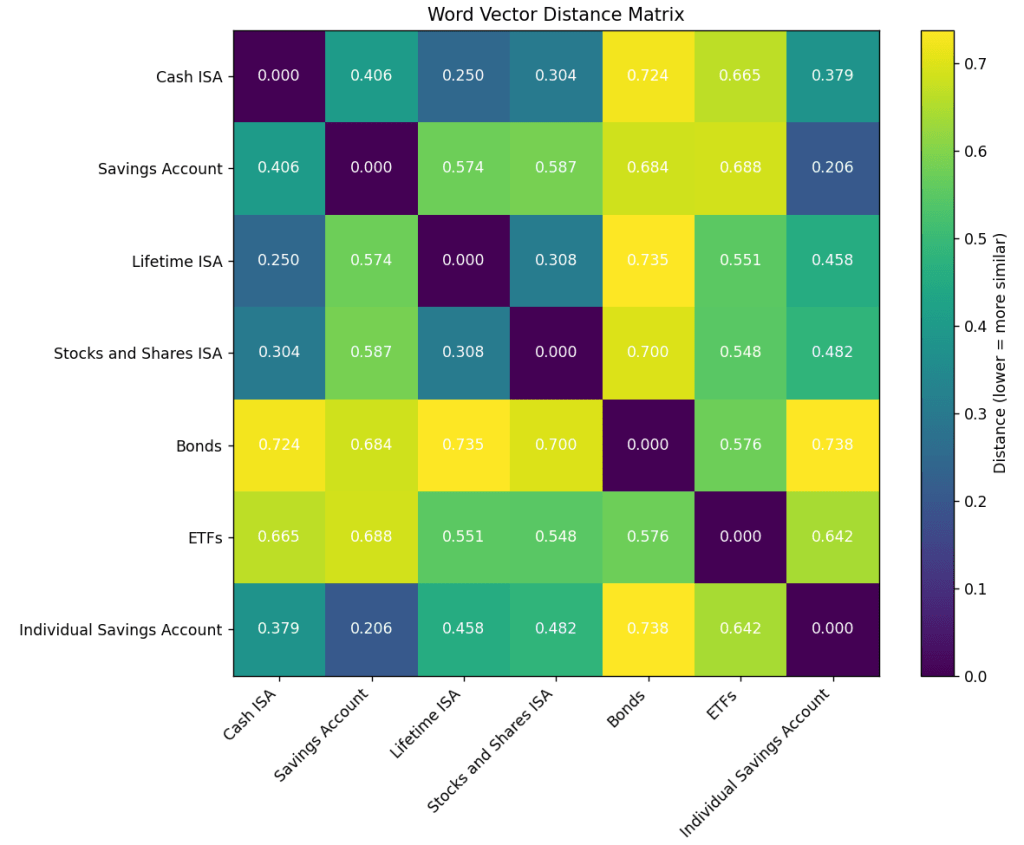
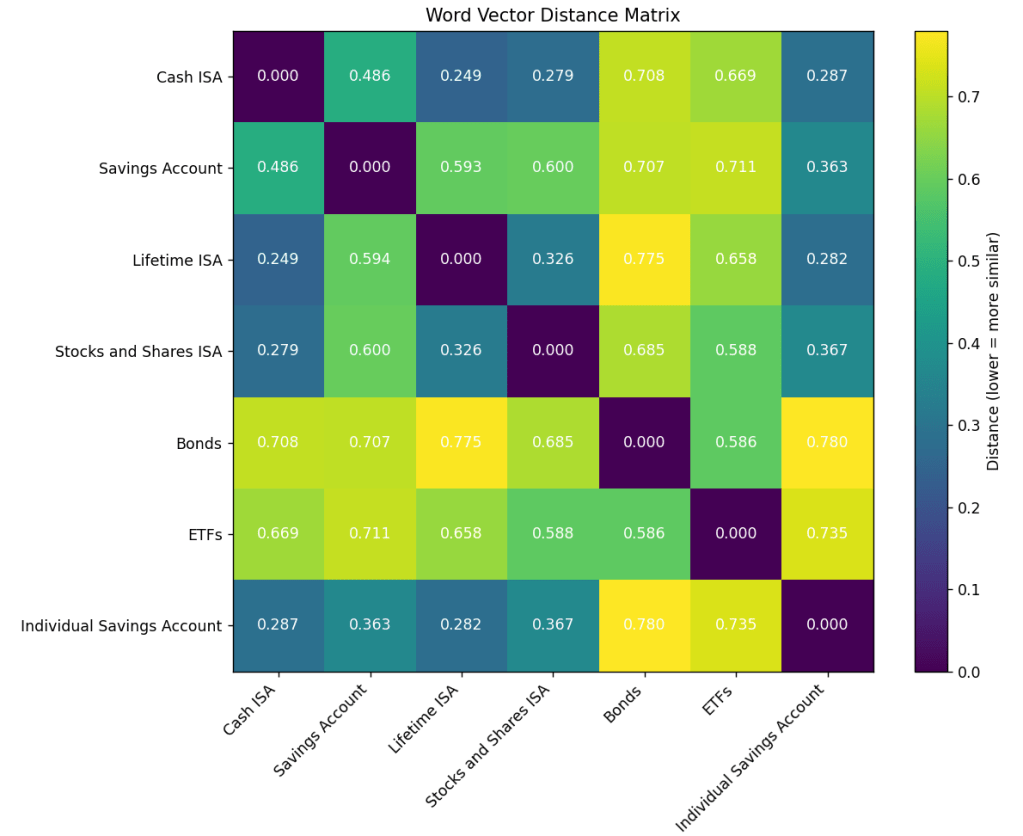
These embedding models have a time-horizon so if a concept did not exist when these were trained, they would not know about it or how to relate it to other concepts. See example of differences in concept resolution below using OpenAI’s ‘text-embedding-3-small’ (Figure 1a) and ‘text-embedding-3-large’ (Figure 1b). Clearly the ‘large’ model has an accurate model of the Savings Account space for UK.
Figure 1a: Note the significant difference for Individual Savings Account against ISAs and the general term Savings Account. All the ISAs are Individual Savings Accounts which are also Savings Accounts.Figure 1b: Note the confusion is not seen in the ‘large’ embedding model as all ISAs and the generic term Savings Account are now quite close to Individual Savings Account.
Embedding models cannot explicitly be given context for a comparison.
Another important point from Figure 1a and 1b above is that these distance measures are fixed. We cannot provide context to the embedding model. For example if the context is tax regulation then the similarity score will be very different. As it would be if the context was risk vs reward.
Think of the context as taking the existing high-dimensional vector space in which all these concepts sit and transforming it to bring certain concepts closer and teasing others apart.
Now a question for you: Have you gone through an embedding mode evaluation for your use-case or just picked a default Open AI or Google embedding model and run with that?
All this without even discussing the many variants of how vector results are evaluated and the different styles of vector creation pipelines and the impact of design choices (e.g., chunking strategy).
Enter PageIndex
PageIndex attempts to the burdened developer from all this embedding model selection, tuning vectorisation pipelines, thinking about chunking strategies and spinning up new bits of software like vector databases.
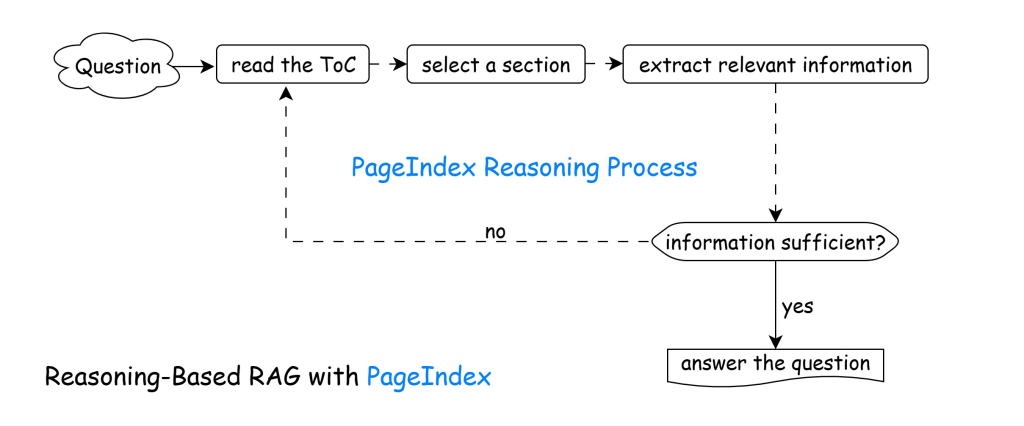
It is based on the concept that let the LLM figure out what is in a document by drawing a table of contents as a light weight index tree called a PageIndex. Then use this content index to identify and extract the relevant sections/concepts from the doc and use those for generating the response in a ‘reasoning loop’ (see Figure 2).
Here you are not spinning up a vector db or bouncing between vectors and plain text at the mercy of the embedding model being used. Everything stays plain text and the SMEs can go and evaluate the PageIndex created, tweak it if needed or even create multiple versions for different use-cases.
"title": "Domestic and International Cooperation and Coordination",
"start_index": 28,
"end_index": 31,
"summary": "In 2023, the Federal Reserve collaborated ..."
}
]
}
The snippet above shows an example of a PageIndex.
Note that the index can be at any level: document, pages, paragraphs etc. and contains metadata to provide additional richness and flexibility to this process (e.g., no need to commit to a chunking strategy).
The way I like to think of PageIndex RAG vs Vectorised RAG is:
PageIndex you are using the notes on a topic prepared by your teacher.
Vectorised you are using the notes on a topic prepared by your friend based on what the teacher taught in the classroom.
Now this method has its own trade-offs which are critical to understand before we jump on this based on LinkedIn hype.
Firstly, it depends on ‘agentic’ style of generation which means multiple loops / LLM calls as compared to a single lightweight embedding model call. Cost implications can be massive especially when you need to re-index.
Secondly, still dependency on some kind of AI-model. We have expanded the concept space by moving from say a 50m to 8b parameter embedding model to a LLM with greater than 20b parameters, mixture of experts, reasoning mode and many other tweaks. We can provide context to build out different indexes via the page index build prompt. That said we will still be bothered by training bias where different models may produce different indexes.
Thirdly, reindexing becomes unpredictable. Earlier you could train lots of small embedding models based on the topic landscape of your organisation and domain. You could store them as your own assets. Now you are dependent on the major model providers like OpenAI, Anthropic, and Google. Let us say you built out your page index based on v1 of the documents of interest using Gemini Flash 2.0. Six months later some documents are updated to v2 now we need to rebuild the page index. But now Gemini Flash 2.0 has been deprecated so you are forced to move to Gemini Flash 2.5. Here the good thing about the Page Index concept is that you can provide the existing version (based on v1 documents) and the v2 documents and instruct the model to update rather than rebuild from scratch. Again this is increasing our dependence on the model thereby requiring SME validation of the Page Index at each stage.
Fourth, Page Index as a chain of steps. Vector index is a one step process. Page Index makes it an agentic loop where the depth of retrieval is dynamic. This can increase latency and make the process less auditable and repeatable. At the same time it can also make the retrieval process tune-able for different topic areas – where a complex query can be supported by additional retrieval loops where as simple queries can be one-shot. Vector retrieval is by default one-shot.

 Fish Eye View