Note: This post is a collaborative effort between Syed Munazzir Ahmed and I.
Do you know how the different options for agent control transfer work within ADK? If not, then read this post as these critical data points that will help you architect your solutions. Code here.
Sub-Agent
When we want an agent to dictate where next the control is transferred to. In the code snippet below we are registering two sub-agents (1 and 2) with the root agent using the sub_agents keyword argument.
root_agent = LlmAgent(name="Root_Agent", description="<agent description>", model=model, instruction=instructions_root, sub_agents=[sub_agent1, sub_agent2])
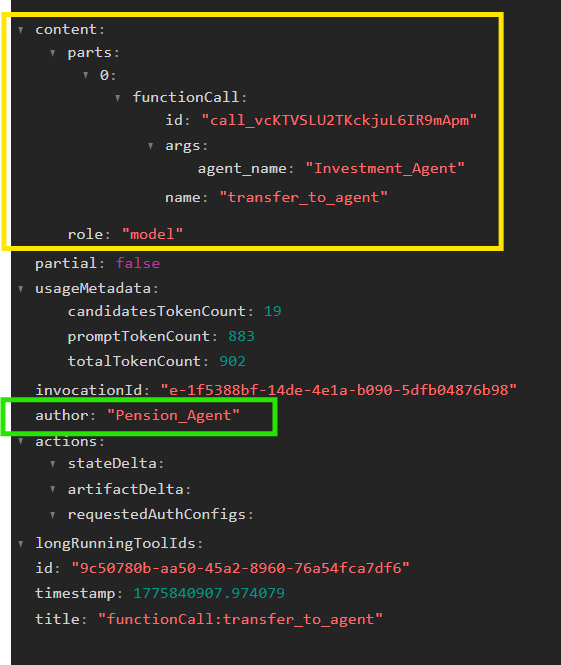
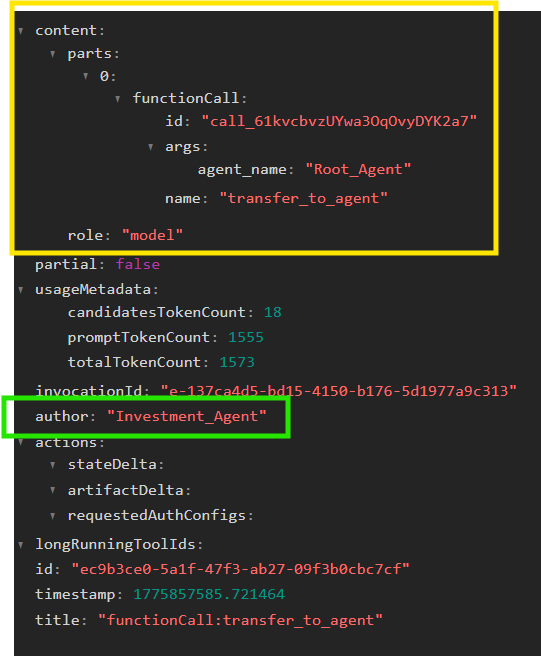
The sub-agent works using a special internal tool called transfer_to_agent. Using adk web you can view the event trace and see transfer_to_agent in action.
In the event traces below you can see the Pension Agent (sub_agent2) transferring to Investment Agent (sub_agent1) by invoking the transfer_to_agent function using the sub_agent1’s name value. And sub_agent1 transferring to the root agent.
The complete test code attached at the end of this post.
Given the function transfer_to_agent is provided by the the ADK framework it is generally available to all the agents including sub_agents as well as the root agent. Root agent only engages at the start of a session. This is shown in the figure below.
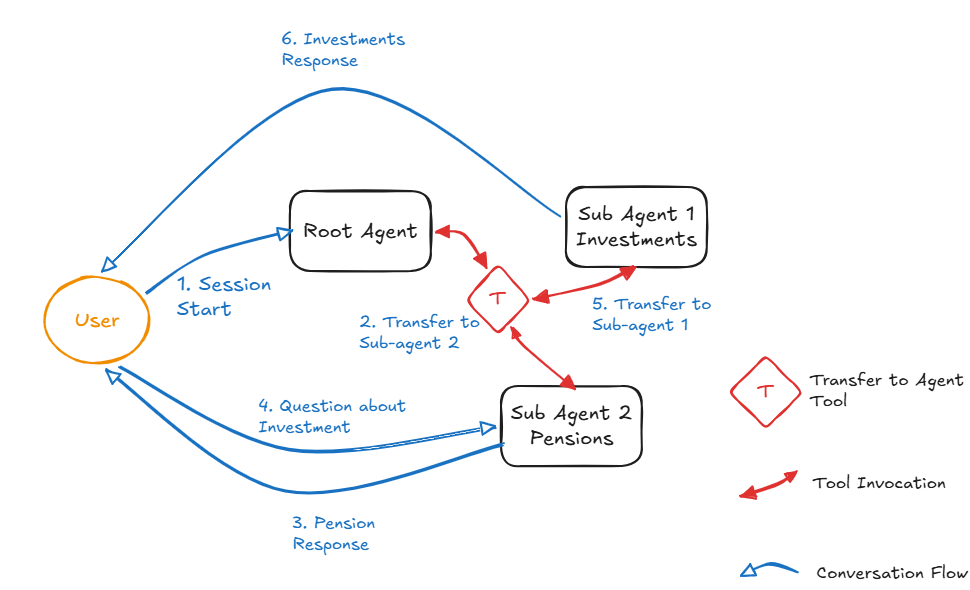
When you introduce callback handlers to track the flow through the framework you will find that when control is passed from one agent to the other using transfer_to_agent the ‘after agent’ callback is executed for both the agents involved.
For example: if we ask a Pensions question from the Investment Agent which currently holds the conversation link…
- Before agent for Investment Agent (calling the tool: transfer_to_agent)
- Before agent for Pension Agent (target for the transfer)
- After agent for Pension Agent (response done)
- After agent for Investment Agent (to deal with the tool response from transfer_to_agent)
Agent as Tool
This is used when you want non-deterministic invocation of an agent without transferring control. Given the fact that the Agent is invoked via a tool call the agent execution is wrapped within the tool execution. Similar to the API request being executed within the tool execution.
Agent as tool is a construct that I don’t use because it wraps Agent interaction within a tool call which breaks the abstraction of the tool interface.
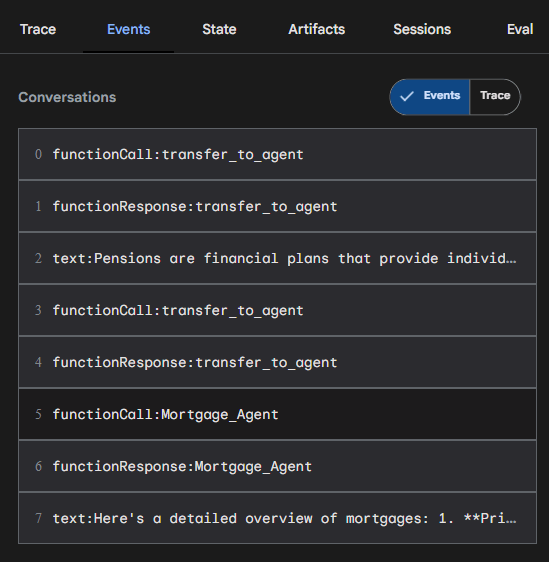
In the snippet above we can see how the Agent as Tool sits right beside transfer_to_agent calls. The key difference between using one or the other can be seen in the snippet below.
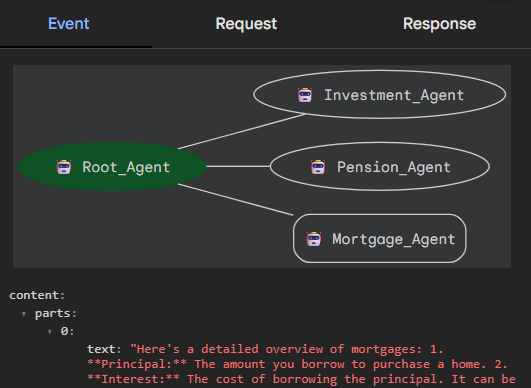
As we can see when using Agent as Tool the final response is always provided by the Root Agent. This means that the root agent is always invoked with the Agent as Tool response being treated as a response from any other kind of tool (e.g., non-agentic tool which provides response from an API).
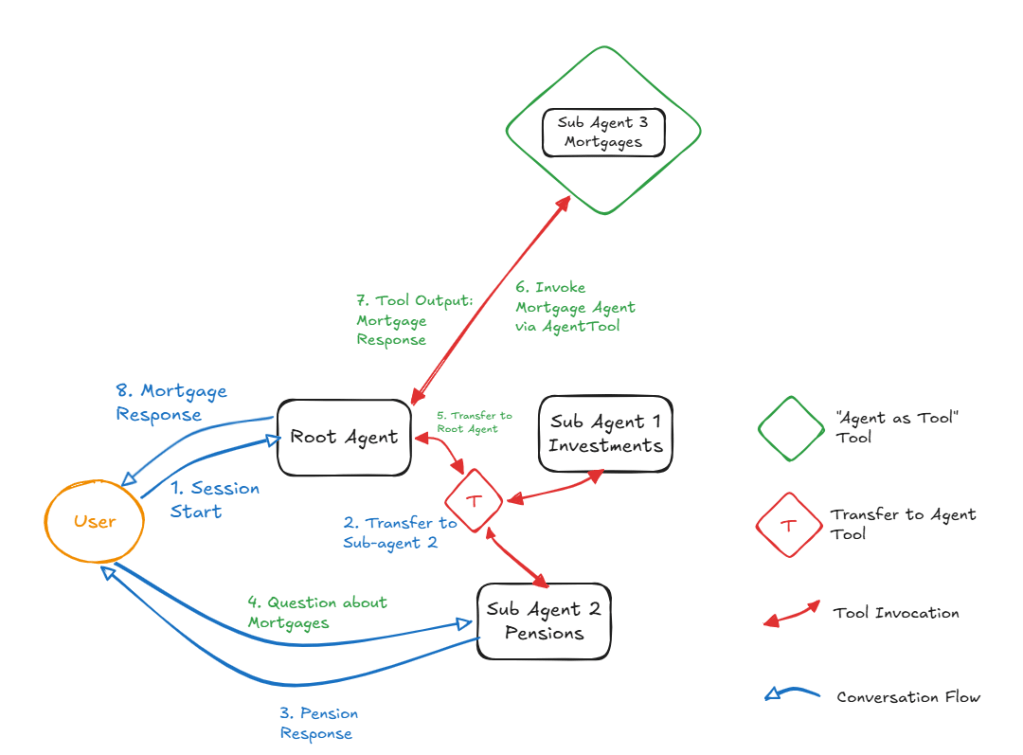
The consequences of using Agent as Tool construct are:
- Root agent is the only user facing agent therefore it starts to be more than a gatekeeper and different skills start to creep in.
- There is a linearity in the conversation as everything flows through the root agent.
- There is visibility of the tool implementation (i.e., an AI agent) which breaks the tool abstraction.
Workflow Agents: Sequential, Loop, Parallel
These agents are simpler to understand as these represent deterministic flow transfer between different stages. ADK 2.0 is bringing in the Graph construct to enable a flexible way to define deterministic workflows instead of having to build complex flows using these three constructs.
These workflow agents are being replicated across use-cases using custom agents by directly extending BaseAgent. This is probably another reason why ADK 2.0 is plugging in many gaps like these.
Code for Transfer_to_Agent and Agent as Tool
from google.adk.agents.llm_agent import LlmAgentfrom google.adk.agents.callback_context import CallbackContextfrom google.adk.tools import AgentToolfrom typing import Optionalfrom google.genai import typesfrom google.adk.models.lite_llm import LiteLlmmodel = LiteLlm(model="openai/gpt-4-turbo")instructions_1 = """You are a helpful assistant that provides advice on investment matters and common products such as stocks, bonds, pensions, and ISAs.You will be given a question from a user, and you should provide a detailed answer to the question. If the question is not clear, ask for clarification before providing an answer."""instructions_2 = """You are a helpful assistant that provides advice on pension matters. You will be given a question from a user, and you should provide a detailed answer to the question. If the question is not clear, ask for clarification before providing an answer."""instructions_3 = """You are a helpful assistant that provides advice on mortgage matters. You will be given a question from a user, and you should provide a detailed answer to the question. If the question is not clear, ask for clarification before providing an answer."""instructions_root = """You lead the conversation and scan the sub-agent responses to check for relevance and correctness. Use agents for investments and pensions."""def before_agent(callback_context: CallbackContext) -> Optional[types.Content]: print("\n=== BEFORE AGENT ===") print(f"Agent Name: {callback_context.agent_name}") print(f"User Content: {callback_context.user_content}") print("===================\n")def after_agent(callback_context: CallbackContext) -> Optional[types.Content]: print("\n=== AFTER AGENT ===") print(f"Agent Name: {callback_context.agent_name}") print(f"User Content: {callback_context.user_content}") print("==================\n")sub_agent1 = LlmAgent(name="Investment_Agent", description="Agent that knows about investments, stocks, bonds, ISAs.", model=model, instruction=instructions_1, after_agent_callback=after_agent, before_agent_callback=before_agent)sub_agent2 = LlmAgent(name="Pension_Agent", description="Agent that knows about pension matters.", model=model, instruction=instructions_2, after_agent_callback=after_agent, before_agent_callback=before_agent)sub_agent3 = LlmAgent(name="Mortgage_Agent", description="Agent that knows about mortgage matters.", model=model, instruction=instructions_3, after_agent_callback=after_agent, before_agent_callback=before_agent)agent_as_tool = AgentTool(sub_agent3)root_agent = LlmAgent(name="Root_Agent", description="Agent that leads the conversation and checks sub-agent responses for relevance and correctness.", model=model, instruction=instructions_root, sub_agents=[sub_agent1, sub_agent2], after_agent_callback=after_agent, before_agent_callback=before_agent, tools=[agent_as_tool])
 Fish Eye View