This is the third post in this series. The first one was creating a basic text-to-SQL tool that used a Large Language Model to create SQL based on user’s question and data schema. The second one tested the text-to-SQL capabilities of Github Copilot. We use a SQLite database as a backend.
In this post we look at answering the user’s question using a conversational mode of interaction as opposed to the Q&A mode.
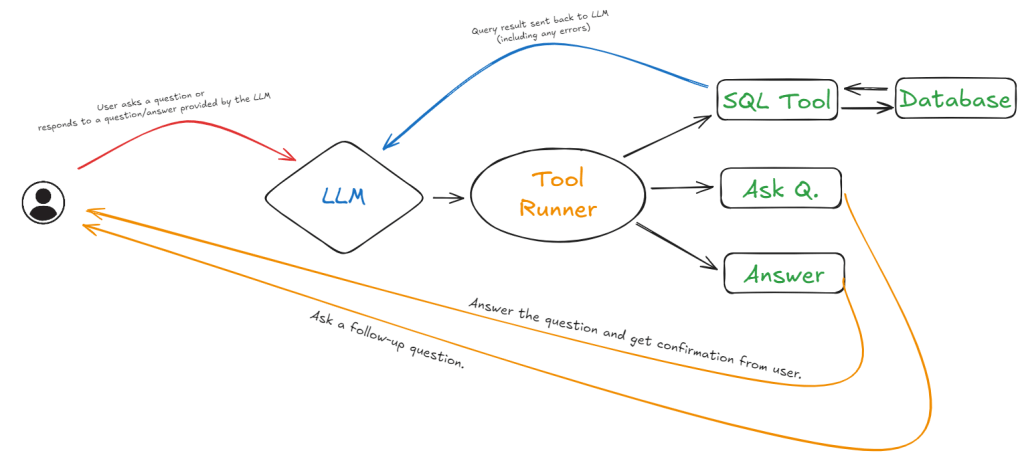
The LLM is made aware of the available tools and how to use them (see Figure 1). In this case we have three tools:
- SQL Tool: LLM provides SQL query through <SQL> </SQL> tags which is then caught by the Tool Runner and forwarded to the SQL tool. After the SQL tool finishes running any output (including errors) are passed back to the LLM.
- Ask A Question Tool: LLM is allowed to ask a follow-up question by using the <Q> </Q> tags which is then caught by the Tool Runner and forwarded to the Ask Q. tool. This sends the question to the user and returns the user’s response back to the LLM.
- Answer the Question Tool: LLM can also decide that it is now able to answer the question that was asked. It can use the <R> </R> tags to wrap the answer. The tool then sends that to the user and gets their confirmation if the question has been answered or further help is needed. This is there to continue the conversation in case the user has follow-up questions.
A running history of the inputs and LLM responses is maintained which ensures the context is maintained. This requires a model with decent context size.
These types of systems that combine LLMs with tool use and some level of feedback to achieve one or more goals are referred to as Agentic Systems.
Models
I have used Open AI GPT-4o-mini and Google Gemini-1.5-flash. Both models are quite user-friendly and cheap to use. For all my testing with OpenAI I spent $0.02 and because I stayed within the free-tier I did not pay anything for the Google model.
GPT-4o-mini has context size of 128,000 tokens (bit more than a book) and output size of 16,384 tokens (about a book chapter).
Gemini-1.5-flash has context size of 1 million tokens and output size of 8,192 tokens.
The Main Prompt
You are an AI assistant that can take one action at a time to help a user with a question: {question}
You cannot answer without querying for the data. You are allowed to answer without asking a follow up question.
You can only select ONE action per response. Do not create a SQL query if you do not have enough information.
Do not repeat the input provided by the user as part of the response.
Use tags below to indicate the action you want to take:
## Run SQL query within the following tags in one line: <SQL> </SQL>. You cannot execute a query - only generate it.
## Ask a follow up question to the user - surround question with tags in one line: <Q> </Q>.
## If you have enough data to give final answer to the user's question use tags in one line: <R> </R>.
Data schema:
{ddl}
The prompt above is the ‘driving’ prompt. This is the prompt that sets the context, task definition, and constraints in the beginning. The {question} placeholder is where the initial question is added. The data schema placeholder {ddl} is where the data definition is added.
Each tool has its own ‘mini’ prompt that is used to either trigger the user (biological LLM) or the LLM.
The prompt is the same for both the LLMs.
A Conversation using Google Gemini-1.5-flash
The colours map to the paths in Figure 1.
The red arrows represent user input/responses to follow-up questions (Ask A Question Tool and Answer The Question Tool).
The blue arrows represent the response from the SQL Tool.
The orange arrows represent the response from the LLM.
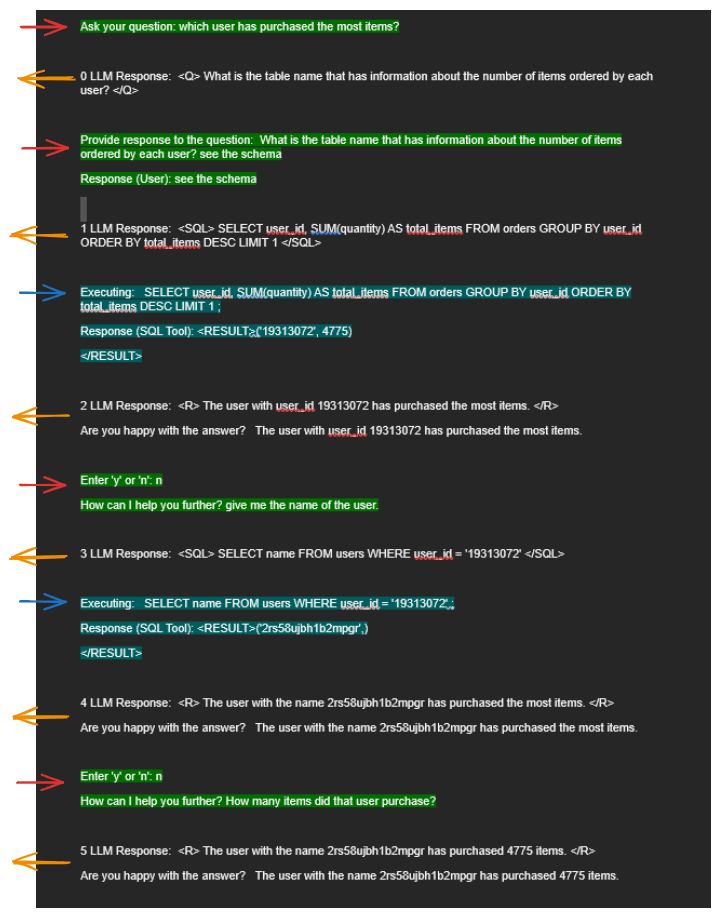
The interaction starts with the initial question from the questioner (green highlight): ‘which user has purchased the most items?’
The third LLM response (index: 2) answers the question after running a query (blue highlight) but only partially. The questioner wants the full ‘name’ and not just a ‘user-id’ which is clarified through a sub-sequent interaction.
The fifth LLM response (index: 4) provides an updated answer with the user’s ‘name’. This time the the questioner asks a follow-up question about the number of items purchased by that user.
The sixth and final LLM response (index: 5) provides the final answer that includes the ‘name’ and the total number of items purchased.
A Conversation using GPT-4o-mini
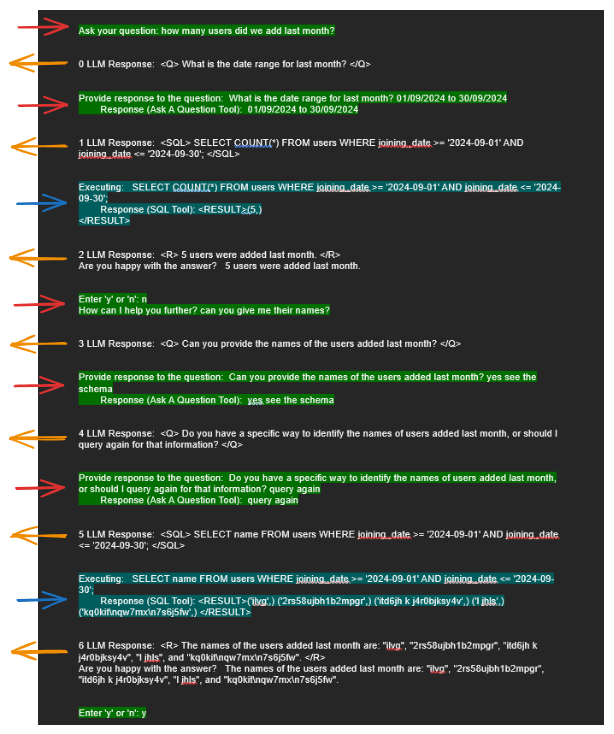
The above example using GPT-4o-mini is even more amazing. It shows fairly complex reasoning and follow up questions to reduce the subjectivity (e.g., defining ‘last month’). Unlike Gemini-1.5-flash, GPT-4o-mini recognises the schema embedded in the prompt and doesn’t ask a follow-up question about the correct table name. This shows that GPT-4o-mini’s attention mechanism is better in this case for this prompt.
Conclusion
What was surprising was how easy it was to build this app. The code can be found on my Github. There are two files, the first one is the ‘main’ program that drives the LLMs, and the second file is a client that helps me switch between OpenAI and Gemini.
SQLite Database file (marketplace.db)
LLM Client to abstract away interaction with LLM
The code is mainly plumbing with the LLMs taking a lot of the cognitive load.
Agent-like Aspects
We can see Agentic behaviour in the interaction through the LLM deciding to use different tools (e.g., run a SQL query, ask a question). The system is also able to adjust to changing questions. For example in the case we ask a follow-up question, it does not ask again for table names.
Some things to explore further are :
- How can we get to proper agent behaviour where the goal itself can change?
- This would involve some level of ‘erasing’ history where our initial prompt sets out the ‘goal’ (answering questions in this case) to refocus the LLM towards a different task.
- This different focus will need to highlighted to the LLM (almost like a command prompt). We will probably see some sort of ‘command task’ mechanism coming in to LLMs to help them focus.
- We should be able to add different tools, make the LLM aware of them and remove them as required. For example, if we wanted to transfer money, we could provide temporary access to a tool that takes some info and initiates the transfer and take that away (erase it from LLMs memory) to ensure it can’t be misused.
- How can we improve the prompt so that the LLM doesn’t ask which table to use?
- How can we test different database back ends and how can we direct the LLM to generate suitable SQL query?
- How can we supplement user interaction with mechanisms like RAG to onboard new information (e.g., dynamically load schema)?
- How can we package this? There are various frameworks such as LangChain, Llama Stack that we can explore.

 Fish Eye View
1 Comment