Part 4 of this series focuses on extending the framework we created in the previous post by adding some tools. If you have not read the previous post: Part 3: Agentic Talking with your Data
In the previous examples one of the recurring issues we come across is the LLM’s lack of awareness of the current time and date. This is to be expected given the lack of real time information streams available to the LLM.
There are also some minor fixes and improvements like using Beautiful Soup to extract data from tags and tweaking the prompt itself.
The New Prompt
We can see the new prompt below. We have added two new tools via tags to the prompt. The first one is a ‘time tool’ which allows the LLM to access the latest time and date. The LLM can use the ‘T’ tag to invoke the tool.
You are an AI assistant that can take one action at a time to help a user with a question: {question}
You cannot answer without querying for the data. You are allowed to answer without asking a follow up question.
You can only select ONE action per response. Do not create a SQL query if you do not have enough information. Do not repeat the input provided by the user as part of the response.

Use tags below to indicate the action you want to take:
## Run SQL query within the following tags in one line: <SQL> </SQL>. You cannot execute a query - only generate it.
## Ask a follow up question to the user - surround question with tags in one line: <Q> </Q>.
## If you have enough data to give final answer to the user's question use tags in one line: <R> </R>.
## You can ask for help with finding current time and date using: <T> </T>.


Data schema:
{ddl}
Output Example
We can see the trace of an example interaction below using the Gemini 1.5 Flash. Green highlighted text contains the user’s initial input and subsequent responses. The purple highlighted numbers indicate the response from the LLM. The blue highlighted text is the answer provided by the LLM.
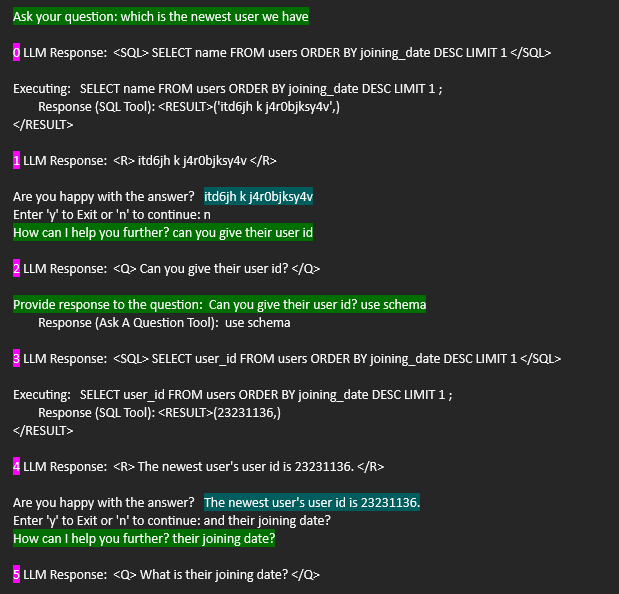
In the first part of the chat we can see the general pattern emerging where the user asks a question and the LLM asks a question in return [Response 2]. This is typically a request for the answer to the question asked by the user! If the user nudges the LLM to use the schema, it is then generating, executing (via SQL Tool) and returning a proper answer using the Answer Tool [Response 3 and 4]. Finally the user asks a follow up question: their joining date?
Next we come to the second part of the chat as the LLM first generates and then executes the SQL to answer the joining date question [Response 5, 6, and 7].
Then comes the interesting part – the final follow up question: how many days ago was that from today? Previously, the LLM would have asked a follow up question to ascertain the current date. But in this case it immediately fires off a request to the Time and Date tool [Response 8] which is then used (correctly!) to create a new SQL query [Response 9] which then finally gives the correct answer [Response 10] of 41 days even though the SQL tool response is a floating point number which is automatically rounded by the LLM when it converts the SQL result to an answer to the question.

Conclusion
Some interesting conclusions.
- This highlights why answering a question is the end-to-end process and using SQL to gather the data is just one of the possible intermediate steps.
- LLM is also capable of overusing the tools. For example, in this case using the SQL tool to calculate date difference rather than just using the joining date and current date to evaluate the duration.
- LLM is quickly able to use tools. Thing to try is when does the LLM start getting confused with the tools available to it and how to plan and orchestrate their use.

 Fish Eye View