I wanted to demystify tool use within LLMs. With Model Context Protocol integrating tools with LLMs is now about writing the correct config entry.
This ease of integration with growing capability of LLMs has further obfuscated what is in essence a simple but laborious task.
Preparing for Calling Tools
LLMs can only generate text. They cannot execute function calls or make requests to APIs (e.g., to get the weather) directly. It might appear that they can but they cannot. Therefore, some preparation is required before tools can be integrated with LLMs.
- Describe the schema for the tool – input and output including data types.
- Describe the action of the tool and when to use it including any caveats.
- Prompt text to be used when returning the tool response.
- Create the tool using a suitable framework (e.g., Langchain @tools decorator).
- Register the tool with the framework.
Steps 1-4 are all about the build phase where as step 5 is all about the integration of the tool with the LLM.
Under the Hood
But I am not satisfied by just using some magic methods. To learn more I decided to implement a custom model class for Langchain (given its popularity and relative maturity). This custom model class will integrate my Gen AI Web Server into Langchain. The Gen AI Web Server allows me to host any model and wrap it with a standard REST API.
Code: https://github.com/amachwe/gen_ai_web_server/blob/main/langchain_custom_model.py
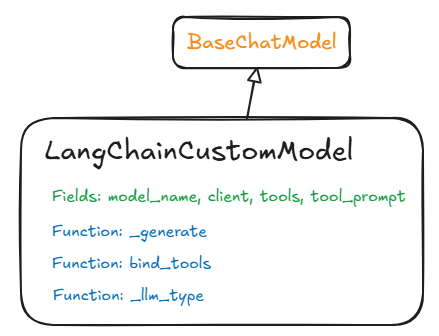
The BaseChatModel is the Langchain (LC) abstract class that you need to extend to make your own model fit within a LC workflow. I selected the BaseChatModel because it requires minimal additions.
Creating my custom class: LangChainCustomModel by extending BaseChatModel gives me the container for all the other bits. The container is made up of Fields and Functions, let us understand these in detail. The reason I use a container paradigm is because the BaseChatModel uses pydantic Fields construct that adds a layer of validation over the python strong-but-dynamic typing.
Fields:
These are variables that store state information for the harness.
model_name – this represents the name of the model being used – in case we have different models we want to offer through our Langchain (LC) class. Google for example offer different variants of their Gemini class of models (Flash, Pro etc.) and we can provide a specific model name to instantiate the required model.
client – this is a my own state variable that holds the specific client I am using to connect to my Gen AI Web Server. Currently this is just a static variable where I am using a locally hosted Phi-4 model. I could make this a map and use model_name to dynamically select the client.
tools – this array stores the tools we register with the Langchain framework using the ‘bind_tools’ function.
tool_prompt – this stores the tool prompt which describes the tools to the LLM. This is part of the magic that we don’t see. This is what allows the LLM to understand how to select the tool and how to structure the text output so that the tool can be invoked correctly upon parsing the output once the LLM is done. The tool prompt has to make it clear for the LLM when and how to invoke specific tools.
Functions
This is where the real magic happens. Abstract functions (starting with ‘_’) once overloaded correctly act as the hooks into the LC framework and allow our custom model to work.
_generate – the biggest magic method – this is what does the orchestration of the end to end request:
- Assemble the prompt for the LLM which includes user inputs, guardrails, system instructions, and tool prompts.
- Invoke the LLM and collect its response.
- Parse response for tool invocation and parameters or for response to the user.
- Invoke selected tool with parameters and get response.
- Package response in a prompt and return it back to the LLM.
- Rinse and repeat till we get a response for the user.
_llm_type – return the type of the LLM. For example, the Google LC Class returns ‘google_gemini’ as that is the general ‘type’ of the models provided by Google for generative AI. This is a dummy function for us because I am not planning to distribute my custom model class.
bind_tools – this is the other famous method we get to override and implement. For a pure chat model (i.e., where tool use is not supported) this is not required. The LC base class (BaseChatModel) has a dummy implementation that throws ‘NotImplemented’ exception in case you try to call it to bind tools. The main role of this method is to populate the tools state variable with tools provided by the user. This can be as simple as an array assignment.
Testing
This is where the tyres meet the road!
I created three tools to test how well our LangChainCustomModel can handle tools from within the LC framework. The three tools are:
- Average of two numbers.
- Moving a 2D point diagonally by the same distance (e.g., [1,2] moved by 5 becomes [6,7]).
- Reversing a string.
My Gen AI Web Server was hosting the Phi-4 model (“microsoft/Phi-4-mini-instruct”).
Prompt 1: “What is the average of 10 and 20?”
INFO:langchain_custom_model:Tool Name: average, Args: {'x': 10, 'y': 20}

INFO:langchain_custom_model:Tool Response: 15.0

INFO:langchain_custom_model:Tool Response: Yes, you can respond to the original
message. The average of 10 and 20 is 15.0.
The first trace shows the LLM producing text that indicates the ‘average’ tool should be used with parameters x = 10 and y = 20. The second trace shows the response (15.0). The final trace shows the response back to the user which contains the result from the tool.
Prompt 2: “Move point (10, 20) by 5 units.”
INFO:langchain_custom_model:Tool Name: move, Args: {'x': 10, 'y': 20, 'distance': 5}

INFO:langchain_custom_model:Tool Response: (15.0, 25.0)

INFO:langchain_custom_model:Tool Response: Yes, you can respond to the original message. If you move the point (10, 20) by 5 units diagonally, you would move it 5 units in both the x and y directions. This means you would add 5 to both the x-coordinate and the y-coordinate.

Original point: (10, 20)
New point: (10 + 5, 20 + 5) = (15, 25)

So, the new point after moving (10, 20) by 5 units diagonally is (15, 25). Your response of (15.0, 25.0) is correct, but you can also simply write (15, 25) since the coordinates are integers.
The first trace shows the same LLM producing text to invoke the ‘move’ tool with the associated parameters (this time 3 parameters). The second trace shows the tool response (15.0, 25.0). The final trace shows the response which is a bit long winded and strangely has both the tool call result as well as LLM calculated result. The LLM has almost acted as a judge of the correctness of the tool response.
Prompt 3: “Reverse the string: I love programming.”
INFO:langchain_custom_model:Tool Name: reverse, Args: {'x': 'I love programming.'}

INFO:langchain_custom_model:Tool Response: .gnimmargorp evol I

INFO:langchain_custom_model:Tool Response: Yes, you can respond to the original message. Here is the reversed string:.gnimmargorp evol I
As before, the first trace this time contains the invocation of the ‘reverse’ tool with appropriate argument of the string to be reversed. The second trace shows the tool response. The final trace shows the LLM response to the user where the tool output is used.
My next task is to attempt to implement tool chaining which will be a combination of improving the internal prompts as well as experimenting with different LLMs.
While this is a basic implementation it shows you the main integration points and how there is no real magic when your LLMs invoke tools to do lots of amazing things.
The most intricate part of this custom model is the tool call catcher. Assuming the LLM has done its job the tool call catcher has the difficult job of extracting the tool name and parameters from the LLMs response, invoking the selected tool, return any response from the tool, and deal with any errors.
The code: https://github.com/amachwe/gen_ai_web_server/blob/main/langchain_custom_model.py

 Fish Eye View