
This post attempts to bring together different low level components from the current agentic AI ecosystem to explore how things work under the hood in a multi-agent system. The components include:
- A2A Python gRPC library (https://github.com/a2aproject/a2a-python/tree/main/src/a2a/grpc)
- LangGraph Framework
- ADK Framework
- Redis for Memory
- GenAI types from Google
Part 2 of the post is here.
As ever I want to show how these things can be used to build something real. This post is the first part where we treat the UI (a command-line one) as an agent that interacts with a bunch of other agents using A2A. Code at the end of the post. TLDR here.
We do not need to know anything about how the ‘serving’ agent is developed (e.g., if it uses LangGraph or ADK). It is about building a standard interface and a whole bit of data conversion and mapping to enable the bi-directional communication.
The selection step requires an Agent Registry. This means the Client in the image above which represent the Human in the ‘agentic landscape’ needs to be aware of the agents available to communicate with at the other end and their associated skills.
In this first part the human controls the agent selection via the UI.
There is a further step which I shall implement in the second part of this post where LLM-based agents discover and talk to other LLM-based agents without direct human intervention.
Key Insights
- A2A is a heavy protocol – that is why it is restricted to the edge of the system boundary.
- Production architectures depend on which framework is selected and that brings its own complexities which services like GCP Agent Engine aim to solve for.
- Data injection works differently between LangGraph and ADK as these frameworks work at different levels of abstraction
- LangGraph allows you full control on how you build the handling logic (e.g., is it even an agent) and what is the input and output schema for the same. There are pre=made graph constructs available (e.g., ReACT agent) in case you did not want to start from scratch.
- ADK uses agents as the top level abstraction and everything happens through a templatised prompt. There is a lower level API available to build out workflows and custom agents.
- Attempting to develop using the agentic application paradigm requires a lot of thinking and lot of hard work – if you are building a customer facing app you will not be able to ignore the details.
- Tooling and platforms like AI Foundry, Agent Engine, and Copilot Studio are attempting to reduce the barriers to entry but that doesn’t help with customer facing applications where the control and customisation is required.
- The missing elephant in the room – there are no controls or responsible AI checks. That is a whole layer of complexity missing. Maybe I will cover it in another part.
Setup
There are two agents deployed in the Agent Runner Server. One uses a simple LangGraph graph (‘lg_greeter’) with a Microsoft Phi-4 mini instruct running locally. The other agent uses ADK agent (‘adk_greeter’) using Gemini Flash 2.5. The API between the Client and the Agent Runner Server is A2A (supporting the Message structure).
Currently, the agent registry in the Agent Runner Server is simply a dict keyed against the string label which holds the agent artefact and appropriate agent runner.
It is relatively easy to add new agents using the agent registry data structure.
Memory is implemented at the Agent Runner Server and takes into account the user input and the agent response. It is persisted in Redis and is shared by all agents. This shared memory is a step towards agents with individual memories.
There is no remote agent to agent communication happening as yet.
Output
The command line tool first asks the user which agent they want to interact with. The labels presented are string labels so that we can identify which framework was used and run tests. The selected label is passed as metadata to the Agent Runner Server.
The labels just need to correspond to real agent labels loaded on the Agent Runner Server where they are used to route the request to the appropriate agent running function. It also ensures that correct agent artefact is loaded.
The code is in test/harness_client_test.py
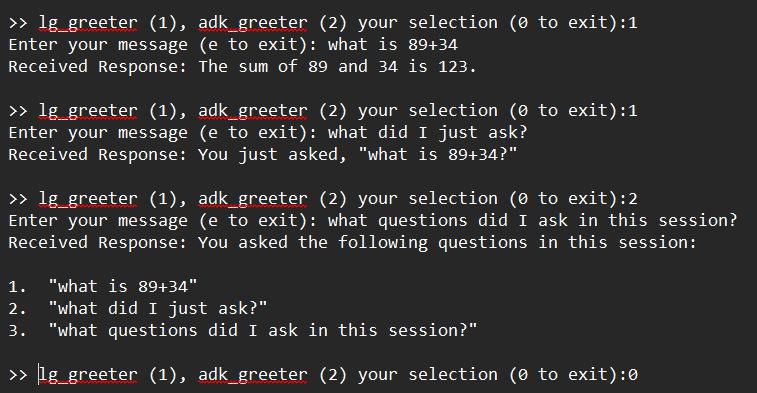
In the test above you can see how when we ask a question to the lg_greeter agent it then remembers what was asked. Since the memory is handled at the Agent Runner level and is keyed by the user id and the session id it is retained across agent interactions. Therefore, the other agent (adk_greeter) has access to the same set of memories.
Adding Tools
I next added a stock info tool to the ADK agent (because LangGraph agent running on Phi-4 is less performant). The image below shows the output where I ask ADK (Gemini) for info on IBM and it uses the tool to fetch it from yfinance. This is shown by the yellow arrow towards the top.
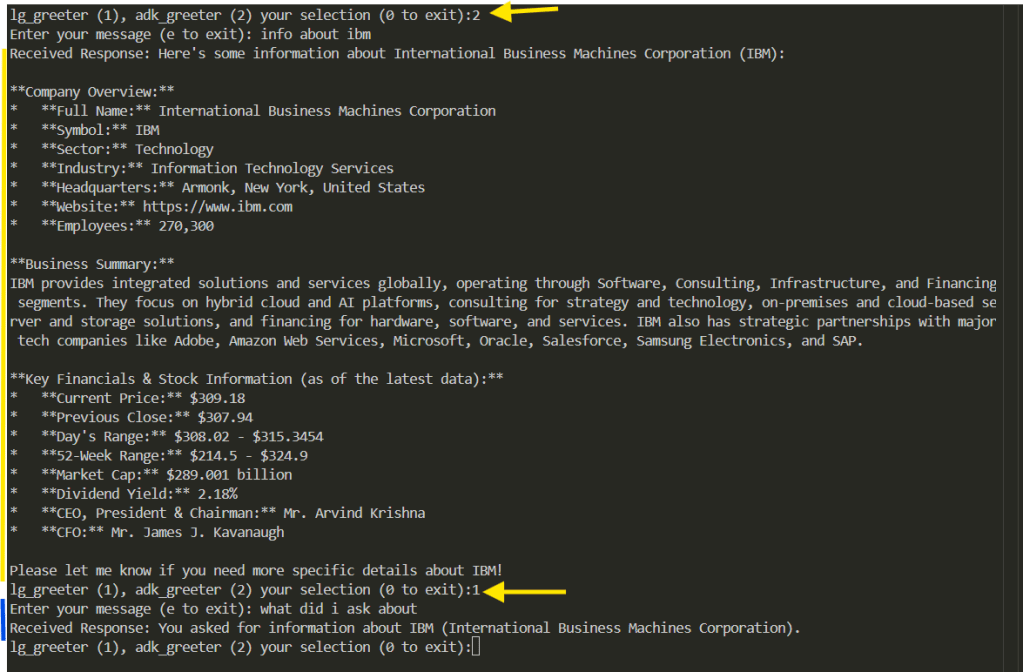
Then I asked Phi-4 about my previous interaction which answered correctly (shown by the yellow arrow towards the bottom.
Adding More Agents
Let us now add a new agent using LangGraph that responds to the user queries but is a Dungeons&Dragons fan therefore rolls 1d6 as well and gives us the result! I call this agent dice (code in dice_roller.py)
You can see now we have three agents to choose from. The yellow arrows indicate agent choice. Once again we can see how we address the original question to dice agent and subsequent one to the lg_greeter and then the last two to the adk_greeter.
A thing to note is the performance of Gemini Flash 2.5 on the memory recall questions.

Possible extensions to this basic demo:
- Granular memory
- Dynamic Agent invocation
- GUI as an Agent
Code
https://github.com/amachwe/multi_agent
You will need a Gemini API key and access to my genai_web_server and locally deployed Phi-4. Otherwise you will need to change the lg_greeter.py to use your preferred model.
Check out the commands.txt for how to run the server and the test client.

 Fish Eye View
1 Comment