Part One of this post can be found here. TLDR is here.
Upgrading the Multi-Agent System
In this part I remove the need for a centralised router and instead package each agent as an individual unit (both a server as well as a client). This is a move from single server multiple agents to single server single agent. Figure 1 shows an example of this.
We use code from Part 1 as libraries to create generic framework that allows us to easily buil agent as servers that support a standard interface (Google’s A2A). The libraries allow us to standardise the loading and running of agents written in LangGraph or ADK.
With this move we need an Active Agent Registry to ensure we register and track every instance of an agent. I implement a policy that blocks the activation of any agent if its registration fails – no orphan agents. The Agent Card provides the skills supported by the registered agent which can be used by other agents to discover its capabilities.
This skills-based approach is critical for dynamic planning and orchestration that gives us the maximum flexibility (while we give up on control and live with a more complex underlay).
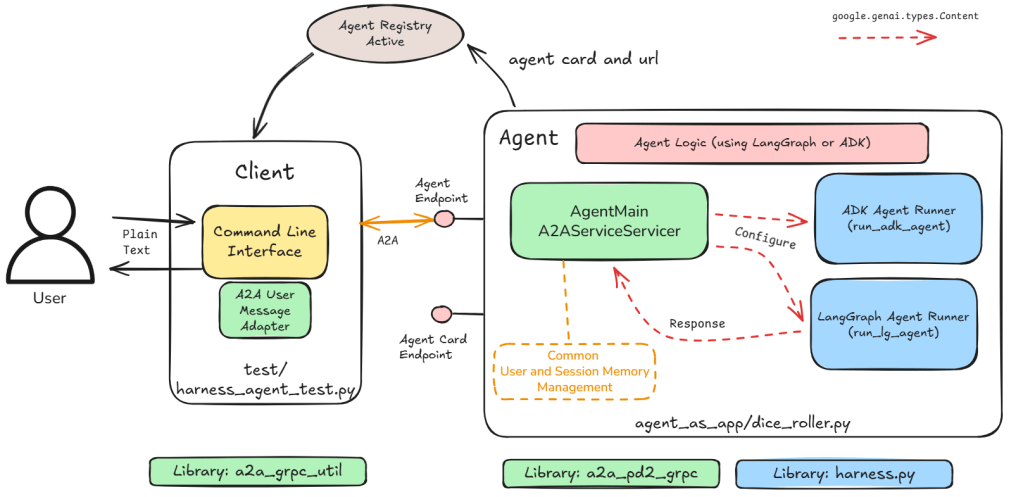
With this change we no longer have a single ‘server’ address that we can default to. Instead our new Harness Agent Test client needs to either dynamically lookup the address of the user provided agent name or have an address provided for the agent we want to interact with.
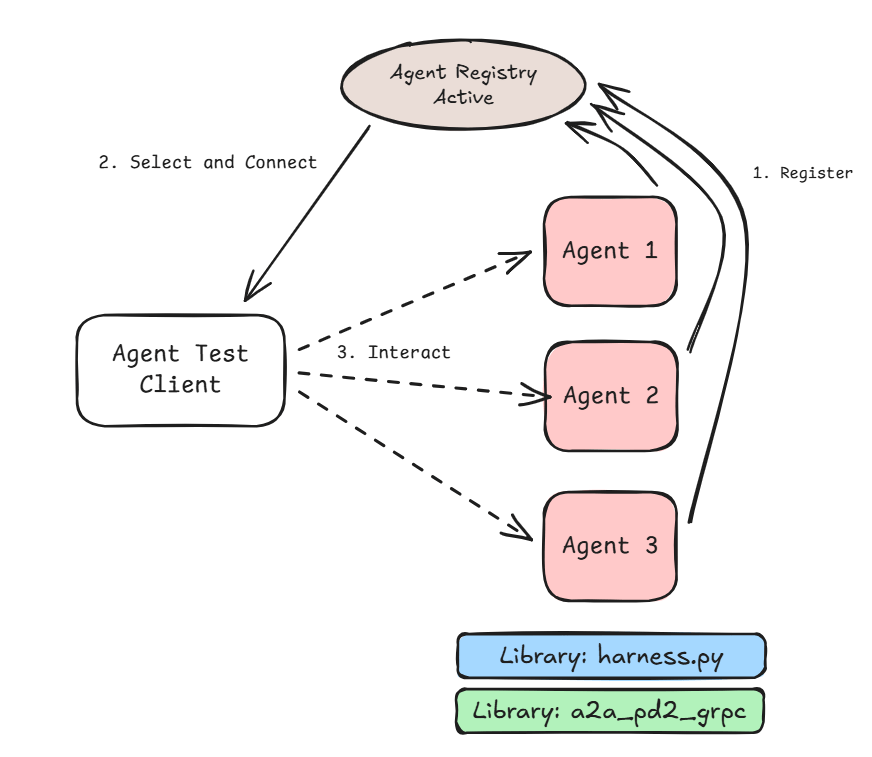
Figure 2 above shows the process of discovery and use. The Select and Connect stage can be either:
- Manual – where the user looks up the agent name and corresponding URL and passes it in to the Agent Test client.
- Automatic – where the user provides the agent name and the URL is looked up at runtime.
Distributed Multi-Agent System
The separation of agents into individual servers allows us to connect them to each other without tight coupling. Each agent can be deployed in its own container. The server creation also ensures high cohesion within the agent.
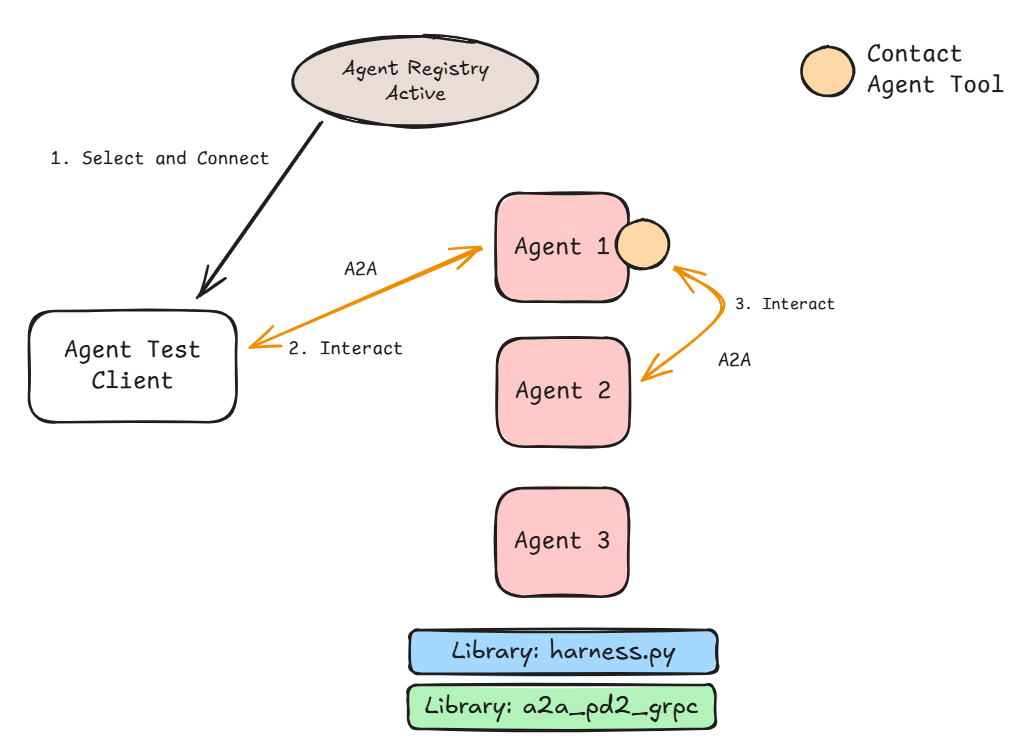
The Contact Agent tool allows the LLM inside the agent to evaluate the users request, decide skills required, map to the relevant agent name and use that to direct the request. The tool looks up the URL based on the name, initiates a GRPC-based A2A request and returns the answer to the calling agent. Agents that don’t have a Contact Agent tool will not be able to request help from other agents. This can be used as a mechanism to control interaction between agents.
In Figure 3 the user starts the interaction (via the Agent Test Client) with Agent 1. Agent 1 as part of the interaction requires skills provided by Agent 2. It uses the Contact Agent tool to initiate an A2A request to Agent 2.
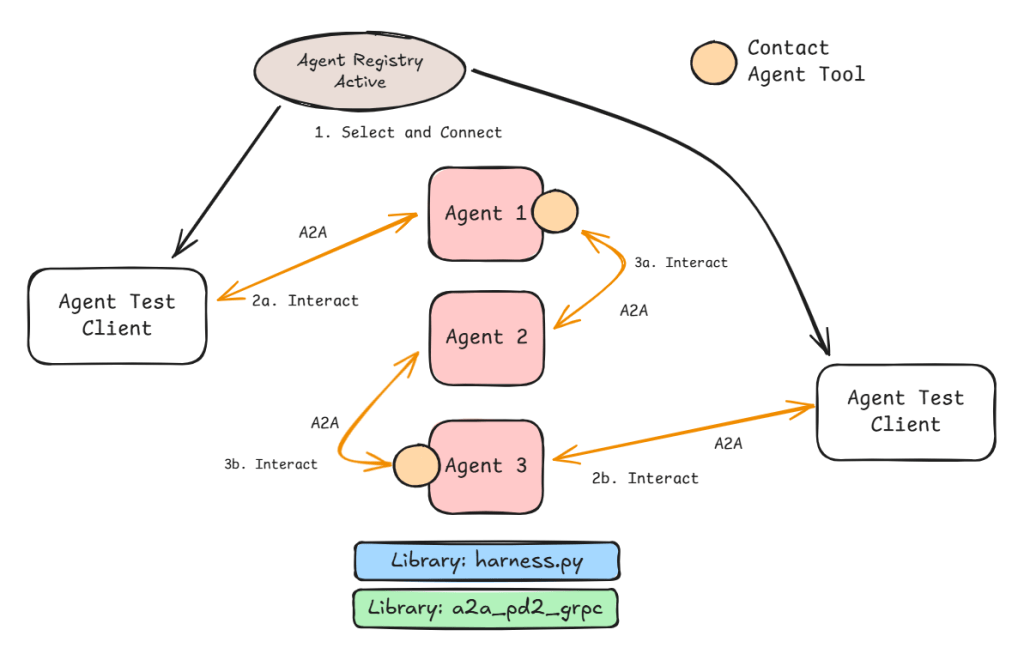
All the agents deployed have their own A2A Endpoint to receive requests. This can make the whole setup a peer-to-peer one if we provide a model that can both respond to human input as well as requests from other agents and not restrict the Contact Agent tool to specific agents. This means the interaction can start anywhere and follow different paths through the system.
This flexibility of multiple paths is shown in Figure 4. The interaction can start from Agent 1 or Agent 3. If we provide the Contact Agent Tool to Agent 2 then this becomes a true peer-to-peer system. This is where the flexibility comes to the fore as does the relative unpredictability of the interaction.
Architecture
The code can be found here.
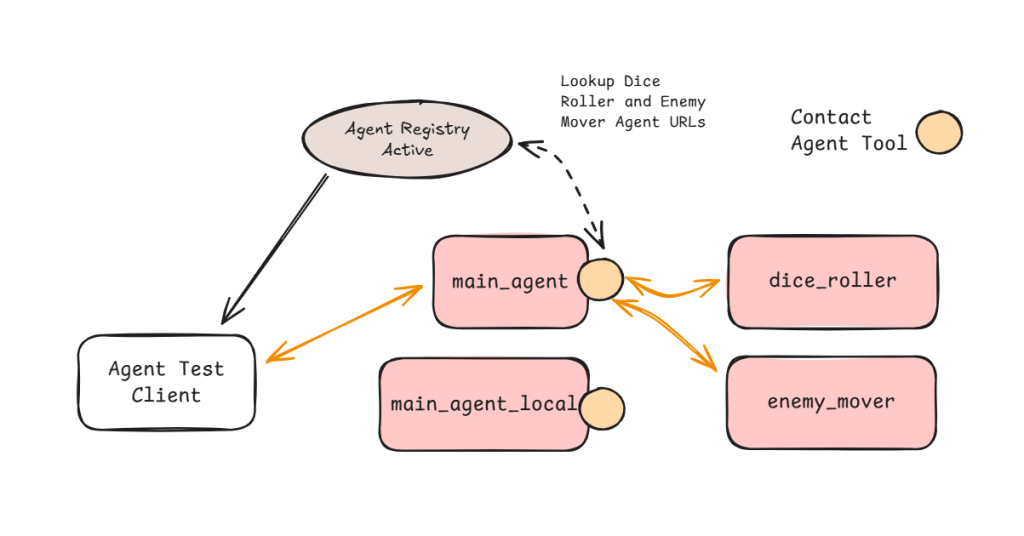
Figure 5 shows the test system in all its glory. All the agents shown are registered with the registry and therefore are independently addressable by external entities including the Test Client.
The main difference between the agents that have access to the Contact Agent tool and ones that don’t is the ability contact other agents. Dice Roller agent for example does not have the ability to contact other agents. I can still connect directly with it and ask it to roll a dice for me but if I ask it to move an enemy it won’t be able to help (see Figure 6).
On the other hand if I connect with the main agent (local or non-local variant) it will be aware of Dice Roller and Enemy Mover (a bit of Dungeons and Dragons theme here).
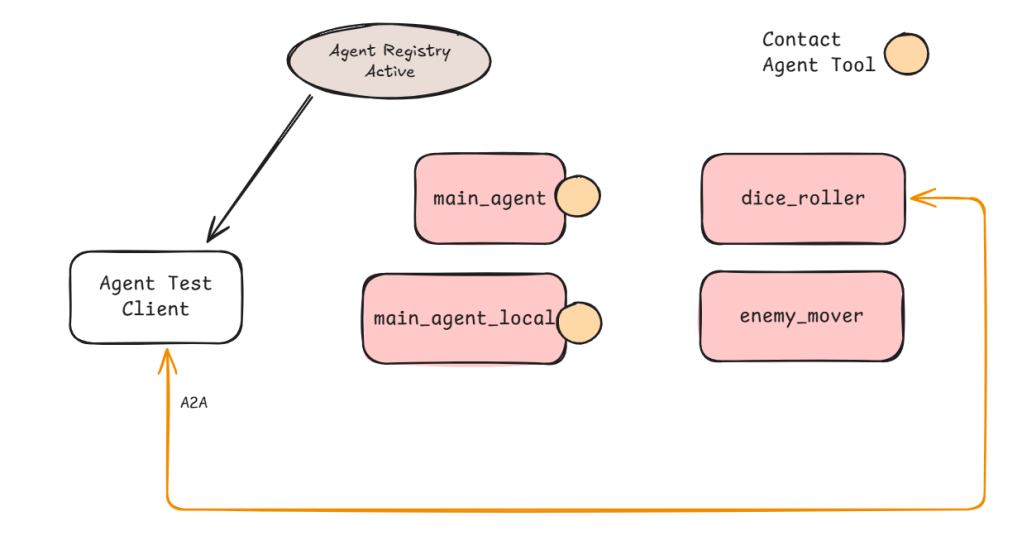
There is an interesting consequence of pre-populating the Agent list. This means the Agents that are request generators (the ones with the Contact Agent tool in Figure 6) need to be instantiated last. Otherwise the list will not be complete. If two agents need to contact each other then current implementation will fail as the agent that is registered first will not be aware of any agents that are registered afterwards. Therefore, we cannot trust peer-to-peer multi-agent systems. We will need dynamic Agent list creation (perhaps before every LLM interaction) but this can slow the request process.
Setup
Each agent is now an executable in its own right. We setup the agent with the appropriate runner function and pass it to a standard server creation method that brings in GRPC support alongside hooks into the registration process.
These agents can be found in the agent_as_app folder.
The generic command to run an agent (when in the multi_agent folder):
python -m agent_as_app.<agent py file name>As an example:
python -m agent_as_app.dice_rollerOnce we deploy and run the agent it will attempt to contact the registration app and register itself. The registration server which must be run separately can be found in agent_registry folder (app.py being the executable).
You will need a Redis database instance running as I use it for the session memory.
Contact Agent Tool
The contact agent tool gives agents the capability of accessing any registered agent on demand. When the agent starts it gets a list of registered agents and their skills (a limitation that can be overcome by making agents aware of registrations and removals) and stores this as a directory of active agents and skills along with the URL to access the agent.
This is then converted into a standard discovery instruction for that agent. As long as the agent instance is available the system will work. This can be improved by dynamic lookups and event-based registration mechanism.
The Contact Agent tool uses this private ‘copy’ to look up the agent name (provided by the LLM at time of tool invocation), find the URL and send an A2A message to that agent.
Enablers
The server_build file in lib has the helper methods and classes. The important ones are:
AgentMain that represents the basic agent building block for the GRPC interface.
AgentPackage that represents the active agent including where to access it.
register_thyself method (more D&D theme) is the hook that makes registration a background process as part of the run_server convenience method (in the same file).
Examples
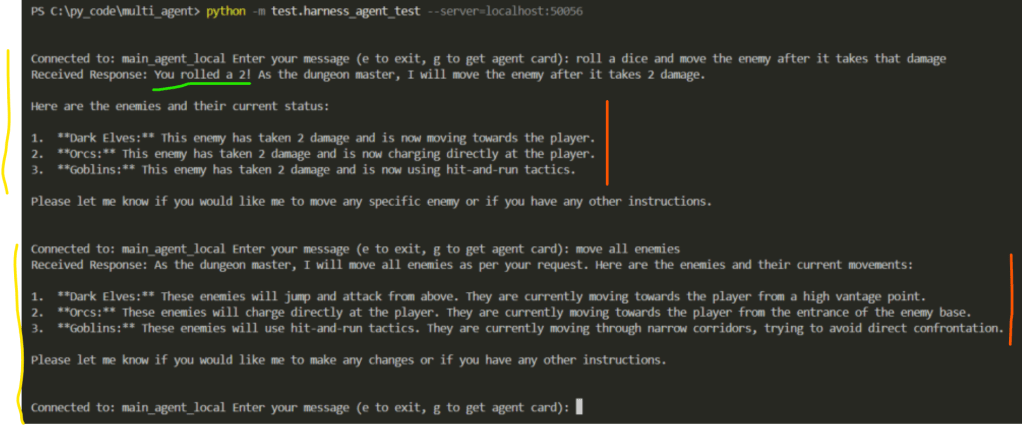
The interaction above uses the main_agent_local (see Figure 5) instead of main_agent as the interaction point. The yellow lines represent two interactions between the user and the main_agent_local via the Harness Agent Test client.
The green line represents the information main_agent_local gathered by interacting with the dice_roller. See screenshot below from the Dice Roller log which proves the value 2 was generated by the dice_roller agent.

The red lines represents interactions between the main_agent_local and the enemy_mover. See the corresponding log from enemy_mover below.

Key Insight: Notice how between the first and second user input the main_agent_local managed to decide what skills it needed and what agents could provide that. Both sessions show the flexibility we get when using minimal coupling and skills-based integration (as opposed to hard-coded integration in a workflow).
Results
I have the following lessons to share:
- Decoupling and using skills-based integration appears to work but to standardise it across a big org will be the real challenge including arriving at org-wide descriptions and boundaries.
- Latency is definitely high but I have also not done any tuning. LLMs still remain the slowest component and it will be interesting to see what happens when we add a security overlay (e.g., Agentic ID&A that controls which agent can talk with which other agent).
- A2A is being used in a lightweight manner. Questions still remain on the performance aspect if we use it in anger for more complex tasks.
- The complexity of application management provides scope for standard underlay to be created. In this space H1 2026 will bring lot more maturity to the tool offerings. Google and Microsoft have already showcased some of these capabilities.
- Building the agent is easy and models are quite capable. Do not fall for the deceptive ease of single agents. Gen AI apps are still better unless you want a sprawl of task specific agents that don’t talk to each other.
Models and Memory
Another advantage of this decoupling is that we can have different agents use different models and have completely isolated resource profiles.
In the example above:
main_agent_local – uses Gemini 2.5 Flash
dice_roller – uses locally deployed Phi-4
enemy_mover – uses locally deployed Phi-4
Memory is also a common building block. It is indexed by user id and session id (both randomly generated by the Harness Agent Test client).
Next Steps
- Now that I have the basics of a multi-agent system the next step will be to smoothen out the edges a bit and then implement better traceability for the A2A communications.
- Try out complex scenarios with API-based tools that make real changes to data.
- Explore guardrails and how they can be made to work in such a scenario.
- Explore peer-to-peer setup.

 Fish Eye View
1 Comment