Disclaimer: This post will refer to examples and scenarios that I have personally tested using ADK web. I have also extended my testing to GCP Agent Engine where possible. In practice ADK web and Agent Engine are different platforms so prepare to be surprised if something works in ADK web but not with Agent Engine. I will attempt to highlight where I have come across such issues. Agent Engine code at the bottom of the post.
The recent updates on ADK 2.0 (here), which is in Alpha release currently, point toward the framework offering greater control for orchestration through the introduction of a graph construct. This also ensures it attempts to fight back against the likes of LangGraph.
Why Customise?
The reason for this post is around the above question. Currently, most examples for ADK solve the orchestration between agents using a composition of one of 5 ‘core’ patterns:
- Sub-agent
- Agent-as-Tool
- Three deterministic workflow patterns (Sequential, Parallel, and Loop).
The deterministic workflow patterns are all based around an ‘Agent’ that is not driven by a LLM. Instead it is driven by code.
To actually implement an agent in ADK the most common starting point is LlmAgent. This is an out-of-the-box implementation of the ReACT agent architecture.
But there are several scenarios that require you to build a custom agent (at least till we have ADK 2.0 out). Some of these are outlined below:
- When stubbing out agents.
- When you require fine-grained orchestration control (e.g., using ML to decide what happens next based on the output of the previous agent).
- When we want to create our own style of agent (e.g., those based on ML-models and deterministic decisioning) and not use LlmAgent.
How to Customise?
The basic outline for a ‘blank’ agent is as follows:
class BlankAgent(BaseAgent): def __init__(self, name:str, description:str): super().__init__(name=name, description=description) override async def _run_async_impl(self, ctx: InvocationContext) -> AsyncGenerator[Event, None]: # custom code goes here... yield # when you are ready to complete execution then yield an Event here.
The key aspects to focus on:
- name and description in the init method: required to identify your agent and to describe it for upstream agents.
- _run_async_impl method: this is where the logic of this custom agent goes.
The Logic of the Agent
The _run_async_impl which has been overridden in the above snippet is an async method. This means it is not a ‘blocking’ method instead it is called from within an event loop.
Insight: ADK by-default executes agents in an async manner even if to the consumer it looks like a synchronous call.
The InvocationContext object is the magic object that contains all the information available for our custom agent to understand the task it is being asked to perform and any additional data/context provided. It also provides information about the current ‘state’ of the interaction including conversational context.
A given context spans one full turn starting with the external input into the multi-agent system (e.g., user’s message) and ends with the final response of the multi-agent system (e.g., response back to the user). The context is therefore made up of multiple agent calls which in turn can be made up of several custom calls, LLM calls, or tool calls.
Given the yield construct we are expected to formulate our agent as a generator of events. Which brings us to the Event construct within ADK.
Insight: An ADK agent, from a programmatic perspective, is nothing but a generator of events that influences what downstream agents see. If no Events are generated by your agent then it is invisible to the other agents in the system.
Event Class
The Event Class is the most important class to understand because this is what allows your agent to surface itself in the event stream that is one Multi-agent system execution turn. If your agent doesn’t yield any Event objects it will be invisible to the other agents just like an employee that never sends an email, types a line of code, or attends a meeting.
So what is an Event?
An
Eventin ADK is an immutable record representing a specific point in the agent’s execution. It captures user messages, agent replies, requests to use tools (function calls), tool results, state changes, control signals, and errors. [https://google.github.io/adk-docs/events/]
The Event class has two required attributes:
- Author: author of the event (e.g., agent name).
- Invocation Id: even though the documentation states it as a required, your agent will still work without adding invocation id to events because in the code for the Event class it has a default empty string value. Agent Engine: this is required and must be unique and generated per processing stage.
Other attributes of interest:
- content: represented by the Content object which is the ‘output’ of your agent. Content object can represent complex content types such as text, file data, code etc.
- partial/turn_complete: boolean values that signal the completeness of the response.
- actions: type of EventActions such as:
- state_delta/artefact_delta: indicating update of state/artefact with given delta.
- transfer_to_agent: indicating action to transfer to the indicated agent.
- escalate: indicating an escalation to the indicated agent.
Implementing an Agent that Provides a Static Response
Remember our custom agent can only communicate via Events. In this section let us create a basic agent that generates a response using a deterministic method. In this case it responds by appending ‘Hello world’ to the query provided by the upstream agent.
class DeterministicStubAgent(BaseAgent): def __init__(self, name: str, description: str): super().__init__(name=name, description=description) override async def _run_async_impl(self, ctx: InvocationContext) -> AsyncGenerator[Event, None]: invocation_id = random.randint(1,99999) # your id generation logic # Get the input message from the context logger.info(f"{self.name} received context: {ctx}") input_message = ctx.user_content.parts[0].text if ctx.user_content and ctx.user_content.parts else "" print(f"Received input message: {input_message}") # Add "Hello world" to the message modified_message = f"Hello world {input_message}" print(f"Modified message: {modified_message}") yield Event(invocation_id=invocation_id, author=self.name, content = Content(role="assistant", parts=[Part(text=modified_message)]))
In the agent above we first access the incoming request via the InvocationContext -> user_content structure and store it in input_message and then create a modified message (append ‘Hello world’).
Then we construct and yield the Event object that contains the deterministic response generated by our custom agent within the content structure.
The above snippet also shows you the starting and endpoints of your custom flow. Start is accessing upstream content that you may want to respond to and the end is the generation of an Event that contains your response/output.
To run the deterministic agent with a LLM-driven agent:
MODEL = LiteLlm(model="ollama_chat/qwen3.5:2b")instruction = """You are an autonomous agent that takes a complex maths problem and breaks it down into smaller steps to solve it. You have access to a set of agents for each branch of maths."""stub_agent_1 = StubAgent(name="Stub_Agent_Integration", description="Agent that can do Integration problems")stub_agent_2 = DeterministicStubAgent(name="Stub_Agent_Differentiation", description="Agent that can do Differentiation problems")root_agent = LlmAgent(name="Root_Agent", description="Root agent for handling conversation and classification of problem", instruction=instruction, model=MODEL, sub_agents=[stub_agent_1, stub_agent_2])
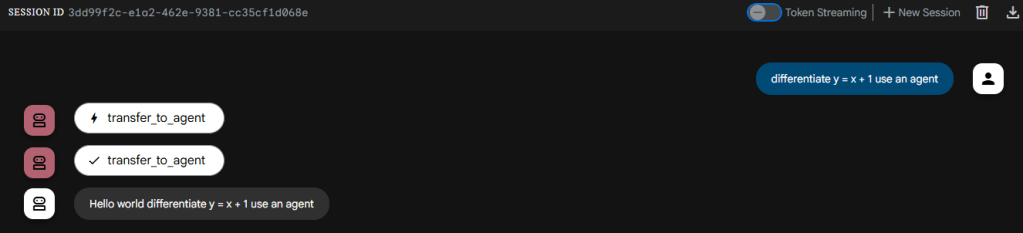
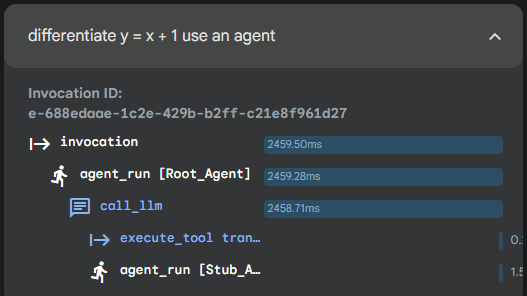
When you run the above as a sub-agent to the root agent this is what the interaction and trace looks like:
Example with EventActions
If you are going to the trouble of creating a custom agent your need will be beyond content generation. You may need to inform other agents about some session level operational information (e.g., cost incurred or agent-hop-count update) or indicate some change in state to the wider application.
The content block is not suitable for this as it is about the content flow. There is a separate ‘state’ structure in the context that exists at the session level which can be used to store temporary state information. Given this is at the session level and not persisted do not use this to store complex bits of information. The session state is not a data store!
  @override
  async def _run_async_impl(self, ctx: InvocationContext) -> AsyncGenerator[Event, None]:
      # Get the input message from the context
      logger.info(f"{self.name} received context: {ctx}")
      input_message = ctx.user_content.parts[0].text if ctx.user_content and ctx.user_content.parts else ""
      print(f"Received input message: {input_message}")
      # Add "Hello world" to the message

      modified_message = f"Hello world {input_message}"
      print(f"Modified message: {modified_message}")
      hop_count = ctx.session.state.get("hop_count", 0)
      state_delta = {"hop_count": hop_count + 1
      }
      action = EventActions(state_delta=state_delta)
      yield Event( author=self.name, content = Content(role="assistant", parts=[Part(text=modified_message)]), actions=action)
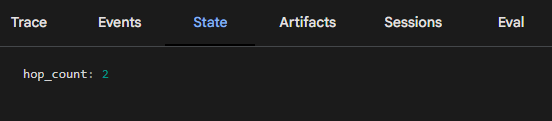
In the snippet above we add a hop_count session state variable to maintain a log of how many times this agent has been called per session. The real world use of this would be to ration the use of ‘expensive’ agents.
If you are using ADK web to test and learn then you can use the ‘State’ tab on the right to explore how this state variable increments every time our custom agent is used in a given session. Below we can see it has been used twice in the session.
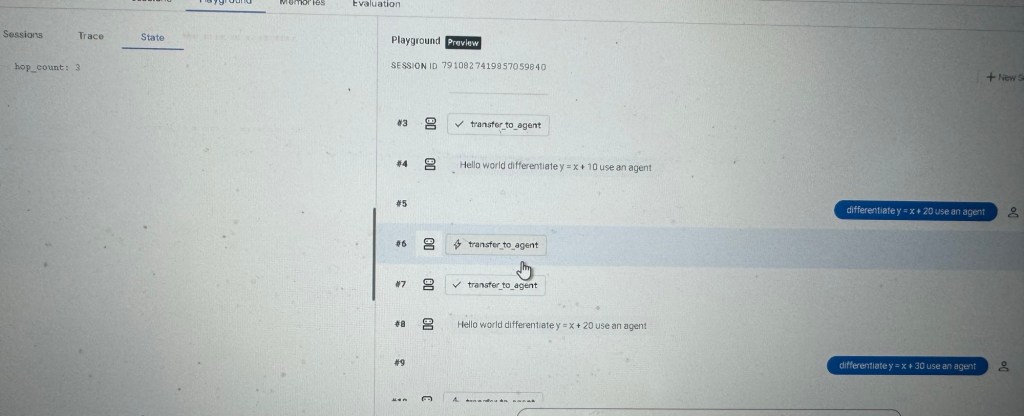
In another session it has been used thrice.

The image below shows Agent Engine deployment with some tweaks to the code.
Conclusion
We have gone through some important information around how to build your own custom ADK agent with code snippets. We have spoken about the overall structure and how to construct simple Events.
We then extended this to work with EventActions specifically how we can perform state-updates to share session level information with other agents.
We will build on this knowledge to develop sophisticated custom agents and to carry out common tasks such as stubbing agents for testing multi-agent systems.
Code Tested with Agent Engine
from typing import AsyncGenerator

from google.adk.agents.llm_agent import LlmAgent
from google.adk.agents import BaseAgent, InvocationContext
from google.adk.models.lite_llm import LiteLlm
from typing_extensions import override
from google.adk.events import Event, EventActions
from google.genai.types import Content, Part
import random

import logging
logging.basicConfig(level=logging.INFO)
logger = logging.getLogger(__name__)

class StubAgent(BaseAgent):
    def __init__(self, name:str, description:str, sub_agents=[]):
        super().__init__(name=name, description=description, sub_agents=sub_agents)

    @override
    async def _run_async_impl(self, ctx: InvocationContext) -> AsyncGenerator[Event, None]:
        print("Activating StubAgent with context:", ctx)
        logger.info(f"{self.name} received context: {ctx}")
        yield Event(turn_complete=True, author=self.name)


class DeterministicStubAgent(BaseAgent):
    integration: str = "Stub_Agent_Integration"
    def __init__(self, name: str, description: str, sub_agents=[]):
        super().__init__(name=name, description=description)


    @override
    async def _run_async_impl(self, ctx: InvocationContext) -> AsyncGenerator[Event, None]:
        # Get the input message from the context
        logger.info(f"{self.name} received context: {ctx}")
        input_message = ctx.user_content.parts[0].text if ctx.user_content and ctx.user_content.parts else ""
        print(f"Received input message: {input_message}")
        # Add "Hello world" to the message

        modified_message = f"Hello world {input_message}"
        print(f"Modified message: {modified_message}")

        hop_count = ctx.session.state.get("hop_count", 0)
        state_delta = {"hop_count": hop_count + 1
        }

        invocation_id = f"{hop_count}_{random.randint(1000, 9999)}"


        if hop_count>=2 and hop_count<5:
            # Transfer to another cheaper agent after 2 hops
            action = EventActions(state_delta=state_delta,transfer_to_agent=self.integration)
            event = Event( invocation_id=invocation_id, author=self.name, content = Content(role="assistant", parts=[Part(function_call={"name": "transfer_to_agent", "args": {"agent_name": self.integration}})]), actions=action)

        elif hop_count>=5:
            print("Turn completed")
            action = EventActions(state_delta=state_delta,turn_complete=True)
            event = Event( invocation_id=invocation_id, author=self.name, content = Content(role="assistant", parts=[Part(text=modified_message)]), actions=action)

        else:
            action = EventActions(state_delta=state_delta)
            event = Event( invocation_id=invocation_id, author=self.name, content = Content(role="assistant", parts=[Part(text=modified_message)]), actions=action)


        yield event


MODEL = LiteLlm(model="ollama_chat/qwen3.5:2b")
#Note: used Gemini Flash 2.5 when testing with Agent Engine.

instruction = """
You are an autonomous agent that takes a complex maths problem and breaks it down into smaller steps to solve it.
You have access to a set of agents for each branch of maths.
"""

stub_agent_1 = StubAgent(name="Stub_Agent_Integration", description="Agent that can do Integration problems")
stub_agent_2 = DeterministicStubAgent(name="Stub_Agent_Differentiation", description="Agent that can do Differentiation problems")

root_agent = LlmAgent(name="Root_Agent", description="Root agent for handling conversation and classification of problem", instruction=instruction, model=MODEL, sub_agents=[stub_agent_1, stub_agent_2])
 Fish Eye View