- Post 1: the need for RAG
- This post: implementing RAG
- Post 3: measuring benefits of RAG
- Post 4: implementing RAG using LangChain
In the previous post we looked at the need for Retrieval Augmented Generation (RAG). In this post we understand how to implement it.
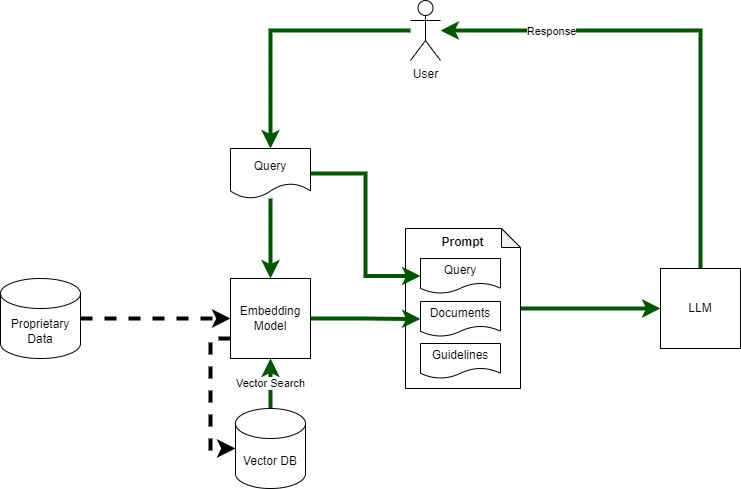
Figure 1 shows RAG architecture. Its major components include:
- Embedding Model: To convert query and proprietary data text into vectors for vector search.
- Vector DB: To store and search vectorised documents
- Large Language Model (LLM): For answering User’s query based on retrieved documents
- Proprietary Data Store: source of ‘non-public’ data
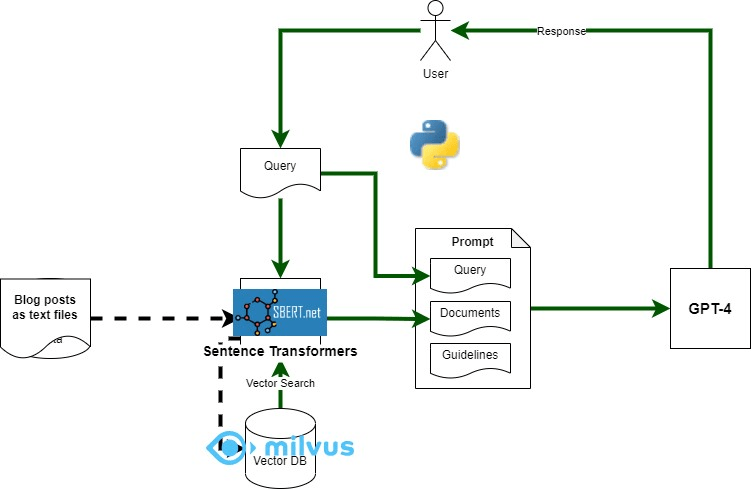
I used python to create a simple app to explore RAG – using my blog posts as the proprietary ‘data source’ that we want to use for answering questions. Component mapping shown in Figure 2 and described below.
- Embedding Model: Sentence-Transformers (python sentence_transformers)
- Vector DB: Milvus with python client (pymilvus)
- LLM: GPT-4 (gpt-4-0613) via Open AI API client (python)
- Proprietary Data Source: blog posts – one text file per blog post
I used the dockerised version of Milvus, it was super easy to use, remember to reduce the logging level as the logs are quite verbose. Download the docker compose file from here: https://milvus.io/docs/install_standalone-docker.md
Sentence Transformers (sentence_transformers), Python Milvus client (pymilvus), and OpenAI (openai) Python Client can all be installed using pip.
RAG Implementation Code
The main RAG implementation is here: https://github.com/amachwe/rag_test/blob/master/rag_main.py
The logic is straight forward. We have a list of queries covering topics relevant to the blog post and topics that are not relevant to make sure we can run some experiments on the output.
We execute each query against GPT-4 twice. Once with attached documents retrieved from the vector database (using the same query) and once without any attached documents.
We then vectorise the RAG and Non-RAG response from the language model and compare them to get a similarity score.
The data from each run is saved in a file named ‘run.csv’.
We also log the response from the language model as well.
Vector DB Build Code
The code to populate the vector db with documents can be found here:
https://github.com/amachwe/rag_test/blob/master/load_main_single.py
For this test I created a folder with multiple text files in it. Each text file corresponds to a single blog post. Some posts are really small and some are quite long. The chunking is at the sentence level. I will investigate other chunking methods in the future.
Running the Code
To run the code you will first need to populate the vector db with documents of your choice.
Collection name, schema, and indexes can be changed as needed. In this respect the Milvus documentation is quite good (https://milvus.io/docs/schema.md).
Once the database has been loaded the RAG test can be run. Make sure collection name and OpenAI keys are updated.
In the next post we look at the results and start thinking about how to evaluate the output.

 Fish Eye View
Thanks for sharing. I am tempted to try and test this out 🙂 Tbh, I got bit lost in the diagram, as the “Query” is being shown in two places, once in the prompt and another in parallel going into the Embedding model. Does the user query first gets into the prompt, which then sends it to the Embedding model or it all happens in parallel? Kindly elaborate.
LikeLike
The query is used in two places. First it is used to retrieve text from vector database. Then that text and the query are sent to the LLM to do the QnA task. The advantage of RAG is that it allows LLM to answer the question based on closed context rather than what it may have learnt during its training. (Sorry for the delay in replying).
LikeLiked by 1 person