This post follows up on the previous posts and attempts to build a generic harness that builds out OKF bundles on any topic. This aims to showcase the tech behind products such as Copilot CLI.
OKF bundles are one example of a knowledge artefact that can be used to provide information to specialised agents for a wide variety of tasks.
The harness has tools that allow directory traversal and internet searching to build out OKF bundles. State of the art harnesses like Copilot and Claude CLI have sophisticated tools that can for example read/write word documents and process PDFs.
Previous posts can be found here and I would encourage you to review them before reading this one:
The Outline
The code can be found here:
https://github.com/amachwe/okf
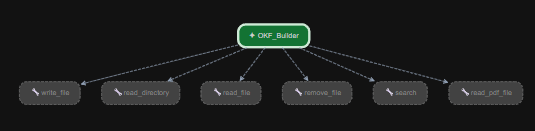
This is a simple code repo with one ADK agent called OKF_Builder (in https://github.com/amachwe/okf/blob/master/okf_builder/agent.py) which has access to six tools:
- Read Directory tool
- File manipulation tools:
- Write Text File
- Read Plain Text File
- Read PDF File
- Remove File
- Internet Search Tool
Directory and File manipulation tools enable the agent to access locations in the local file system.
Search tool uses TAVILY API to search the web. We restrict URLs to type ‘edu’ and ‘wikipedia’.
Prompt and Config
The Prompt is stored in prompt.yaml found here: https://github.com/amachwe/okf/blob/master/prompt.yaml. The simple prompt is represented tagged as a ‘skill’.
The Config is stored in config.yaml found here: https://github.com/amachwe/okf/blob/master/config.yaml. The only config is the path-root which restricts the operational scope of the agent when it comes to file manipulation.
Agents CLI and Running the Agent
We will use Google’s agents-cli to deploy and test the agent. For that you need agents-cli-manifest.yaml (https://github.com/amachwe/okf/blob/master/agents-cli-manifest.yaml) to auto deploy the agent.
Command to auto deploy (run in the root repo folder that contains the okf_builder folder and the agent, manifest, prompt and config yaml files) to the playground app provided by Google:
> agents-cli playground
Use the playground chat app to interact with the agent.
Once the playground spins up load the web-interface you will find the agent loaded with the six tools as below:
Start with a simple prompt like:
build okf for go language creating, debugging, testing. and performance improvement
See the agent in action as it combines internet search, local files, and the magic of the LLM to create OKF bundles.
Tips
- Create a working directory and point the agent to it to focus it on relevant content.
- Include your own knowledge sources within the working directory to reduce dependency on the Internet and LLM’s internal knowledge.
- Ask the agent to iteratively add depth to the OKF bundle produced.
- Ask the agent to combine more content into the OKF bundle.
- Experiment with different LLMs to see the difference in the output.
LLM as the Secret Sauce
The MODEL parameter in agent.py allows us to select different models. Models need to have reasoning modes to ensure good output.
I have tested the agent with two models (via LiteLLM):
- gpt-5.6-terra – via OpenAI API
- gemma4:12b (via ollama) – locally hosted
These are two extreme ends of the model spectrum.
Two examples that showcase the difference in the output can be seen here:
https://github.com/amachwe/okf/tree/master/examples
Same topic but the agent powered by two different LLMs.
I created a few more bundles that can be found here: https://github.com/amachwe/okf/blob/master/examples/other_bundles.zip
Feel free to play around with the prompt, config, tools and enjoy creating different knowledge artefacts.


2 Comments