Measuring Benefits of RAG

Understanding the Response

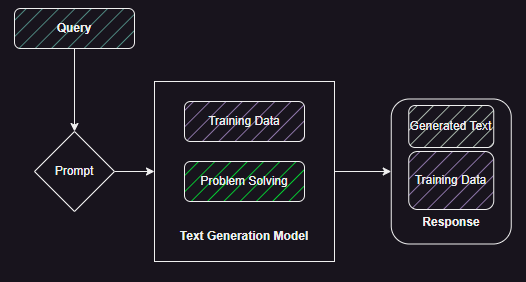
In this final post we understand how we can start to measure the performance of Retrieval Augmented Generation (RAG) and therefore estimate its value. Figure 1 shows the basic generation mechanism in Text Generation Models. The query has to trigger the correct problem solving paths which combines the training data to create a response. The response is a mix of text from the training data and newly generated text. This generated text can be an extrapolation based on the training data or it could be simply gluing the training data together without adding new facts.

Figure 1: Basic mechanism of text generation using a Generative AI Model.

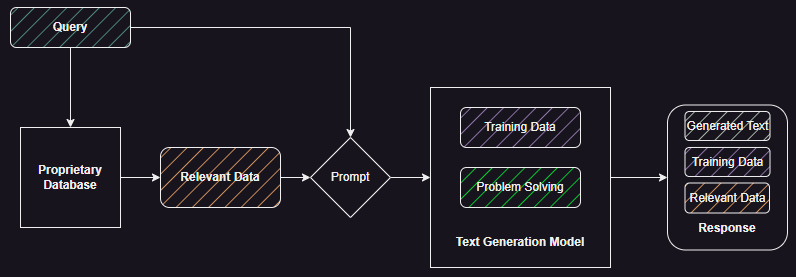
For the enterprise question and answer use-case we want to start with the latter behaviour but tune it, as shown in Figure 2, to include relevant data from a proprietary database, minimize data from training, and control the generated text. So ideally, we want the model to use its problem solving capabilities to generate a response based on relevant proprietary data.

Figure 2: Retrieval augmented response generation.

Figure 3 shows some possible combinations we can find in the response.

Figure 3: Possible combinations present in a RAG response.

A response that consists of large amounts of generated text with little grounding in training data could be a possible hallucination. If the response is based mainly on training data with either generated text or data from proprietary database added to it we may find the response plausible but it may not be accurate.

To illustrate this with an example: say this was deployed on a retail website and the customer/agent wanted to ask about the return policy associated with a particular product. We want the model to use its problem solving (language generation) capabilities to generate the response, using the data associated with product policy available in the retailers database. We do not want it to create its own returns policy based on its training data (training data driven in Figure 3) or for it to get ‘creative’ and generate its own returns policy (hallucination). We also don’t want it to mix training data with proprietary data because there may be significant differences between generic return policies it may have observed during training and the specific policy associated with that product.

The ideal response (see Figure 3) consists of data retrieved from the proprietary database, where we can be assured of its accuracy, validity, and alignment with business strategy with the generated text used as a glue to explain the policy without adding, changing, or removing any part of it. In this case we are using the text comprehension (retrieved docs), problem solving (summarisation/expansion), and text generation skills of the model.

Building the Baseline

To evaluate the RAG response we need to build a baseline. This is critical for cases where the proprietary data is not entirely unique and similar examples may be present in the training data of the model being used. For example, standard terms and conditions that have been customised for an organisation. In this case, it is important to run the common queries we expect against the model without any supporting proprietary data (see Figure 1). This tells us what answer does the model give based purely on training data and how is it different from the the organisation specific answer.

Therefore, to build the baseline we create a corpus of questions (both relevant and nonsensical) that we believe the customers would ask and interrogate the selected model. The analysis of the response tells us what the model knows and which class of undesired responses are most common. This analysis must be done by subject matter experts to ensure semantic correctness.

Running with RAG

Using the same corpus of questions with RAG pipeline allows us to generate what we expect to be accurate and focused responses. We can compare these with the baseline and weed out cases where the model is focusing more on the training (generic) data than the retrieved proprietary data.

Ideally, we want the RAG response to be different from the non-RAG responses for the same question. For the case where the proprietary data is unique (e.g., customer interactions, transactions, internal company policies, etc.) this difference should be quite significant. We should evaluate this difference both objectively (say using embedding vectors – see next section) as well as subjectively using subject matter experts.

We should analyse the response where the question was not related to the domain of the organisation to protect against different prompt-based attacks. These should produce some response from the model when we are not using RAG. When we use RAG we should be able to block the request to the model because we do not find relevant data in the proprietary database.

Building a corpus of questions also allows us to cache the model response thereby reducing runtime costs. This would require first checking the question against a cache of answered questions and running the RAG pipeline only if the question is not found in the cache or there is significant difference (e.g., using embedding vector distance).

Comparing the Output

The basic requirement here is to compare the response generated with and without RAG, and proving that RAG response is accurate and safe even when asked unrelated or nonsensical questions.

There are various objective metrics we can look at.

Firstly, we can compare the amount of text generated with and without RAG. We would expect on common topics the generated text may be similar in length but on unique topics there must be a significant difference.

Secondly, we can use an embedding generating model (e.g., sentence-transformers/all-MiniLM-L6-v2) to create embeddings from the RAG and non-RAG responses. These can then be compared using similarity metrics.

Thirdly, we can use subject matter experts and customer panels to manually evaluate the responses (without revealing which answer was generated with/without RAG). What we should find is a clear preference for the RAG answer.

In this post we will focus on comparing the amount of text generated as well as the similarity between the RAG and non-RAG response.

If we find no significant difference between RAG and non-RAG response and no clear preference for the RAG response then the dataset may be a good target for non-generative AI based methods that are significantly cheaper to run.

An Example

It is always good to get your hands dirty to explore a topic. I built my own RAG pipeline using using my blog posts as the source of proprietary data.

Step 1: Review the documents in the data store and build the corpus with a mix of related and unrelated questions.

Step 2: Build the RAG pipeline – see the second post. Three major components are: Milvus vector database, sentence transformer for similarity, and GPT4 as the text generation model.

Step 3: Run each question multiple times with and without RAG and collect the response data (text and tokens generated). This will allow us to get a good baseline.

Comparing Amount of Text Generated

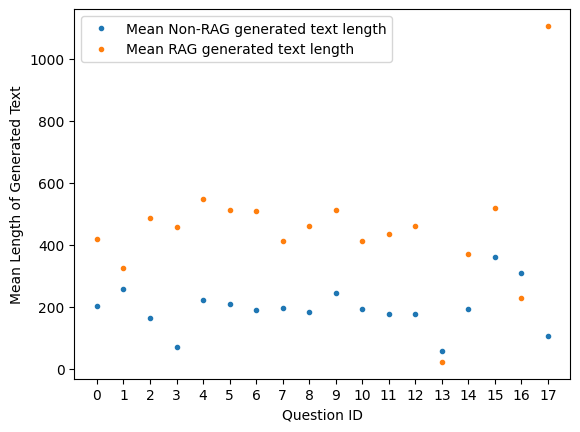
Figure 4 compares length of text generated with and without RAG. Given the set of questions (X-axis) we compare the number of tokens (Y-axis) generated by the model with and without RAG. We repeat the same question multiple times with and without RAG and calculate the average value.

In general when using RAG we see more text is generated on average than without RAG. Although for some questions (e.g., question no. 13 and 16) the text generation is less with RAG. The two questions relate to topics which are unlikely to be found in the proprietary dataset or the training data of the model (e.g., ‘who is Azahar Machwe’). Question 17 shows a big difference in size given that one of the posts in my blog relates directly to the question.

Figure 4: Comparing average amount of text generated with and without RAG.

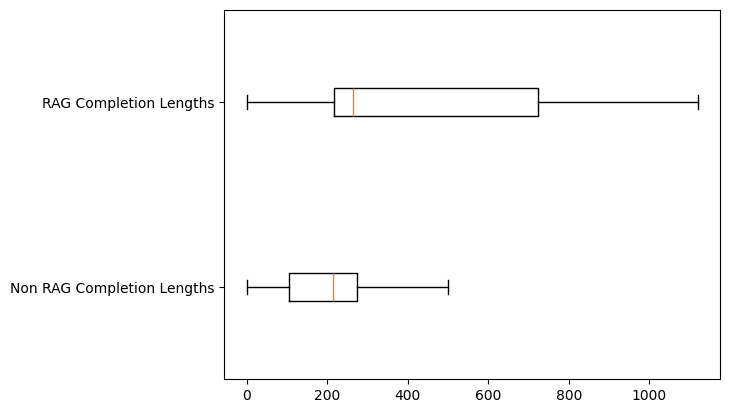
Figure 5 shows actual lengths of generated text with and without RAG. We can see with RAG the spread and skew is quite significant. For RAG the output is less spread out and the skew also appears to be less. The median for Non RAG is below the first quartile of RAG.

Figure 5: Comparing actual lengths of generated text with and without RAG.

These two plots (Figure 4 and 5) show that adding proprietary data is influencing the quantity of text generated by the model.

Comparing Similarities of Output

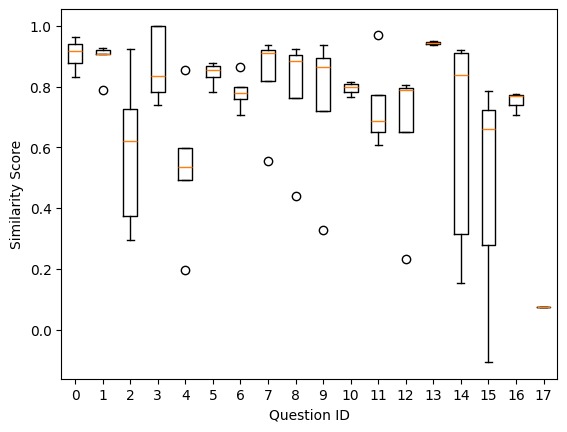
We use the same set of questions and generate multiple responses with and without RAG. We then measure the similarity of the RAG response to the Non-RAG response. Figure 6 shows the similarities plotted against different questions.

Figure 6: Similarity score of RAG and Non-RAG responses across different questions.

We can see a few patterns in the spread of the similarities.

  1. Questions 2, 14, and 15 show a large spread with a skew which suggests that the questions being asked have answers in the proprietary data as well as the training data. In this case these were technical questions about ActiveMQ, InfluxDB, and New Delhi, India.
  2. Questions 1, 13, and 17 show no spread and are at one end of the similarity scale.
    • Question 1 and 13 show that the RAG and Non-RAG responses are similar.
      • This could be because my original blog post and training data for the model were sourced from the same set of articles.
      • Both my blog posts and the model had no information about it (therefore similar ‘nothing found’ responses from the model).
    • Question 17 is at the other end and shows that RAG and Non-RAG responses have low similarity. This question was very specific to a blog post I wrote. Comparing it to Figure 4 we can see that the RAG response contains much more text than the Non-RAG.
  3. Questions 5, 6, 7, 8, and 9 with similarity range between 0.7 and 0.9. This points to responses that:
    • Need additional scrutiny to ensure we are not depending on training data.
    • Questions that need further prompt design to sample responses that give low similarity (below 0.7)

Key Takeaways

  1. Human scrutiny (subject matter experts, customer surveys, and customer panels) is required especially once the solution has been deployed to ensure we evaluate the prompt design, vectorisation strategy, and model performance.
  2. We should build a corpus of questions consisting of relevant, irrelevant, and purely nonsense (e.g., prompt attack) questions and keep updating it whilst the application is in production. This will allow us to evaluate new models, vectorisation strategies, and prompt designs. There are some examples where models are used to generate the initial corpus where no prior examples are available.
  3. Attempt to get separation between RAG and Non-RAG response in terms of similarity and amount of text generated. Fold in human scrutiny with this.
Figure 7: Developing and operationalising RAG-based applications.

Implementing RAG (2)

In the previous post we looked at the need for Retrieval Augmented Generation (RAG). In this post we understand how to implement it.

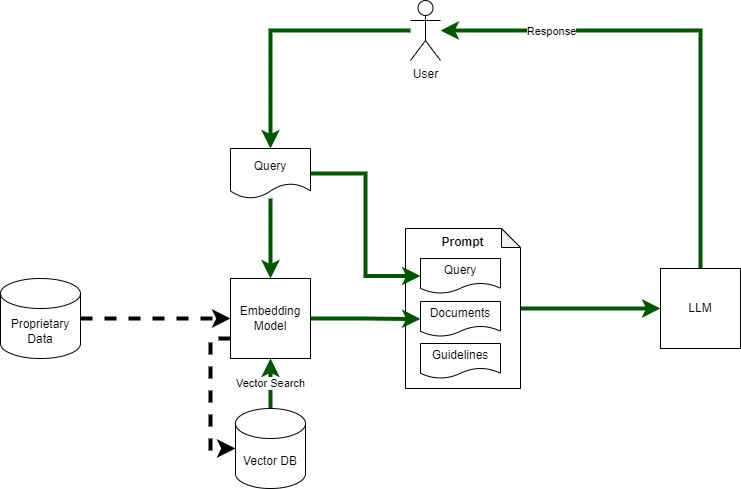
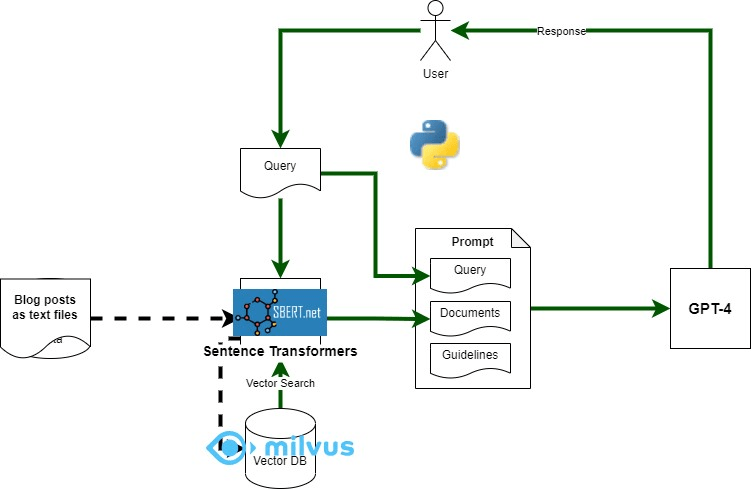
Figure 1 shows RAG architecture. Its major components include:

  • Embedding Model: To convert query and proprietary data text into vectors for vector search.
  • Vector DB: To store and search vectorised documents
  • Large Language Model (LLM): For answering User’s query based on retrieved documents
  • Proprietary Data Store: source of ‘non-public’ data
Figure 1: Outline of RAG Architecture

I used python to create a simple app to explore RAG – using my blog posts as the proprietary ‘data source’ that we want to use for answering questions. Component mapping shown in Figure 2 and described below.

  • Embedding Model: Sentence-Transformers (python sentence_transformers)
  • Vector DB: Milvus with python client (pymilvus)
  • LLM: GPT-4 (gpt-4-0613) via Open AI API client (python)
  • Proprietary Data Source: blog posts – one text file per blog post
Figure 2: Components used to implement RAG

I used the dockerised version of Milvus, it was super easy to use, remember to reduce the logging level as the logs are quite verbose. Download the docker compose file from here: https://milvus.io/docs/install_standalone-docker.md

Sentence Transformers (sentence_transformers), Python Milvus client (pymilvus), and OpenAI (openai) Python Client can all be installed using pip.

RAG Implementation Code

The main RAG implementation is here: https://github.com/amachwe/rag_test/blob/master/rag_main.py

The logic is straight forward. We have a list of queries covering topics relevant to the blog post and topics that are not relevant to make sure we can run some experiments on the output.

We execute each query against GPT-4 twice. Once with attached documents retrieved from the vector database (using the same query) and once without any attached documents.

We then vectorise the RAG and Non-RAG response from the language model and compare them to get a similarity score.

The data from each run is saved in a file named ‘run.csv’.

We also log the response from the language model as well.

Vector DB Build Code

The code to populate the vector db with documents can be found here:

https://github.com/amachwe/rag_test/blob/master/load_main_single.py

For this test I created a folder with multiple text files in it. Each text file corresponds to a single blog post. Some posts are really small and some are quite long. The chunking is at the sentence level. I will investigate other chunking methods in the future.

Running the Code

To run the code you will first need to populate the vector db with documents of your choice.

Collection name, schema, and indexes can be changed as needed. In this respect the Milvus documentation is quite good (https://milvus.io/docs/schema.md).

Once the database has been loaded the RAG test can be run. Make sure collection name and OpenAI keys are updated.

In the next post we look at the results and start thinking about how to evaluate the output.

Fun With RAG (1)

A short series on RAG – which is one of the most popular methods for working with LLMs whilst minimising the impact of training bias and hallucinations.

Retrieval Augmented Generation (RAG) involves supplementing the information stored within a large language model (LLM) with information retrieved from an external source for answering questions with improved accuracy and references for validation.

RAG is especially important when we want to answer questions accurately without retraining the LLM on the dataset of interest. This decoupling from retraining allows us to update data independently of the model.

The Source of LLM’s Knowledge

Let us understand a bit more about the above statement regarding the training of LLMs. Generally, training involves multiple stages with different types of data involved in each stage.

The first stage involves large datasets consisting of Wikipedia, books, manuals, and anything else that we can find on the Internet. This is like parents telling their children to read a wide variety of text to improve their knowledge, vocabulary, and comprehension. This usually results in a generic ‘language model’ also known as a foundation LLM. The main problem with such a model is that while it knows a lot about constructing language it has not learnt how to say construct language to support a chat.

The second and subsequent stages involve fine-tuning a foundation model to specialise it to handle specific tasks such as having a ‘chat’ (e.g., ChatGPT) or helping search for information. Now the data used to train during fine-tuning is quite different from what is used in the first stage and includes human feedback and curated datasets. This is similar to a college student reading a coursebook, they already know the language structures and form. The data is usually specialised to reflect the tasks it is being fine tuned for. A lot of the ‘understanding’ of what is a proper response is learnt at this stage.

Key Concept
Therefore as a finished product the LLM has patterns and data from the following sources: the Internet - including books, Wikipedia, and manuals, human feedback on its responses, and specialised curated datasets suitable for the tasks it was developed for.

The Gap

The LLM as a finished product is quite useful. It is able to perform many useful tasks, and use its capability of language formation to respond with the correct syntax and format. For example, if you ask GPT4 to write a poem it will us the correct alphabets and format.

The Scenario

But imagine you were running a company that sold electronic gadgets. Customer and colleague feedback indicates that even though you have a set of Frequently Asked Questions and well structured product guides, it still takes time to get to specific pieces of information. You discover customers are calling to get the agents to summarise and explain parts of the guide. This process is far from simple and often leads to confusion as each agent summarises in a different way and sometimes the less experienced agents provide erroneous information.

Obviously, you get very excited about the power of LLMs and build a business case for how we can save agent time, enable customer self-serve, and increase first-time-correct using LLMs to explain/summarise/guide the agents and the customers. You setup a proof of concept to test the technology and create an environment with your favourite cloud provider to try out some LLMs. This is where you hit the first issue. While the LLMs you are trying have generic knowledge about electronics and can answer common questions, they have no way of answering specific questions because either that data did not form part of the training set or there was not enough of it, or that data did not exist on the public Internet when training was being carried out.

As an example: say the customer wants information about a recently released laptop. LLM will be able answer questions like: ‘what is usb-c’ or ‘tell me about how to clean laptop screens’ as there is a lot of information on the Internet about these topics. But if we ask specific questions like: ‘what is the expected battery life of the laptop’ the LLM will not be able to answer since this laptop model did not exist when the LLM was trained. You want the LLM to say ‘sorry I don’t know’ but it is difficult to identify that unless you can tabulate what you do know.

The worst case is that LLM has partial or related data for say the laptop brand or some other laptop model and it uses that to create a response that sounds genuine but is either incorrect or baseless. This can increase the frustration experienced by the customers and agents.

Key Concept 
The LLM does not have enough knowledge to answer the question. There are other cases where it may have partial knowledge, incorrect knowledge, or it may 'think' it has enough based on links with unrelated knowledge items. But because the LLM is compelled to generate, it will generate some response. This gap in knowledge between what it needs to respond correctly vs what it knows is where RAG comes in.

LLMs: Forward Pass vs Generate

Large language models are complex constructs that can understand and generate language – made up of a token-probability map generator and the next token selector which uses that map to select the next token. We will explore the structure of Large LanguageModels (LLMs) using the transformers python library provided by HuggingFace.

The token generator part is the gazillion-parameter, heavy weight, neural network based, language model. We create it as below, where the ‘model’ object encapsulates the LLM:

There are different model objects associated with each model type. In the above example we are loading a version of the GPT2 model using the ‘from_pretrained’ convenience method.

The token probabilities for the next token are obtained by performing a forward pass through the model as above.

The output will be shaped according to the vocabulary size and output size of the model (e.g., 50,257 for GPT2 and 32,000 for Llama2). If we do some processing of the output and map it against the index in the ‘vocab.json’ associated with the model, we can get a probability map of tokens like below (from GPT2). The screenshot shows the token index and its probability score and text value:

The token generator and selector parts are conveniently encapsulated in the generate method associated with the model object:

The selector uses searching and sampling mechanisms (e.g., top-k/top-p sampling and beam search) to select the next token. This component is what provides the mechanism to inject variation in the generated output. The model itself doesn’t provide any variability. The forward pass will predict the same same set of next tokens given the same input.

The forward pass is repeated again by adding the previously generated token to the input (for auto-regressive models like GPT) which allows the response to ‘grow’ one token at a time. The generate method takes care of this looping under the hood. The max_length parameter controls the number of times this looping takes place (and therefore the length of the generated output).

Generating Embeddings

Embeddings allow non-numeric data such as graphs and text to be passed into neural networks for use-cases such as machine translation. Embeddings map the non-numeric data into a set of numbers that preserve some/all of the properties of the original data.

Let us start with a simple example: we want to translate a single word from one language to another (say English to German). The model will have three parts – an encoder that maps an English word to a point in an abstract numeric space, a ‘decoder’ that maps a point from another numeric space to a German word, and a translator that maps the ‘English’ numeric space to the ‘German’ numeric space.

Encoder: [hat] -> [42]

Translation: [42] -> [100]

Decoder: [100] -> [Hut]

Remember the requirement that some/all of the properties must be preserved when moving to the numeric space? In the example above, for ’42’ to be an embedding and not just an encoding it should reflect the meaning of the word ‘hat’. In a numeric space that has preserved the ‘meaning’ we expect that the numbers for ‘hat’ and ‘cap’ should be close to each other and the number for the word ‘elephant’ should be far away.

In case of images, we would expect embeddings of the different images of hand-written ‘1’ to be close to each other and those for ‘2’ to be far away. Embeddings for ‘7’ might be closer as hand-written ‘7’ can look like a ‘1’.

Generating Embeddings

Training your own embedding generator for the English language is relatively easy as you have lots of free data available. You can use the Book Corpus dataset (https://huggingface.co/datasets/bookcorpus) that consists of 5gb of extracts from books.

To prepare the data for to train the encoder-decoder network you will need a tokenizer which converts a string of words into a string of numeric tokens. I used the freely available GPT2 tokenizer from Huggingface.

During the training process, tokens are then passed through the encoder-decoder network where we attempt to:

  1. train the encoder part to generate an embedding that represents the input string.
  2. train the decoder part to ‘recreate’ the input token string from the generated embedding.

The resulting trained encoder-decoder pair can then be separated (think of breaking a chocolate bar in half) and just the encoder part be used to generate embeddings.

Let us see with an example.

The first step is to tokenize the input string:

‘I love pizza’ -> tokenize -> [45, 54, 200]

Then to train the encoder-decoder pair so that input can be recreated by decoder at the other end:

Input: [45, 54, 200] -> encoder -> [4, 6] -> decoder -> Output: [45, 54, 200]

In the example above the generated embeddings have 2-dimensions (easier to visualise) with the value of [4, 6]. This when passed to the decoder should generate a token string that is same as the input.

The neural network usually looks like the figure ‘8’ with the embedding output found in the narrow ‘waist’.

For my example I used a max sentence length of 1024 words. Embedding dimension of 2 (to make it easier to visualise). Input layer of 1024, with three encoder layers: 500, 200 and 2. Mirroring that the decoder with 2, 200, 500 layers and a final output layer of 1024.

Training took 2 days to complete on my laptop.

Output Examples

Figure 1: Plotting single word embeddings.

Figure 1 shows single words put through the encoder and the resulting embedding. Two dimensional embeddings allow easy visualisation of the embedding points. We can see some clusters for Countries and Animals and the merging of the two clusters for ‘Cat’ and ‘India’. Clearly we are getting some ‘meaning’ of the word translating to the embedding but it is far from perfect.

Figure 2: Plotting phrase embeddings.

In Figure 2 we can see the output of phrase embeddings. We see a cluster of phrases around ‘England’ but then an outlier that talks about the London being the capital of England. Other clusters can be seen around Animal phrases and Country phrases. This again is far from perfect.

The main thing I want to highlight is that with minimal effort preparing the data and training the encoder model, it has extracted some concept of ‘meaning’ and this property is translated into the embedding space. Similar phrases are showing up closer to each other in the numeric embedding space. This is after 2 days of training a relatively small model on a low-powered laptop.

A question that arises is ‘how did it learn the meaning’. The answer is relatively straightforward. It did not learn the actual meaning. It learned the relationships between words based on their occurrence in the training data set. This is why large language models cannot be used in a raw state because the data they are used to train with may have all kinds of skewed subsets that lead to things like gender bias.

Imagine training larger models on more powerful infrastructure. Well, you don’t need to imagine, we can already see the power of GPT-4 which took months to train on highly specialized hardware (Nvidia GPUs).

Machine Learning, Forgetting and Ignoring

The focus in AI is all about Machine Learning – training larger models with more data and then showcasing how that model performs on tests. This is testing two main aspects of the model:

  1. Ability to recall relevant information.
  2. To organize and present the relevant information so that it resembles human generated content.

But no one is talking about the ability to forget information and to ignore information that is not relevant or out of date.

Reasons to Forget

Forgetting is a natural function of learning. It allows us to learn new knowledge, connect new knowledge with existing (reinforcement) and deal with the ever increasing flood of information as we grow older.

For Machine Learning models this is a critical requirement. This will allow models to keep learning without it taking more time and effort (energy) as the body of available knowledge grows. This will also allow models to build their knowledge in specific areas in an incremental way.

ChatGPT has a time horizon of September 2021 and has big gaps in its knowledge. Imagine being 1.5 years behind in today’s day and age [see Image 1].

Image 1: Gaps in ChatGPT.

Reasons to Ignore

Machine learning models need to learn to ignore. This is something humans do naturally, using the context of the task to direct our attention and ignore the noise. For example, doctors, lawyers, accountants need to focus on the latest available information in their field.

When we start to learn something new we take the same approach of focusing on specific items and ignoring everything else. Once we have mastered a topic we are able to understand why some items were ignored and what are the rules and risks of ignoring.

Current transformer models have an attention mechanism which does not tell us what to ignore and why. The ‘why’ part is very important because it adds a level of explainability to the output. For example the model can end up paying more attention to the facts that are incorrect or no longer relevant (e.g. treatments, laws, rules) because of larger presence in the training data. If it was able to describe why it ignored related but less repeated facts (or the opposite – ignore repeated facts in favor of unique ones – see Image 2 below) then we can build specific re-training regimes and knowledge on-boarding frameworks. This can be thought of as choosing between ‘exploration’ and ‘exploitation’ of facts.

Image 2: ChatGPT giving wrong information about Queen Elizabeth II, which is expected given its limitations (see Image 1), as she passed away in 2022.

Image 2: Incorrect response – Queen Elizabeth II passed away in 2022.

Image 3: Asking for references used and ChatGPT responding with a few valid references (all accessed on the day of writing the post as part of the request to ChatGPT). Surely, one of those links would be updated with the facts beyond 2021. Let us investigate the second link.

Image 4: Accessing the second link we find updated information about Queen Elizabeth II that she passed away in 2022. If I was not aware of this fact I might have taken the references at face value and used the output. ChatGPT should have ignored what it knew from its training in favor of newer information. But it was not able to do that.

Image 4: Information from one of the links provided as reference.

What Does It Mean For Generative AI?

For agile applications where LLMs and other generative models are ubiquitous we will need to allow these models to re-train as and when required. For that to happen we will need a mechanism for the model to forget and learn in a way that builds on what was learnt before. We will also need the model to learn to ignore information.

With ML Models we will also need a way of validating/confirming that the right items have been forgotten. This points to regular certification of generative models especially those being used in regulated verticals such as finance, insurance , healthcare and telecoms. This is similar to certification regimes in place for financial advisors, doctors etc.

Looking back at this article – it is simply amazing that we are talking about Generative AI in the same context as human cognition and reasoning!

Controlling Expenses

Money worries are back. In response to rising inflation in the UK, Bank of England has been forced to increase the base rate to 4.25%. That is expected to squeeze demand in two ways:

  1. Improving savings rate to encourage people to spend less and save more
  2. Increasing cost of borrowing – making mortgages more expensive

If you are worried about making money stretch till the end of the month then the first thing to do is: understand your spending.

The best way to understand your spending is to look at your sources of money. Generally, people have two sources:

  1. Income – what we earn
  2. Borrowing – what we borrow from one or more credit products

It is important to understand credit cards are not the only credit product out there. Anything that allows you to buy now and pay later is a credit product – even if they don’t charge interest.

Understand your Income and Expenses

Go to your bank account or credit-card app to understand how much money you get in each month, how much of it is spent and how much do you borrow over that amount. Most modern banking apps allow you to download transactions in comma separated values (csv) format or as an excel sheet. Many also have spending analytics that allow you to investigate the flow of money.

Once you have downloaded the data you just need to extract 4 items and start building your own expense tracker (see Excel sheet below).

Four pieces of information are important here:

  1. Date of Transaction
  2. Amount (with indication of money spent or earned)
  3. Categorization of the Transaction
  4. Description (optional) – to help categorize the transaction to allow you to filter

For the Categorization I like to keep it simple and just have three categories:

  1. Essential – this includes food, utilities (including broadband, mobile), transport costs, mortgage, insurance, essential childcare, small treats, monthly memberships. This is essential for your physical well-being (i.e. basic food, shelter, clothes, medicine) as well as mental and emotional well-being (i.e. entertainment, favorite food etc. as an occasional treat).
  2. Non-essential – this includes bigger purchases (> £20) such as dining out, more expensive entertainment, travel etc. that we can do without.
  3. Luxury – this includes purchases > £100 which we can do without.

The Excel sheet below will help you track your expenses. The highlighted items are things that you need to provide.

The items that you need to provide (highlighted in the sheet) are:

  1. Transaction data from your bank and credit-card (Columns A-D), this should be for at least 3 months – this is time consuming the first time as you will have to go through and mark each entry as category 1, 2 or 3 (see above). One you do it for historic data you can then maintain it with minimal effort for new data.
  2. Timespan of the data in months
  3. Income

This will generate the expenses in each category on a total and monthly basis (to help you budget).

This will also generate, based on the income provided, the savings you can target each month.

Note: All results are in terms of the currency used for Income and the Transaction records.

Things To Do

Once you understand what you are spending in the three categories you can start forecasting by taking monthly average spending in each category.

Tracking how monthly average changes over a few months will tell you the variance in your spending. Generally, spending rises and falls as the year progresses (e.g. rising sharply before festive periods like Christmas and Diwali and falling right after).

You can do advanced things like factor for impact of inflation on your monthly spending and savings.

Finally, once you have confidence in the output – you can move items between categories. This will allow you to play what-if and understand the impact of changing your spending patterns on your monthly expenses and savings.

Generative AI in the Legal System

  1. Impact of Generative AI
  2. Automation to the Rescue
    1. A Court Case is Born
      1. Generative AI in this Phase
    2. Hearings and Decisions
      1. Generative AI in this Phase
    3. End of the Case and What Next?
    4. Generative AI in this Phase
  3. Human in the Loop
  4. ChatGPT and its Impact

The Legal System is all about settling disputes. Disputes can be between people or between a person and society (e.g. criminal activity), can be a civil matter or a criminal one, can be serious or petty. Disputes end up as one or more cases in one or more courts. One dispute can spawn many cases which have to be either withdrawn or decided, before the dispute can be formally settled.

With generative AI we can actually treat the dispute as a whole rather than fragment it across cases. If you look at ChatGPT it supports a dialog. The resolution of a dispute is nothing but a long dialog. In the legal system, this dialog is encapsulated in one or more cases. The dialog terminates when all its threads are tied up in one or more judgments by a judge.

The legal process is heavily based on human-human interaction. For example, the interaction between client-lawyer, lawyer-judge, with law enforcement and so on. This interaction is based on documentation. For example, client provides a brief to a lawyer, lawyer and client together create a petition or a response which is examined by the judge, judge provides judgments (can take many forms such as: interim, final, summary etc.), observations, directions, summons etc. all in form of documents that are used to trigger other processes often outside the court system (such as recovery of dues, arrests, unblocking sale of property etc.). Figure 1 highlights some of the main interactions in the legal system.

Figure 1: High-level interactions in the court system.

Impact of Generative AI

To understand the impact of Generative AI, the key metric to look at are: cost and the case backlog. Costs include not only costs of hiring legal representation but also costs associated with the court system. This includes not only the judges and their clerks, but also administration, security, building management and other functions not directly related to the legal process. Time can also be represented as a cost (e.g. lawyers fees). Longer a case takes more expensive it becomes not only for the client but also for the legal system.

The case backlog here means the number of outstanding cases. Given the time taken to train new lawyers and judges, and to decide cases, combined with a growing population (therefore more disputes), it is clear that as number of cases will rise faster than they can be decided. Each stage requires time for preparation. Frivolous litigation and delay tactics during the trial also impacts the backlog. Another aspect that adds to the backlog is the appeals process where multiple other related cases can arise after the original case has been decided.

As the legal maxim goes ‘justice delayed is justice denied’. Therefore, not only are we denying justice we are also making a mockery of one of the judicial process.

Automation to the Rescue

To impact case backlog and costs we need to look at the legal process from the start to the finish. We will look at each of these stages and pull out some use-cases involving Automation and AI.

A Court Case is Born

Figure 2 zooms in on the start of the process that leads to a new case being created in the Court System. Generally one or more petitioners, either directly or through a lawyer petitions the court for some relief. The petition is directed towards one or more entities (person, government, company etc.) who then become the respondents in the case. The respondent(s) then get informed of the case and are given time to file their response (again either directly or through a lawyer).

In many countries costs are reduced by allowing ‘self-serve’ for relatively straightforward civil cases such as recovery of outstanding dues and no-contest divorces. Notices to respondents are sent as part of that process. Integrations with other systems allow secure electronic exchange of information about the parties (e.g. proof of address, income verification, criminal record).

Figure 2. How a case starts.

Generative AI in this Phase

  • To generate the petition for more types of cases – the petitioner provides prompts for generative AI to write the petition. This will reduce the load on lawyers and enable wider self-serve. This can also help lawyers in writing petitions by generating text for relevant precedence and law based on the brief provided by the petitioner.
  • To generate potential responses to the petition (using precedence and law) to help clients and lawyers fine tune the generated petition to improve its quality. This will reduce the cost of application.
  • For the respondents, generate summary document from the incoming notice from the petitioner. This will allow the respondents to understand the main points of the petition than depending on the lawyer. This will reduce cost and ensure lawyers can handle more clients at the same time.
  • Speech-to-text with Generative AI – as a foundational technology to allow documents to be generated based on speech – this is widely applicable – from lawyers generating petitions/responses to court proceedings being recorded without a human typing it out to judges dictating the judgment (more on this later).
  • Other AI Use-cases:
    • To evaluate incoming petitions (raw data not the generated AI) to filter out frivolous litigation, cases that use confusing language and to give a complexity score (to help with prioritization and case assignment). This will reduce case backlog.

Hearings and Decisions

Once the case has been registered we are in the ‘main’ phase of the case. This phase involves hearings in the court, lot of back and forth, exchange and filing of documents, intermediate orders etc. This is the longest phase, and is both impacted by and contributes to the case backlog, due to multiple factors such as:

  • Existing case backlog means there is a significant delay between hearings (months-years.
  • Time needs to be given for all parties to respond after each hearing (days – weeks or more depending on complexity).
  • Availability of judges, lawyers and clients (weeks-months).
  • Tactics to delay the case (e.g. by seeking a new date, delaying replies) (days-weeks)

This phase terminates when the final judgment is given.

In many places a clear time-table for the case is drawn up which ensures the case progresses in a time-bound manner. But this can stretch over several years, even for simple matters.

Generative AI in this Phase

  • Generative AI capabilities, of summary and response generation. Generation of text snippets based on precedence and law, can allow judges to set aggressive dates and follow a tight time-table for the case.
  • Write orders (speech-to-text + generative AI) while the hearing is on and for the order to be available within hours of the hearing (currently it may take days or weeks). From the current method of judge dictating/typing the order to judge speaking and the order being generated (including insertion of relevant legal precedence and legislation).
  • Critique any documents filed in the courts thereby assisting the judge with research as well as create potential responses to the judgment to improve its quality.
  • Other AI Use-cases:
    • AI can help evaluate all submissions to ensure a certain quality level is maintained. This can help stop wasted hearings spent parsing overly complex documents and solving resulting arguments that further complicate the case. This type of style ‘fingerprinting’ is already in use to detect fake-news and misleading articles.

End of the Case and What Next?

Once the final judgment is ‘generated’ the case, as far as the court system is concerned, has come to a conclusion. The parties in question may or may not think the same. There is always a difference between a case and the settlement of the dispute.

There is always the appeals process as well as other cases that may have been spawned as a result of the dispute.

Generative AI in this Phase

  • Since appeals are nothing but a continuation of the dialog after a time-gap – generative AI can consume the entire history and create the next step in the ‘dialog’ – this could be generating documents for lawyers to file the appeal based on the current state of the ‘dialog’.

Human in the Loop

Generative AI models can be trained to behave a judge’s clerk (when integrated with speech-to-text and text-to-speech). As it can become a lawyers researcher. If you think this is science fiction then read this.

It is not difficult to fine-tune a large language model on legal texts and cases. It would make the perfect companion for a lawyer or a judge to start with. If then you allowed it to learn from the interactions it could start filing on behalf of the lawyer or the judge.

But, as with all things AI, we will always need a human-in-the-loop. This is to ensure not just the correctness of the created artifacts, but also to inject compassion, ethics and some appreciation for the gray-areas of a case. Generative AI will help reduce time to generate these artifacts but I do not expect to have an virtual avatar driven by an AI model to be fighting a case in the court. Maybe we will have to wait for the Metaverse for the day when the court will really be virtual.

ChatGPT and its Impact

Best way to show the impact is by playing around with ChatGPT.

Deepika Singh vs CAT (2022) is a landmark case as it widens the definition of ‘family’.

ChatGPT (3.5) is clearly not a very learned lawyer and shows its tendency to hallucinate. It created a realistic (but fake) case summary. I had to Google it to ensure there was no such case with the plaintiff and respondent of the same name because of the quality of the summary. Then when I dug into the ‘famous’ Deepika Singh case I realized it was decided August 2022. ChatGPT 3.5’s time horizon is June 2021. Since it was not trained on that case it decided to make something up that would at least sound genuine.

Then I tired an older ‘famous’ case. Arnab Goswami vs Union of India & Others.

This time it got it right! Therefore, I asked it to write a writ petition to free Arnab da as a follow up question in the dialog.

This time I trigger one of the Responsible AI safety-nets built into ChatGPT (i.e. no legal advice) and it also demonstrates that it has understood the context of my request.

One can already see with some additional training ChatGPT can help judges and lawyers with research, creating standard pieces of text and other day to day tasks.

Developing Complex Neural Networks in Keras

Most Keras examples show neural networks that use the Sequential class. This is the simplest type of Neural Network where one input gives one output. The constructor of the Sequential class takes in a list of layers, the lowest layer is the first one in the list and the highest layer the last one in the list. It can also be pictured as a stack of layers (see Figure 1). In Figure 1 the arrow shows the flow of data when we are using the model in prediction mode (feed-forward).

Figure 1: Stack of layers

Sequential class does not allow us to build complex models that require joining of two different set of layers or forking out of the current layer.

Why would we need such a structure? We may need a model for video processing which has two types of inputs: audio and video stream. For example if we are attempting to classify a video segment as being fake or not. We might want to use both the video stream as well as the audio stream to help in the classification.

To do this we would want to pass the audio and video through encoders trained for the specific input type and then in a higher layer combine the features to provide a classification (see Figure 2).

Figure 2: Combining two stacked network layers.

Another use-case is to generate lip movements based on audio segments (Google LipSync3D) where a single input (audio segment) generates both a 3D mesh around the mouth (for the lip movements) and a set of textures to map on the 3D mesh. These are combined to generate a video with realistic facial movements.

This common requirement of combining two stacks or forking from a common layer is the reason why we have the Keras Functional API and the Model class.

Keras Functional API and Model Class

The Functional API gives full freedom to create neural networks with non-linear topologies.

The key class here is tf.keras.Model which allows us to build a graph (a Directed Acyclic Graph to be exact) of layers instead of restricting us to a list of layers.

Make sure you use Keras Utils plot_model to keep an eye on the graph you are creating (see below). Figure 3 shows an example of a toy model with two input encoding stacks with a common output stack. This is similar to Figure 2 except the inputs are shown at the top.

keras.utils.plot_model(model_object, "<output image>.png")
Figure 3: Output of plot_model method.

Code for this can be seen below. The main difference is that instead of passing layers in a list we have to assemble a stack of layers (see input stack 1 and 2 below), starting with the tf.keras.layers.Input layer, and connect them through a special merging layer (tf.keras.layers.concatenate in this example) to the common part of the network. The Model constructor takes a list of these Input layers as well as the final output layer.

The Input layers mark the starting point of the graph and the output layer (in this example) marks the end of the graph. The activation will flow from Input layers to the output layer.

input1 = layers.Input(WIDTH) #input stack 1
    l1 = layers.Dense(20)(input1)
    l2 = layers.Dense(10)(l1)


    input2 = layers.Input(WIDTH) #input stack 2
    l21 = layers.Dense(20)(input2)
    l22 = layers.Dense(10)(l21)

#Common output stack
    common = layers.concatenate([l2,l22])
    interm = layers.Dense(10)(common)
    output = layers.Dense(1)(interm)
    model = models.Model(inputs=[input1,input2],outputs=output)

Azahar Machwe (2022)

Understanding ChatGPT

We know GPT stands for Generative Pre-trained Transformers. But what does ‘Chat’ mean in ChatGPT and how is it different from GPT-3.5 the OpenAI large language model?

And the really interesting question for me: Why doesn’t ChatGPT say ‘Hi’?

The Chat in ChatGPT

Any automated chat product must have the following capabilities, to do useful work:

  1. Understand entity (who), context (background of the interaction), intent (what do they want) and if required user sentiment.
  2. Trigger action/workflow to retrieve data for response or to carry out some task.
  3. Generate appropriate response incorporating retrieved data/task result.

The first step is called Natural Language Understanding and the third step is called Natural Language Generation. For traditional systems the language generation part usually involves mapping results from step (1) against a particular pre-written response template. If the response is generated on the fly without using pre-written responses then the model is called a generative AI model as it is generating language.

ChatGPT is able to do both (1) and (3) and can be considered as generative AI as it does not depend on canned responses. It is also capable of generating a wide variety of correct responses to the same question.

With generative AI we cannot be 100% sure about the generated response. This is not a trivial issue because, for example, we may not want the system to generate different terms and conditions in different interactions. On the other hand we would like it to show some ‘creativity’ when dealing with general conversations to make the whole interaction ‘life like’. This is similar to a human agent reading off a fixed script (mapping) vs allowed to give their own response.

Another important point specific to ChatGPT is that unlike an automated chat product it does not have access to any back-end systems to do ‘useful’ work. All the knowledge (upto the year 2021) it has is stored within the 175 billion parameter neural network model. There is no workflow or actuator layer (as yet) to ChatGPT which would allow it to sequence out requests to external systems (e.g. Google Search) and incorporate the fetched data in the generated response.

Opening the Box

Let us now focus on ChatGPT specifics.

Chat GPT is a Conversational AI model based on the GPT-3.5 large language model (as of writing this). A language model is an AI model that encapsulates the rules of a given language and is able to use those rules to carry out various tasks (e.g. text generation).

The term language can be understood as the means of expressing something using a set of rules to assemble some finite set of tokens that make up the language. This applies to human language (expressing our thoughts by assembling alphabets), computer code (expressing software functionality by assembling keywords and variables) as well as protein structures (expressing biological behavior by assembling amino-acids).

The term large refers to the (175 billion) number of parameters within the model which are required to learn the rules. Think of a model like a sponge, complex language rules like water. More complex the rules, bigger the sponge you will need to soak it all up. If the sponge is small then rules will start to leak out and we won’t get an accurate model.

Now a large language model (LLM) is the core of ChatGPT but it is not the only thing. Remember our three capabilities above? The LLM is involved in step (3) but there is still step (1) to consider.

This is where the ChatGPT model comes in. The ChatGPT model is specifically a fine-tuned model based on GPT-3.5 LLM. In other words, we take the language rules captured by GPT-3.5 model and we fine tune it (i.e. retrain a part of the model) to be able to answer questions. So ChatGPT is not a chat platform (as defined by the capability to do Steps 1-3 above) but a platform that can respond to a prompt in a human-like way without resorting to a library of canned responses.

Why do I say ‘respond to a prompt’? Did you notice that ChatGPT doesn’t greet you? It doesn’t know when you have logged in and are ready to go, unlike a conventional chatbot that chirps up with a greeting. It doesn’t initiate a conversation, instead it waits for a prompt (i.e. for you to seed the dialog with a question or a task). See examples of some prompts in Figure 1.

Figure 1: ChatGPT example prompts, capabilities and limitations. Source [https://chat.openai.com/chat]

This concept needing a prompt is an important clue in how ChatGPT was fine tuned from the GPT-3.5 base model.

Fine Tuning GPT-3.5 for Prompts

As the first step the GPT-3.5 is fine-tuned using supervised learning on a prompt sampled from a prompt database. This is quite a time consuming process because while we may have a large collection of prompts (e.g.: https://github.com/f/awesome-chatgpt-prompts) and a model capable of generating a response based on a prompt, it is not easy to measure the quality of the response except in the simplest of cases (e.g. factual answers).

For example if the prompt was to ‘Tell me about the city of Paris’ then we have to ensure that the facts are correct as well as their presentation is clear (e.g. Paris is the capital of France). Furthermore we have to ensure correct grouping and flow within the text. It is also important to understand where opinion is presented as a fact (hence the second limitation in Figure 1).

Human in the Loop

The easiest way to do this is to get a human to write the desired response to the sampled prompt (from a prompt dataset) based on model generated suggestions. This output when formatted into a dialog structure (see Figure 2) provides labelled data for using supervised learning to fine-tuning the GPT-3.5 model. This basically teaches GPT-3.5 what a dialog is.

Figure 2: Casting text as a set of dialogs.

But this is not the end of Human in the Loop. To ensure that the model can self-learn a reward model is built. This reward model is built by taking a prompt and few generated outputs (from the fine-tuned model) and asking a human to rank them in order of quality.

This labeled data is used to then create the reward function. Reward functions are found in Reinforcement Learning (RL) systems which also allow self-learning. Therefore there must be some RL going on in ChatGPT training.

Reinforcement Learning: How ChatGPT Self-Learns

ChatGPT uses the Proximal Policy Optimization RL algorithm (https://openai.com/blog/openai-baselines-ppo/#ppo) in a game-playing setting to further fine-tune the model. The action is the generated output. The input is the reward value from the Reward function (as above). Using this iterative process the model can be continuously fine-tuned using simple feedback (e.g. ‘like’ and ‘dislike’ button that comes up next to the response). This is very much the wisdom of the masses being used to direct the evolution of the model. It is not clear though how much of this feedback is reflected back into the model. Given the public facing nature of the model you would want to carefully monitor any feedback that is incorporated into the training.

What is ChatGPT Model doing?

By now it should be clear that ChatGPT is not chatting at all. It is filling in next bit of text in a dialog. This process starts from the prompt (seed) that the user provides. This can be seen in the way it is fine-tuned.

ChatGPT responds based on tokens. A token is (as per my understanding) a combination of up to four characters and can be a full word or part of one. It can create text consisting of up to 2048 tokens (which is a lot of text!).

Figure 3: Generating response as a dialog.

The procedure for generating a response (see Figure 3) is:

  1. Start with the prompt
  2. Take the text so far (including the prompt) and process it to decide what goes next
  3. Add that to existing text and check if we have encountered the end
  4. If yes, then stop otherwise go to step 2

This allows us to answer the question: why doesn’t ChatGPT say ‘Hi’?

Because if it seeded the conversation with some type of greeting then we would by bounding the conversation trajectory. Imagine starting with the same block in Figure 3 – we would soon find that the model starts going down a few select paths.

ChatGPT confirms this for us:

I hope you have enjoyed this short journey inside ChatGPT.