Pokemon Go! Evolve vs Transfer

Each type of Pokemon needs certain number of candies (of a compatible type) to evolve to the next level. Usually you need  either 12, 25, 50, 100 or 400 (Magikarp) to evolve to the next level.

The exact number depends on the Type of the Pokemon as well as its current evolution level. For example Pidgey to Pidgeotto requires 12 Pidgey candies where as Pidgeotto to Pidgeot requies 50.

When looking to evolve Pokemon we often need to ‘transfer’ a few back to the Professor to earn candies before we have enough for the evolution. This is especially true in two cases:

a) Uncommon types (dependent on location etc.): where you will end up having far larger number of that type than you will be able to utilize for evolving. For example in our area there are very few Machop, and for the first level you need 25 Machop candies. Thus I will need to catch 9 Machop before I can evolve Machop! But if I was to transfer I could evolve after catching 7 (giving me 7*3 = 21 Machop candies) and then transferring 4 (giving me 4 Machop candies).

b) Very common types (to maximise evolutions especially if you have a lucky egg activated): where if you have a few hundred Pidgeys (again far few that you can evolve).

In both cases you need a way to calculate, given the current number of a particular type (e.g. for a Pidgey and Pidgeotto are different types even though they are part of the same evolution chain), the number of candies available and the number of candies per evolve – how many extra evolutions you can have by transferring some Pokemon.

The formula is:

ToInteger[(Nt + C) / (1 + Co)] – Nc = Ne

Nt = Number of currently present Type

C = Number of currently available Candies

Co = Number of Candies required for next Evolve

Nc = Number of possible Evolves without Transferring

Ne = Number of extra evolutions possible by transferring Pokemon

For example:

Let us assume you have 103 (C) Eevee candies. Now each evolution of Eevee (which has only a single level) requires 25 (Co) Eevee candies. Let us assume we have 30 (Nt) Eevee with us.

This gives:

Nc = ToInteger(103/25) = 4

ToInteger[(Nt + C) / (1 + Co)] = ToInteger[5.11] = 5, thus Ne = 5 – 4 then Ne = 1

Which means we can return Eevees to get one additional evolve!


Now we need to find out exactly how many Eevees we need to return to achieve that one additional evolve – while making optimal use of existing Eevee candies. The so called Equilibrium condition is that we have no un-evolved Eevees or unused Eevee candies after the evolutions.

The formula for Number of Returns (Nr):

Nr = [(Ne + Nc)*Co] – C

From the example above we have: Ne = 1, Nc = 4, Co = 25 and C = 103, which gives:

Nr = [(1+4)*25] – 103 = 125 – 103 = 22

Thus to make optimal use of existing Eevee and Eevee candies we should transfer 22 out of 30 Eevees and utilize the candies gained from transfer to evolve the remaining Eevees.

The result is not at Equilibrium because we will be left with 3 Eevees after we return 22 and evolve 5 [30 – (22+5) = 3].

Enjoy!

Make Your Own IoT Twitter Bot

Internet of Things (IoT) is one of the big buzzwords making the rounds these days.

The basic concept is to have lightweight computing platforms integrated with everyday devices turning them into ‘smart’ devices. For example take your good old electricity meter embed a computing platform on it and connect it to the Internet – you get a Smart Meter!

Basic ingredients of an IoT ‘device’ include:

  • A data source, usually a sensor (e.g. temperature sensor, electricity meter, camera)
  • A lightweight computing platform with:
    • low power requirements
    • network connectivity (wireless and/or wired)
    • OS to run apps
  • Power connection
  • Data connection (mobile data, ethernet or WiFi)

In this post I wanted to build a basic IoT sensor using an off-the-shelf computing platform to show how easy it is!

This is also to encourage people to do their own IoT projects!

Raspberry Pi and Tessel2 platforms are two obvious choices for the computing platform.

I decided to use Tessel2 which is lot less powerful than Pi (sort of like comparing a Ford Focus with a Ferrari F40).

Tessel2 has a 580MHz processor, 64MB RAM and 32MB flash (just for comparison Pi3B has a Quad Core 1.2GHz processor, 1GB RAM) – both have Wifi and Ethernet built in.

Pi comes with a Debian based OS with full desktop-class capabilities (GUI, Applications etc.) where as Tessel2 just supports Node.JS based apps (it is running Open WRT) and has no GUI capabilities. Therefore it is lot closer to a IoT platform in terms of capabilities, power requirements and form factor.

Temperature Tweeter Architecture

Architecture

Computing Platform: Tessel2

Tessel2 has a set of basic hardware features which includes USB2.0 ports, sensor sockets (where you can plug in different modules such as temperature, GPS, bluetooth) and one Ethernet socket.

Since there is no UI for the Tessel2 OS you have to install the ‘t2’ command line tool to interact with your tessel.

The Tessel2 website has an excellent ‘first steps’ section here.

If you are blessed with a Windows 10 based system you might have some issues with detecting the Tessel2. One solution is to install ‘generic USB drivers’ here. But Google is your friend in case you run into the dreaded: ‘Detected a Tessel that is booting’ message.

Data Source: Climate Sensor Module

The sensor module we use as a data source for this example is the climate sensor which gives the ambient temperature and the relative humidity. The sensor module can be purchased separately and you can connect up to two modules at a time.

Power and Data:

As the sensor is based indoors we use a standard micro-USB power supply. For external use we can use a power bank. The data connection is provided through a wired connection (Ethernet) – again as we are indoors.

The Node.JS Application

Start by creating a folder for your Tessel2 app and initialise the project by using the ‘t2 init’ command within that folder.

Create the node.js app to read data from the sensor and then use the ‘twitter’ api to create a tweet with the data. The application is really simple but shows off the power of Node.JS and the large ecosystem of libraries available for it.

One good thing about the Tessel2 is that because it is such a lightweight platform you really cannot run fulll sized Node.JS apps on it. As a comparison, a single Node.JS instance can use up to 1.8GB of RAM on a 64-bit machine where as Tessel2 has only 64MB RAM in total for everything that is running on it!

Most common type of applications that you will find yourself writing, in the IoT space, will involve reading some value from a sensor or attached device then either exposing it via a REST server running on Tessel2 itself (pull) or by calling a remote server to write the data (push).

In other words you will just end up writing pipelines to run on Tessel2 which read from a source and write to a destination. You can also provide support for cross cutting concerns such as logging, authentication and remote access.

If you want to Tweet the data then you will need to register a Twitter account and create a ‘Twitter app’ from your account settings. All the keys and secrets are then generated for you. The Twitter API for Node.JS is really easy to use as well. All the info is here.

The implementation can be found here: https://twitter.com/machwe_bot

Few Pointers

Don’t put any complex calculations, data processing or analytics functionality in the pipeline if possible. The idea is also that IoT devices should be deploy and forget.

Be careful of the libraries you use. Certain objects such as ‘clients’ and ‘responses’ can be quite large considering the fact that you only have less than 64MB of RAM to play around with. So you might want to run the program locally and profile the memory use just to be sure.

‘t2 run’ command allows you to test your program on the tessel2 while getting console output to your terminal. This is an excellent way of testing your programs. Once you are ready to ‘deploy and forget’ your Tessel2 just use the ‘t2 push’ command to load your Node.JS app on the device. Thereafter every time the device restarts it will launch your app.

Code

This is the code for the ‘Climate Tweeter’:

‘npm install’ will get you all the imports.

[codesyntax lang=”javascript”]

var Twitter = require('twitter');

var tessel = require('tessel');
var climatelib = require('climate-si7020');

// Init Climate Module
var climate = climatelib.use(tessel.port['B']);

var data = {
  consumer_key: 'your consumer key',
  consumer_secret: 'your consumer secret',
  access_token_key: 'your access token key',
  access_token_secret: 'your access token secret'
};

var client = (new Twitter(data));

setInterval(function(){
    if (climate_status) {
        // Read the Temperature and Humidity
        climate.readTemperature('c', function (err, temp) {
          climate.readHumidity(function (err, humid) {

            // Output Tweet
            var output = (new Date())+',Bristol UK,Home,Temp(C):'+ (temp.toFixed(2)-5) + ', Humidity(%RH):'+ humid.toFixed(2);
            
            //Tweet to Twitter
            client.post('statuses/update', {status : output}, function(error, tweet, response) {
                    if (error) {												
                        console.error("Error: ",error);
                    }                                                                                                                         
            });     
        });
    });
}},600000);

climate.on('ready', function () {
  console.log('Connected to climate module');
  // Climate module on and working - we can start reading data from it
  climate_status = true;
});

[/codesyntax]

What next?

The interesting thing is that I did not need anything external to the Tessel2 to make this work. I did not have to setup any servers etc. I can very easily convert the device to work outdoors as well. I could hook up a camera (via USB) to make this a ‘live’ webcam, attach a GPS and mobile data module with a power pack (for backup) and connect it to your car (via the power port or lighter) – you have a car tracking device.

Enjoy!


Currency Data, Efficient Markets and Influx DB

This post is about processing currency data which I have been collecting since the end of 2014. The data is collected once every hour from Monday 12am till Friday 11pm.

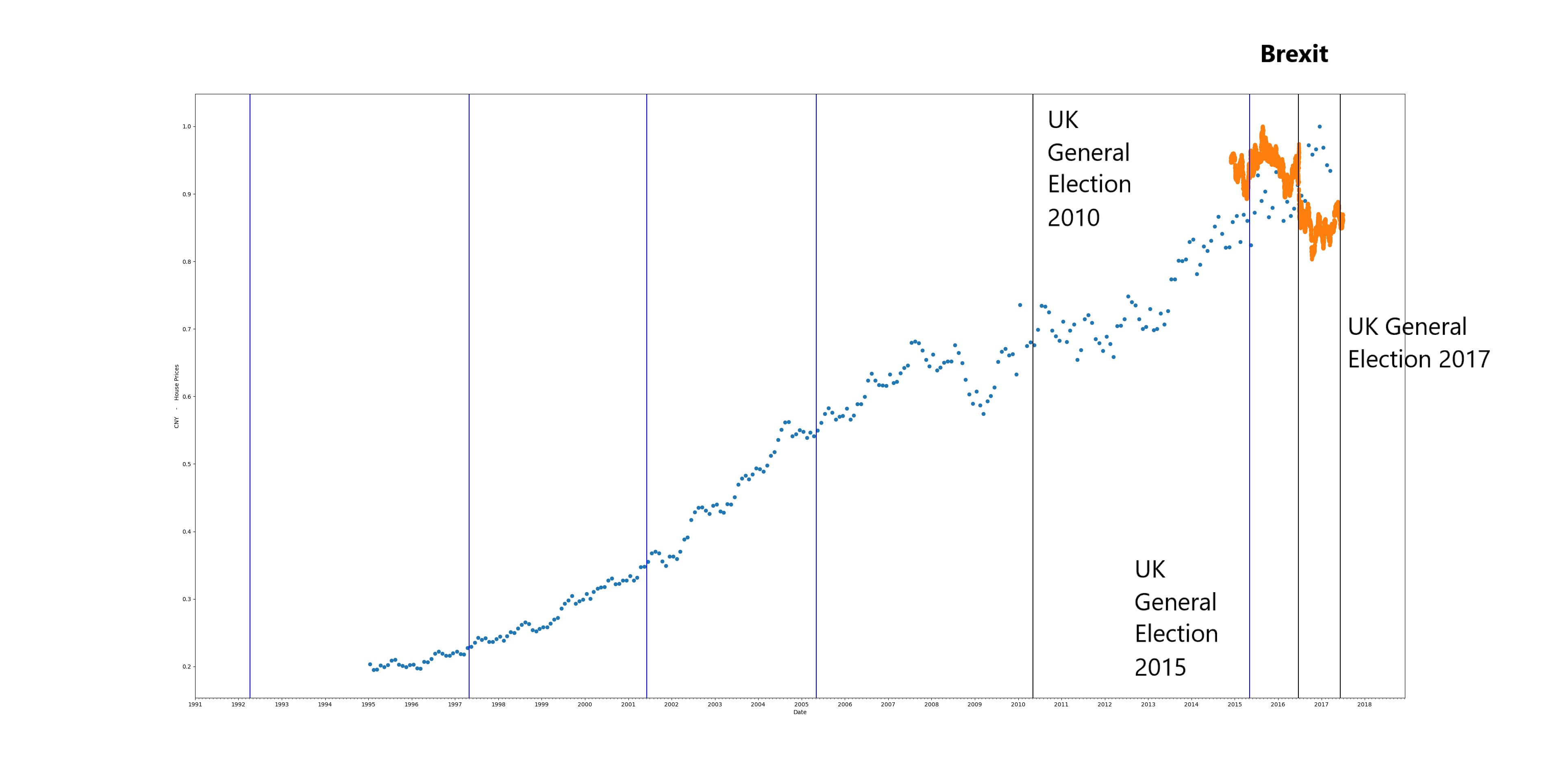
The data-set itself is not large as the frequency of collection is low, but it does cover lots of interesting world events such as Nigerian currency devaluation, Brexit, Trump Presidency, BJP Government in India, EU financial crisis, Demonetisation in India etc.

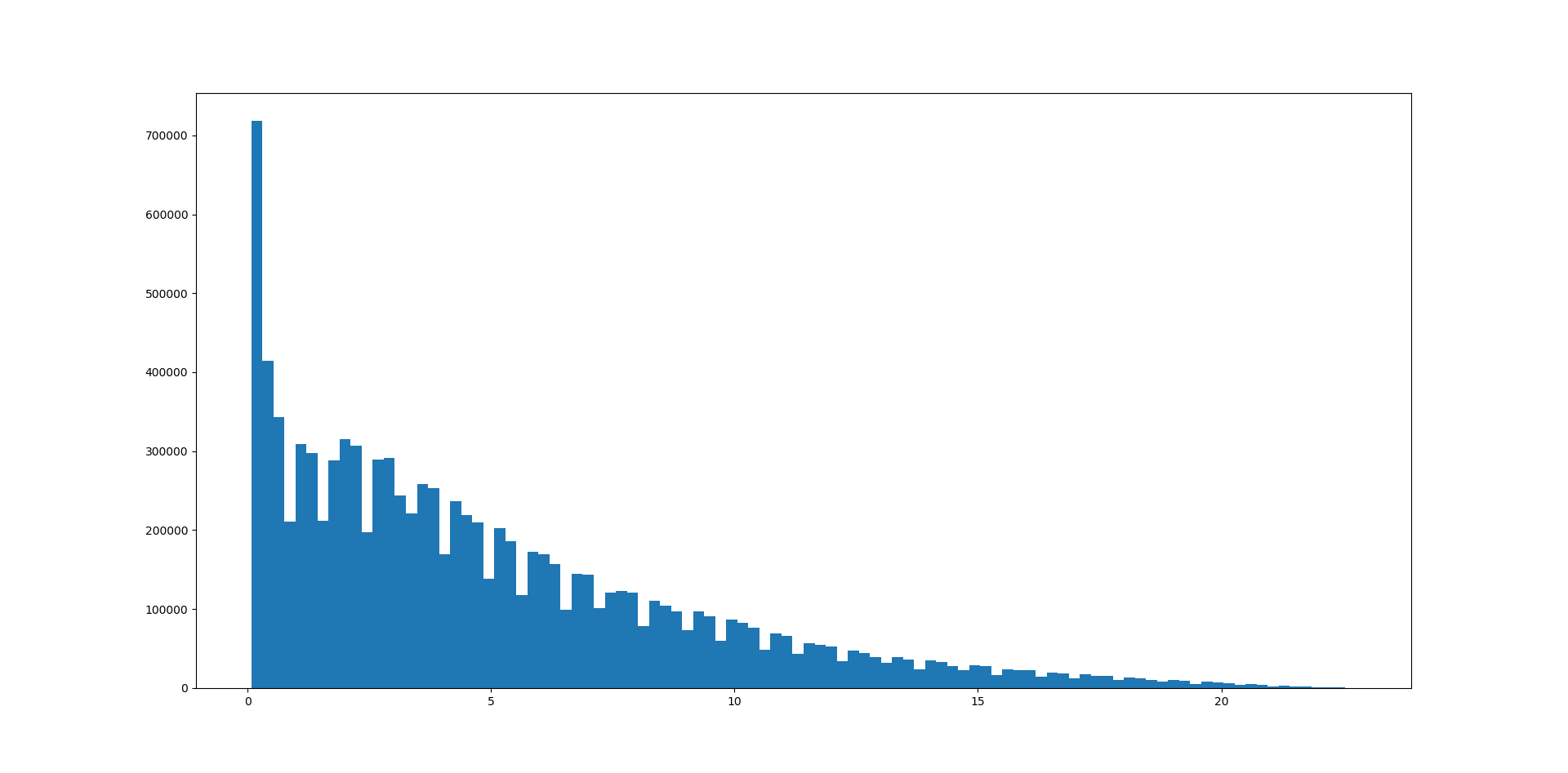
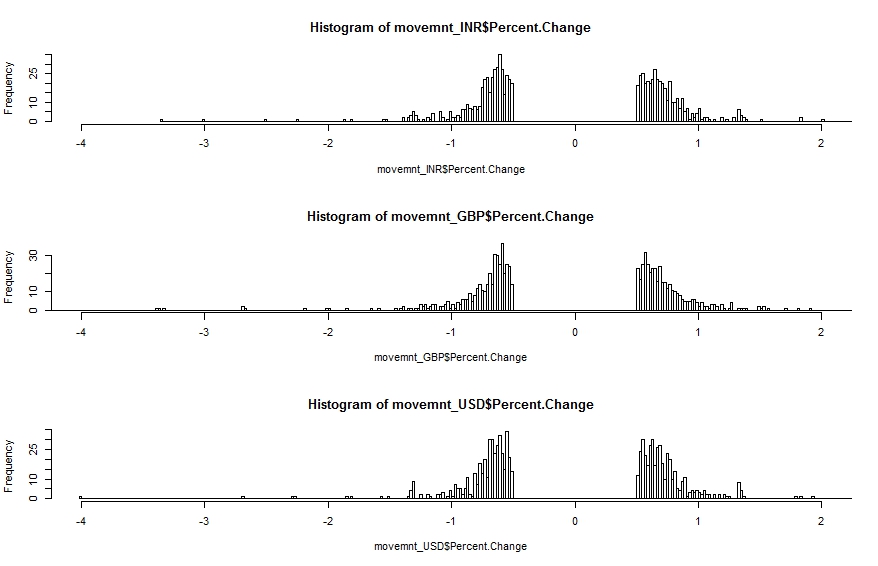
The image below shows the percentage change histogram for three common currencies (GBP – British Pound, USD – US Dollar and INR – Indian Rupee). The value for Percentage Change (X-Axis) is between -4% and 2%

Percentage Change histogram

What is immediately clear is the so called ‘fat-tail’ configuration. The data is highly skewed and shows clear features of ‘power law’ statistics. In other words the percentage change is related to frequency by an inverse power law. Larger changes (up or down) are rarer than small changes but not impossible (with respect to other distributions such as the Normal Distribution).

The discontinuity around Percentage Change = 0% is intentional. We do not want very small changes to be included as these would ‘drown out’ medium and large changes.

Mean Currency Movement

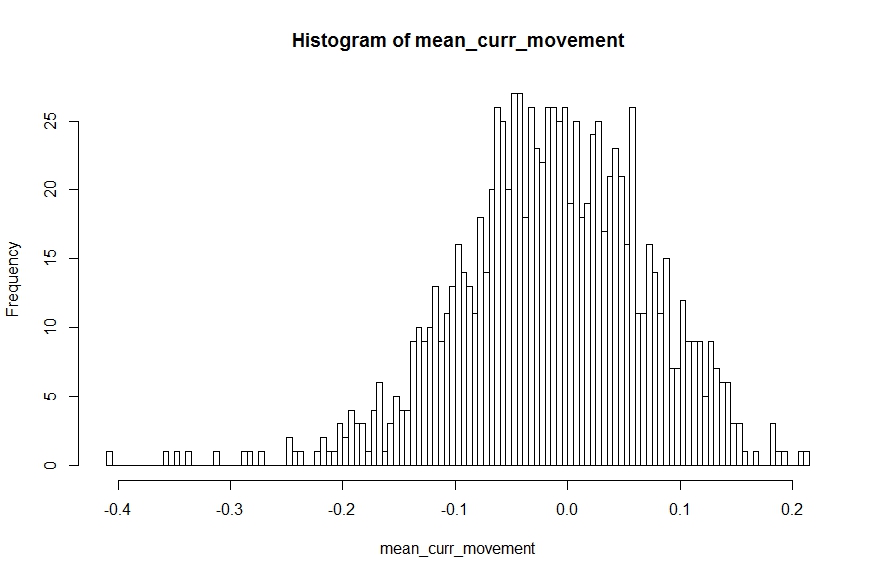
We can use the R code snippet below to draw 100 samples with replacement from  the movement data (combined across all currencies) and calculate the sample mean. The sample means can be plotted on a histogram which should give us the familiar Normal Distribution [this is the ‘Central Limit Theorem’ in action]. The sample mean that is most common is 0% – which is not an unexpected result given the presence of positive and negative  change percentages.

[codesyntax lang=”javascript”]

mean_curr_movement <- replicate(1000, { 
mean__curr_movement<-mean(
		sample(data$Percent.Change,100,replace = TRUE)
		)
	}
)

[/codesyntax]

Compare this with a Normal distribution where, as we move away from the mean, the probability of occurrence reduces super-exponentially making large changes almost impossible (also a super-exponential quantity reduces a lot faster than a square or a cube).

Equilibrium Theory (or so called Efficient Market Hypothesis) would have us believe that the market can be modelled using a Bell Curve (Normal Distribution) where things might deviate from the ‘mean’ but rarely by a large amount and in the end it always converges back to the ‘equilibrium’ condition. Unfortunately with the reality of power-law we cannot sleep so soundly because a different definition of rare is applicable there.

Incidentally earthquakes follow a similar power law with respect to magnitude. This means that while powerful quakes are less frequent than milder ones they are still far from non-existent.

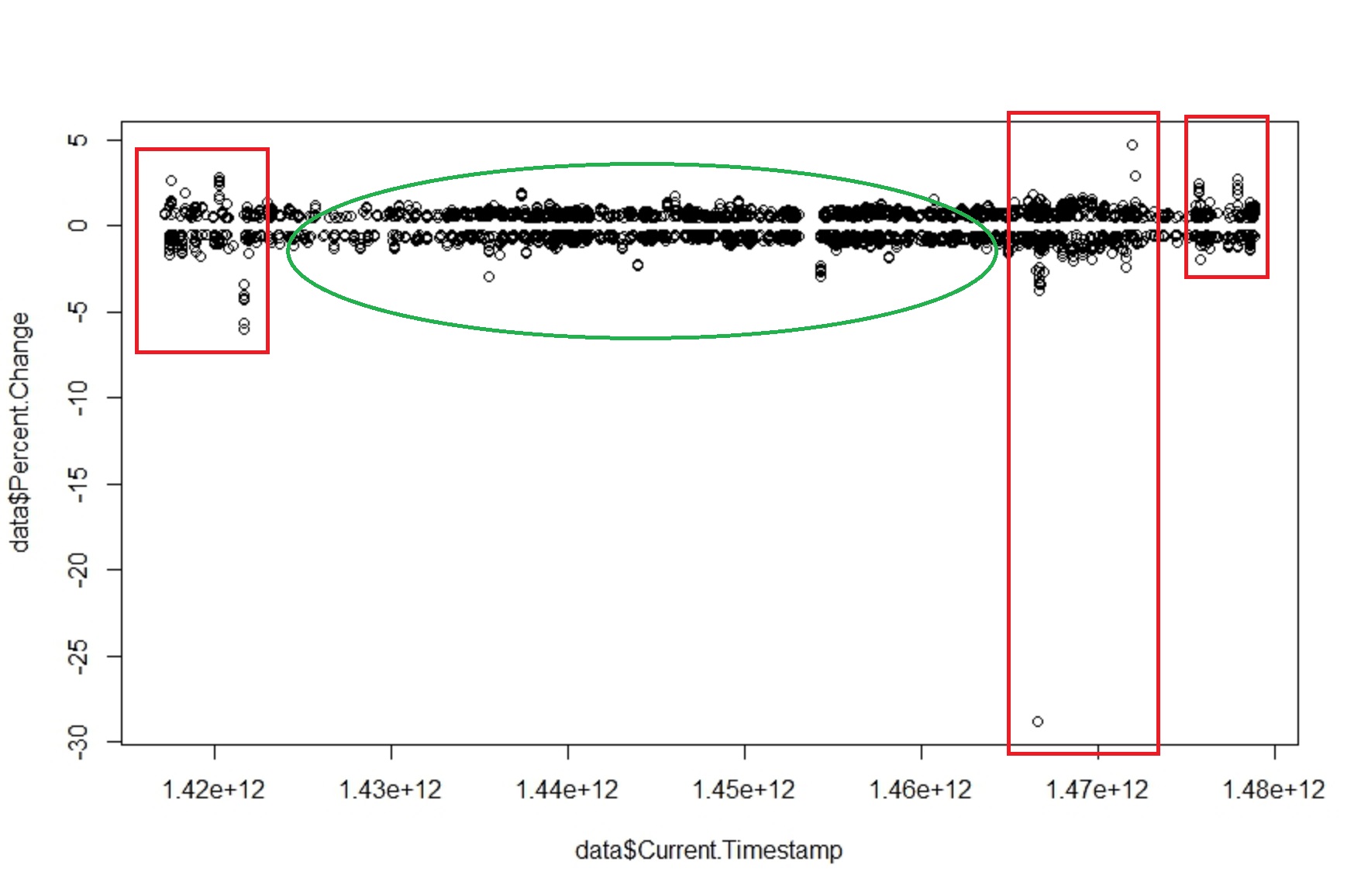
Another magical quality of such systems is that fluctuations and stability often come in clusters. The image below show the percentage movement over the full two years (approx.). We see a relative period of calm (green area) bracketed by periods of high volatility (red areas).

Movement Over Time
Movement Over Time

The above graph shows that there are no ‘equilibrium’ states within the price. The invisible hand has not magically appeared to calm things down and reduce any gaps between demand and supply to allow the price of the currency to re-adjust. Otherwise we would have found that larger the change larger the damping force to resist the change – there by making sudden large changes impossible.

For the curious:

All the raw currency data is collected in an Influx DB instance and then pulled out and processed using custom window functions I wrote in JAVA. The processed data is then dumped into a CSV (about 6000 rows) to be processed in R.

We will explore this data-set a bit more in future posts! This was to get you interested in the topic. There are large amounts of time series data sets available out there that you can start to analyse in the same way.

All the best!

Using Scala Spark and K-Means on Geo Data

The code (Scala+Maven) can be found here: https://github.com/amachwe/Scala-Machine-Learning

The idea is simple… I found an open Geo data (points) set provided by Microsoft (~24 million points). The data is NOT uniformly distributed across the world, in fact the data is highly skewed and there are large concentrations of location data around China (Beijing specifically) and the US (West-Coast).

The data can be found here: https://www.microsoft.com/en-us/download/details.aspx?id=52367

As per the description:

This GPS trajectory dataset was collected in (Microsoft Research Asia) Geolife project by 182 users in a period of over three years (from April 2007 to August 2012). Last published: August 9, 2012.


Loading the Data:

The data set is fairly simple, it contains longitude, latitude, altitude and time-date information. All the details are available with the data set (being Microsoft they have complicated matters by creating a very complex folder structure – but my GeoTrailsLoader Object makes easy work of traversing and loading the data into Mongo ready for you to play around with it.

The data is loaded as Points (WGS 84) and indexed using a 2dSphere. Once the data is in Mongo you can easily test the ‘geographic’ nature of it by running a geo-query:

[codesyntax lang=”javascript”]

{
  $near: {
     $geometry: {
        type: "Point" ,
        coordinates: [ <longitude> , <latitude> ]
     }
  }
}

[/codesyntax]


More Query types here: https://docs.mongodb.com/v3.2/applications/geospatial-indexes/

Clustering the Data:

The ScalaWorker does the K-Means training on the geo-data within Mongo using Spark and the Mongo-Spark connector.

We use a local Spark instance (standalone) but you can just as easily use a Spark cluster if you are lucky enough to have access to multiple machines. Just provide the IP Address and Port of your Spark master instead of ‘local[*]’ in the ‘setMaster’ call.

In the example the data is loaded from Mongo into RDDs and then we initiate K-Means clustering on it with a cluster count of 2000. We use Spark ML Lib for this. Only the longitude and latitude are used for clustering (so we have a simple 2D clustering problem).

The clustering operation takes between 2 to 3 hrs on a i7 (6th Gen), 16GB RAM, 7200RPM HDD.

One way of making this work on a ‘lighter’ machine is to limit the amount of data used for K-Means. If you run it with a small data set (say 1 million) then the operation on my machine just takes a 10-15 mins.

Feel free to play around with the code!

The Results:

The simple 2D cluster centres obtained as a result of the K-Means clustering are nothing but longitudes and latitudes. They represent ‘centre points’ of all the locations present in the data set.

We should expect the centres to be around high concentration of location data.

Furthermore a high concentration of location data implies a ‘popular’ location.

As these cluster centres are nothing but longitudes and latitudes let us plot them on the world map to see what are the popular centres of location data contained within the data set.

Geocluster data (cluster centres) with city names

The image above is a ‘zoomed’ plot of the cluster centres (blue dots). I chose an area with relatively fewer cluster centres to make sure we do not get influenced by the highly skewed data set.

I have provided a sample 2000 cluster centre file here: https://github.com/amachwe/Scala-Machine-Learning/blob/master/cluster_centre_example/clusters_2000.csv

The red text is the ‘popular area’ these cluster centres represent. So without knowing anything about the major cities of Eurasia we have managed to locate many of them (Paris, Madrid, Rome, Moscow etc.) just by clustering location data!

We could have obtained a lot of this ‘label’ information automatically by using a reverse geo-coding service (or geo-decoding service) where we pass the cluster centre and obtain meta-data about that location. For example for the cluster centre: 41.8963978, 12.4818856 (reversed for the  geo-decoding service – in the CSV file it is: 12.4818856, 41.8963978) is the following location in Rome:

Piazza Venezia

Wikipedia describes Piazza Venezia as the ‘central hub’ of Rome.

The geo-decoding service I used (with the sample cluster centre) is: http://noc.to/geodecode#41.8963978,12.4818856

Enjoy!


Artificial Neural Networks: Training for Deep Learning – IIb

  1. Artificial Neural Networks: An Introduction
  2. Artificial Neural Networks: Problems with Multiple Hidden Layers
  3. Artificial Neural Networks: Introduction to Deep Learning
  4. Artificial Neural Networks: Restricted Boltzmann Machines
  5. Artificial Neural Networks: Training for Deep Learning – I
  6. Artificial Neural Networks: Training for Deep Learning – IIa

This post, like the series provides a pathway into deep learning by introducing some of the concepts using some common reference points. This is not designed to be an exhaustive research review of deep learning techniques. I have also tried to keep the description neutral of any programming language, though the backing code is written in Java.

So far we have visited shallow neural networks and their building blocks (post 1), investigated their performance on difficult problems and explored their limitations (post 2). Then we jumped into the world of deep networks and described the concept behind them (post 3) and the RBM building block (post 4). Then we started discussing a possible local (greedy) training method for such deep networks (post 5). In the previous post we started talking about the global training and also about the two possible ‘modes’ of operation (discriminative and generative).

In the previous post the difference between the two modes was made clear. Now we can talk a bit more about how the global training works.

As you might have guessed the two operating modes need two different approaches to global training. The differences in flow for the two modes and the required outputs also means there will be structural differences when in the two modes as well.

The image below shows a standard discriminative network where flow of propagation is from input to the output layer. In such networks the standard back-propagation algorithm can be used to do the learning closer to the output layers. More about this in a bit.

Discriminative Arrangement

The image below shows a generative network where the flow is from the hidden layers to the visible layers. The target is to generate an input, label pair. This network needs to learn to associate the labels with inputs. The final hidden layer is usually lot larger as it needs to learn the joint probability of the label and input. One of the algorithms used for global training of such networks is called the ‘wake-sleep’ algorithm. We will briefly discuss this next.

Generative Arrangement

Wake-Sleep Algorithm:

The basic idea behind the wake-sleep algorithm is that we have two sets of weights between each layer – one to propagate in the Input => Hidden direction (so called discriminative weights) and the other to propagate in the reverse direction (Hidden => Input – so called generative weights). The propagation and training are always in opposite directions.

The central assumption behind wake-sleep is that hidden units are independent of each other – which holds true for Restricted Boltzmann Machines as there are no intra-layer connections between hidden units.

Then the algorithm proceeds in two phases:

  1. Wake Phase: Drive the system using input data from the training set and the discriminative weights (Input => Hidden). We learn (tune) the generative weights (Hidden => Input) – thus we are trying to learn how to recreate the inputs by tuning the generative weights
  2. Sleep Phase: Drive the system using a random data vector at the top most hidden layer and the generative weights (Hidden => Input). We learn (tune) the discriminative weights (Input => Hidden) – thus we are trying to learn how to recreate the hidden states by tuning the discriminative weights

As our primary target is to understand how deep learning networks can be used to classify data we are not going to get into details of wake-sleep.

There are some excellent papers for Wake-Sleep by Hinton et. al. that you can read to further your knowledge. I would suggest you start with this one and the references contained in it.

Back-propagation:

You might be wondering why we are talking about back-prop (BP) again when we listed all those ‘problems’ with it and ‘deep networks’. Won’t we be affected by issues such as ‘vanishing gradients’ and being trapped in sub-optimal local minima?

The trick here is that we do the pre-training before BP which ensures that we are tuning all the layers (in a local – greedy way) and giving BP a head start by not using randomly initialised weights. Once we start BP we don’t care if the layers closer to the input layer do not change their weights that much because we have already ‘pointed’ them in a sensible direction.

What we do care about is that the features closer to the output layer get associated with the right label and we know BP for those outer layers will work.

The issue of sub-optimal local minima is addressed by the pre-training and the stochastic nature of the networks. This means that there is no hard convergence early on and the network can ‘jump’ its way out of a sub-optimal local minima (with decreasing probability though as the training proceeds).

Classification Example – MNIST:

The easiest way to go about this is to use ‘shallow’ back propagation where we put a layer of logistic units on top of the existing deep network of hidden units (i.e. the Output Layer in the discriminative arrangement) and only this top layer is trained. The number of logistic units is equal to the number of classes we have in the classification task if using one-hot encoding to encode the classes.

An example is provided on my github, the test file is: rd.neuron.neuron.test.TestRBMMNISTRecipeClassifier

This may not give record breaking accuracy but it is a good way of testing discriminative deep networks. It also takes less time to train as we are splitting the training into two stages and always ever training one layer at a time:

  1. Greedy training of the hidden layers
  2. Back-prop training of the output layer

The other advantage this arrangement has is that it is easy to reason about. In stage 1 we train the feature extractors and in stage 2 we train the feature – class associations.

One example network for MNIST is:

Input Image > 784 > 484 > 484 > 484 > 10 > Output Class

This has 3 RBM based Hidden Layers with 484 neurons per layer and a 10 unit wide Logistic Output Layer (we can also use a SoftMax layer). The Hidden Layers are trained using CD10 and the Output Layer is trained using back propagation.

To evaluate we do peak matching – the index of the highest value at the output layer must match the one-hot encoded label index. So if the label vector is [0, 0, 0, 1, 0, 0, 0, 0, 0, 0] then the index value for the peak is 3 (we use index starting at 0). If in the output layer the 4th neuron has the highest activation value out of the 10 then we can say it detected the right digit.

Using such a method we can easily get an accuracy of upwards of 95%. While this is not a phenomenal result (the state of the art full network back-prop gives > 99% accuracy for MNIST), it does prove the concept of a discriminative deep network.

The trained model that results is: network.discrm.25.nw and can be found on my github here. The model is simply a list of network layers (LayerIf).

The model can be loaded using:

[codesyntax lang=”java5″]

List<LayerIf> network = StochasticNetwork.load(fileName);

[/codesyntax]

You can use the Propagate class to use it to ‘predict’ the label.


The PatternBuilder class can be used to measure the performance in two ways:

  1. Match Score: Matches the peak index of the one-hot encoded label vector from the test data with the generated label vector. It is a successful match (100%) is the peaks in the two vectors have the same indexes. This does not tell us much about the ‘quality’ of the assigned label because our ‘peak’ value could just be slightly bigger than other values (more of a speed breaker on the road than a peak!) as long as it is strictly the ‘largest’ value. For example this would be a successful match:
    1. Test Data Label: [0, 0, 1, 0] => Actual Label: [0.10, 0.09, 0.11, 0.10] as the peak indexes are the same ( = 2 for zero indexed vector)
    2. and this would be an unsuccessful one: Test Data Label: [0, 0, 1, 0] => Actual Label: [0.10, 0.09, 0.10, 0.11] as the peak indexes are not the same
  2. Score: Also includes the quality aspect by measuring how close the Test Data and Actual Label values are to each other. This measure of closeness is controlled by a threshold which can be set by the user and incorporates ALL the values in the vector. For example if the threshold is set to 0.1 then:
    1. Test Data Label: [0, 0, 1, 0] => Actual Label: [0.09, 0.09, 0.12, 0.11] the score will be 2 out of 4 (or 50%) as the last index is not within the threshold of 0.1 as | 0 – 0.11 | = 0.11 which is > 0.1 and same with | 1 – 0.12 | = 0.88 which is > 0.1 thus we score them both a 0. All other values are within the threshold so we score +1 for them. In this case the Match Score would have given a score of 100%.


Next Steps:

So far we have just taken a short stroll at the edge of the Deep Learning forest. We have not really looked at different types of deep learning configurations (such as convolution networks, recurrent networks and hybrid networks) nor have we looked at other computational models of the brain (such as integrate and fire models).

One more thing that we have not discussed so far is how can we incorporate the independent nature of neurons. If you think about it, the neurons in our brains are not arranged neatly in layers with a repeating pattern of inter-layer connections. Neither are they synchronized like in our ANN examples where all the neurons in a layer were guaranteed to process input and decide their output state at the SAME time. What if we were to add a time element to this? What would happen if certain neurons changed state even as we are examining the output? In other words what would happen if the network state also became a function of time (along with the inputs, weights and biases)?

In my future posts I will move to a proper framework (most probably DL4J – deep learning for java or TensorFlow) and show how different types of networks work. I can spend time and implement each type of network but with a host of high quality deep learning libraries available, I believe one should not try and ‘reinvent the wheel’.

If you have found these blog posts useful or have found any mistakes please do comment! My human neural network (i.e. the brain!) is always being trained!

Artificial Neural Networks: Training for Deep Learning – IIa

  1. Artificial Neural Networks: An Introduction
  2. Artificial Neural Networks: Problems with Multiple Hidden Layers
  3. Artificial Neural Networks: Introduction to Deep Learning
  4. Artificial Neural Networks: Restricted Boltzmann Machines
  5. Artificial Neural Networks: Training for Deep Learning – I

This is the second post on Training a Deep Learning network. The best way to read through is by starting from the first post (see above).

This post, like the series provides a pathway into deep learning by introducing some of the concepts using some common reference points. This is not designed to be an exhaustive research review of deep learning techniques. I have also tried to keep the description neutral of any programming language, though the backing code is written in Java.

So far we have visited shallow neural networks and their building blocks (post 1), investigated their performance on difficult problems and explored their limitations (post 2). Then we jumped into the world of deep networks and described the concept behind them (post 3) and the RBM building block (post 4). Finally in the previous post we started describing a possible training method for such deep networks (post 5) where we take a local view of the network..

In this post we describe the other side of the training process – where we take the global view of the network.

Network Usage:

Before we start that though, it is very important to take a step back and review what we are trying to do.

Our target is to train a neural network that can be used to classify complex data to a high degree of accuracy for tasks that are relatively easy for Humans to do.

Classification can be done in one of two ways: Discriminative or Generative. We have touched on these in the previous post as well. From a practical perspective the choice needs to be made on the basis of what we want our network to do. If we want to use it for a purely label generation task for an input then it is enough to have a discriminative model (which basically calculates p (label | input)). Here we are attempting to assign a label to a set of features extracted from the input. That is why discrimintative training requires labelled training data.

If you want to actually create new inputs based on certain features then you need to have a generative model (which calculates p (label , input)). In case of a generative model we do not ‘discriminate’ between inputs based on features using labels (i.e. try and find the label/class boundary). Instead we treat them as a pair of variables and we try and model their joint probability. This allows us to create new pairs of inputs and features based on the learned joint probabilities.

For example: if we are using MNIST just to recognise and label handwritten digits then we can work with a discriminative model. To get the discriminative output we need some sort of a ‘capping’ output layer (e.g. softmax) which gives us one clear label (for this example there is one to one correspondence between input and label). We cannot directly work with a probability distribution of features (similar to what we saw in the last post) as an output. The process here is inherently one way, present an input and get the label as an output (thus the propagation is away from the input layer).

But what if we wanted to generate new ‘handwritten’ digits (think of an app that translates a typed letter into a handwritten one which matches your handwriting!). If we learn p(input , label)  we can easily reverse it as we could start with a label and get an ‘input’ (hand written digit). The direction of generative propagation is opposite to the discriminative one (the propagation is towards the input layer).

Does this mean that we should always target a generative model as it gives us more flexibility? The short answer is No, because generative models usually have poor performance as compared to their discriminative cousins. The long answer is ‘depends on the use-case’.

Symbol Grounding Problem:

Another reason why we show special interest in generative models is because the standard ‘data’ labeling process is very artificial. In real life no such clear labels exist for most of what we experience or even worse: there may be too many labels. For example if we show an image of a cartoon car to say 10 different people and ask them to assign one label to it we are more than likely to get multiple labels such as: cartoon car, car, cartoon… and that is just in the English language! If we had people in that group whose first language was not English they might use other labels which may or may not have a direct correlation with the corresponding English language labels. In fact all these labels are just different symbols that assign meaning to the data. This is the ‘symbol grounding problem’ in AI.

Our brain definitely does not work with strict labels. In fact it matches the joint distribution behavior better – the cartoon in the above example can be analysed at different levels such as: a cartoon, a cartoon car, a cartoon sports car, a cartoon sports car driving very fast…. so as we analyse the same input we have a growing set of labels associated with it.

It would be very messy if we had to learn a different discriminative model for each of the associated labels that operates on the same input data. Also it would be impossible if we were asked to draw a cartoon sports car without some kind of generative model that takes into account all its possible ‘characteristics’ and returns a learned representation (shape, components, size etc.).

If we also take a look at human cognition (which is what we are trying to mimic) simple classification is just one half of the process. Without the generative ability we would not be able to react to the result of the classification. Our brain may classify the weather as ‘likely to be wet’ as the image of the sky travels from the eye to the brain, but it is the reverse propagation from the brain to our muscles that ensures we pick up the umbrella.For our example: As our brain classifies and breaks down the task of drawing a cartoon sports car it needs to switch into generative mode to actually draw it out.

Here we also have a good reason why generative models should NOT be very accurate or rigid. If we had rigidly learnt generative models that did not change over time (or were very difficult to re-train), there would be no concept of ‘training’, ‘skill’ or ‘creativity’. Given a set of features we all would produce the same (or similar) cartoon sports car! There would be very little difference between the cartoon sports car drawn by a professional cartoonist and one drawn by a child as after a certain point in time a rigid generative model would not respond to additional training.

Note: the above description is an over-simplification of some very complex cognitive processes and is intended only as an aid in understanding the concepts being presented in this post.

MNIST Example:

We can generate digits as we learn to classify them using the greedy learning algorithm described in the previous post. This can be done by simply reversing the direction of propagation from Input => Hidden to Hidden => Input and doing some sampling using clamped hidden vectors.

The process is very simple:

  1. Randomly generate a binary vector equal in length to the top most hidden layer
  2. Clamp this vector to the hidden layer and then propagate down to the visible and back up to the hidden ‘n’ number of times (thus feeding back the result at both hidden and visible layers)
  3. For the last iteration do not propagate back to the hidden unit instead convert the vector on the visible layer into an image

For the test we have the standard MNIST input layer (28 x 28 = 784 inputs). Following that we have 3 hidden layers of 100 neurons each. Each hidden layer is trained using CD-10 on a mini batch of the MNIST dataset. I will be uploading the associated test files on my github. The file is: rd.neuron.neuron.test.TestRBMMNISTRecipe

When we set n = 0 we get very fuzzy generated digits:

Generated Digits
Generated Digits

I can make out a few rough 2s and a some half formed digits and a lot of ‘0’s!

Let us set n = 5 (therefore we do down – up for 5 times and then the 6th pass is just down):

Generated Numbers 6
Generated Numbers 6

As you can see the generated digits are a lot cleaner and we also have some relatively complicated digits (‘3’ and ‘6’) and a rough ‘8’ (3rd row from bottom, 4th column from right).

This proves that our network has learnt the features associated with handwritten digits which it uses to generate new data.

As a final example, let us set n = 50 and generate a larger set of digits:

Generated Digits 50
Generated Digits 50

In the next post we delve deeper into the ‘feature’ – ‘label’ training process and show how we can get our deep network to classify hand-written digits.

Artificial Neural Networks: Training for Deep Learning – I

This is the fifth post of the series on Artificial Neural Networks and the 100th post on my blog!

To get the maximum benefit out of this post I would recommend you read the series in order, especially the post on Restricted Boltzmann Machines:

  1. Artificial Neural Networks: An Introduction
  2. Artificial Neural Networks: Problems with Multiple Hidden Layers
  3. Artificial Neural Networks: Introduction to Deep Learning
  4. Artificial Neural Networks: Restricted Boltzmann Machines

Training:

So far we have looked at some of the building blocks of a deep learning system such as activation functions, stochastic activation units (RBMs) and one-hot encoding to represent inputs and outputs.

Now we put it all together and talk about how we can train such deep networks while avoiding problems related to vanishing gradients. If you have followed the series you might have picked up the hint about using a combination of layer-by-layer training along with the traditional ‘back-prop’ based whole network training.

If not, well that is exactly what happens – usually some sort of Greedy Unsupervised Learning algorithm is applied independently (called ‘pre-training’) on each of the hidden layers, then network wide ‘fine-tuning’ is carried out using Supervised Learning methods (e.g. back-propagation).

The easiest way to understand this is to think about when you are faced with an untidy room one possible approach is to sort out things in a localised way – pick up the books, fold the clothes, tidy the bed one at a time.. this is a greedy approach – you are optimizing locally without worrying about the whole room.

Once the localised items have been sorted, you can take a look at the full room and do bits and pieces of tidying up (e.g. put stacked books on the book shelf, folded clothes in the cupboard).

Contrastive Divergence (CD) is one such method of Localised (Greedy) unsupervised learning (pre-training). We will discuss it next. It might be useful to review the post on Restricted Boltzmann Machines (see list at the top of this post) because I will use some of those concepts to illustrate the logic behind CD.

Pre-training and Contrastive Divergence (CD):

Also known as CD or CD-k where k stands for number of iterations of CD carried out (usual value is either 1 or 10 – so most often you will see CD-1 or CD-10).

Conceptually the method is simple to grasp.

  1. We make continuous and overlapping pairs out of the input and N hidden layers (the Output Layer is excluded).
  2. Select next pair of Layers (starting from the pairing of the Input Layer and Hidden Layer 1)
  3. Pretend that the layer nearest to the input is the ‘visible’ layer and the other layer in the pair is the ‘hidden’ layer
  4. Take batch of training instance and propagate them through any layers to the ‘visible’ layer of the selected pair – thereby forming a local ‘training’ batch for that pair
  5. Update Weights using CD-k between that pair using the localised training batch
  6. Go to Step 2

Confused as to the utility of pretending a hidden layer is a ‘visible’ layer? Don’t worry, it just gets crazier! Before we get into the details of Step 5, I want to make sure that the process around it is well understood with a ‘walk through’.

The first pair will be Input Layer and Hidden Layer 1. Input Layer (IL) is the ‘visible’ layer and the Hidden Layer 1 (HL1) is the ‘hidden’ layer.

As the Input Layer is the first layer of the network we do not need to propagate any values through. So simply present one training instance at a time and use CD (Step 5) to train the weights between IL and HL1 and the biases.

Then we select the next pair: Hidden Layer 1 and Hidden Layer 2. Here we pretend HL1 is the ‘visible’ layer and HL2 is the ‘hidden’ layer. But the training batch needs to be localised to the layer as the ‘raw’ inputs will never be presented directly to HL1 when we use the network for prediction, thus we present the training instances one at a time to the input layer, and using the weights and biases learnt in the previous iteration – propagate them to HL1 thereby creating a ‘localised’ training batch for the pair of HL1 and HL2. We again use CD (Step 5) to train.

Then we select the next pair: Hidden Layer 2 and Hidden Layer 3, create a localised training batch, use CD, move to the next pair and so on till we complete the training of all the hidden layers.

The Output Layer is excluded, so the final pairing will be of Hidden Layer N-1 and Hidden Layer N. As you might have guessed we use the global training step to train the Output Layer. It is also possible to restrict the global supervised training to just the Output Layer if that gives acceptable results.

The diagram below describes the basic procedure of pre-training.

Contrastive Divergence Pre-Training

Contrastive Divergence:

This is where things get VERY VERY interesting. If you remember from the previous post – we associate output distributions with various inputs (given the stochastic nature of RBM).

Ideally what we want is as we train a hidden layer, the distribution for the output of that layer becomes more defined and less spread out. As a limiting case we would like the output distribution to have a just one or two high probability states so that we can confidently select them as the output states associated with that input.

This is just what one would expect if we had non-stochastic output where, all other parameters remaining the same, each input is only ever associated with a single output state.

I show an example below, the two graphs are output distributions for the same input. As you might have guessed the top graph is before training and the bottom graph is after the training. These are log plots so even a small difference in the score (Y-axis) is quite significant.

Training: Start and end Distributions

Thus the central principle behind CD is that we ‘sample’ different combinations of inputs and outputs for a given set of training inputs. Using binary outputs makes sampling lot easier because we have countable, category outputs (e.g. 6 bit stochastic output = 64 possible categories). If we had a real number stochastic output then we would have potentially infinite output combinations. That said – there are examples where real number stochastic outputs are used.

At this stage because we are training a hidden layer (which we will never directly observe when the network is being used for prediction) we cannot use the corresponding output value from the training data as a guide.

The only rough guide to training we have is the fact that we need to modify the model parameters (weights and biases) in such a way that overall the high-probability associations are promoted (for the training inputs) and any ‘noise’ is removed in the final output distribution of that layer.

The approach we are taking is a ‘generative’ approach where we are seeking information about p(x, y) as compared to a ‘discriminative’ approach which seeks information about p(x | y) if x is the class label and y is the input. If you are curious about how the to approaches relate to each other and how p(x, y) can be obtained from the conditional distributions read about the

Chain Rule in Probability: p(x, y)  =  p(x | y) * p(y)  =  p(y | x) * p(x) 

and the resulting

Bayes Rule: p(x | y)  =  p(y | x) * p(x) / p(y)


Sampling and Tuning the Model:

The image below describes how we collect the samples.

If we start with a normal multi-layer neural network (top left) – we find that usually the shape (in terms of number of neurons in a layer) resembles a pyramid – with the Input Layer having the maximum number of neurons and the Output Layer the minimum. The Hidden Layer is usually wider than the Output Layer but narrower than the Input Layer.

If we were to replace the Output Layer with the Input Layer (bottom left) we get a symmetric network.

To get to the layer pairing required for CD (as described previously) we just need to ensure that there is only ever one set of Weights between the paired layers (though we will have two different sets of Biases – one for Hidden Layer one for Visible Layer).

In the diagram below (on the right side) we see what the pairing would look like. In our example below the Input Layer is the visible layer and the Hidden Layer 1 is the hidden layer.


Contrastive Divergence Sampling

For the Sampling:

The sampling process is called ‘Gibbs Sampling’ and it involves step by step sampling from the forward and backward propagation results. See this post on Gibbs sampling for the theory behind it.

Lets keep x as the input to the visible layer and y as the output at the hidden layer. When we do the reverse propagation, following the method of Gibbs sampling, we give the output at the hidden layer back into the hidden layer – which is now the ‘visible’ layer as the input. The resulting output we get at the input layer – which is now the ‘hidden’ layer is the next value of x.

In detail:

Forward Propagation: When we propagate from visible to hidden we use the normal Weights matrix and the Bias for the Hidden Layer. I call this the forward sample – p(y|x) 

Reverse Propagation: When we propagate from hidden to visible we take the transpose of the existing Weights matrix and the Bias for the Visible Layer. I call this the reverse sample – p(x|y)

We use Bernoulli Trials at both ends so our sample is always a bit string. But we also record the sigmoid output as the ‘activation’ probability for the training.

The sampling process is starts by clamping one input from our training batch, call it T[i], at the first pair of layers (Input Layer – Hidden Layer 1 – HL1). You can setup the biases for the two layers and the weights between them using a normal distribution with mean of 0 or as constant value of all zeroes.

  1. We generate the initial y[0] value at HL1 using T[i] as the input by performing forward propagation. Call this a forward sample.
  2. Then we take y[0], clamp it at HL1 as an input, do reverse propagation and get a reverse sample x[1].
  3. Then we take x[1], clamp it on the Input Layer do forward propagation and get the next forward sample y[1].
  4. Then we take y[1], clamp it at HL1 as an input, do reverse propagation and get the next reverse sample x[2].
  5. This keeps going till we get reach the kth pair of x and y (namely x[k], y[k]). Then we use the data from the initial and kth pairs to calculate the weight and bias updates.

We then use the next input from the training batch (T[i+1]) and perform the above steps and do a weight/bias update in the end.

Weights Update:

To update the weights between the jth neuron in the visible layer and the ith neuron in the hidden layer, we use the following equation:

w[i][j] = w[i][j] + { p(H[i] = 1 | v[0]) x v[j][0] }{ p(H[i] = 1 | v[k]) x v[j][k] }

The terms in bold can be simplified as:

w[i][j] = w[i][j] + { } – { }

where:

A = p(H[i] = 1 | v[0]): The probability of the ith hidden layer unit to be turned on given the ‘training’ input at the visible layer at the first step of the Gibbs Sampling process.

B = v[j][0]: The sample value at the jth visible layer unit for the ‘training’ input presented

C = p(H[i] = 1 | v[k]): The probability of the ith hidden layer unit to be turned on given the kth sample of the input vector (at the kth step of the Gibbs Sampling process).

D = v[j][k]: The sample value at the jth visible layer unit for the input sampled at the kth step

A and C are basically the sigmoid outputs for the hidden layer at the start and end of the sampling process. The reason we take the sigmoid and not the Bernoulli trial result is because the sigmoid result is a probability threshold whereas the trial result is an outcome based on the probability threshold.

and are the initial (training) input and the final input sample obtained at the kth step of the Gibbs Sampling process.

Bias Update:

For the jth visible unit the new bias is simply given by:

b[j] = b[j] + (v[j][0]v[j][k]) – this is same as items B and D in the weights update.

For the ith hidden unit the new bias is given by:

c[i] = c[i] + (p(H[i] = 1 | v[0]) p(H[i] = 1 | v[k])) – this is the same as the items A and C in the weights update.

The Java code can be found here (see the Contrastive Divergence method).

The only way the weights can affect the output distribution is by modifying the probability threshold to ensure the removal of ‘noise’ from the resulting distribution. That is the only way to ‘tame’ the output distribution and link it with the input.

Once we have fully trained the current pair of layers, we move to the next pair and perform the above steps (as described before).

The idea here is to use a mini-batch of training data for CD and limiting k to a value not larger than 10 so that pairwise training of layers can proceed quickly.

This is greedy training because we are not worried about the overall effect on the network of our weight changes.

As we train the pair of layers starting from Input-HL1 pair, we are in essence learning to recognise individual features in the input data and their combinations that can help us classify one input from the other. Practically speaking at this level we are not worried about the output label, because if we can effectively distinguish between inputs using lower number of dimensions then those outputs are effectively a ‘class label’.

As a simple example of a neural network with 12 bit input layer (12 units – 4096 possible inputs), 6 bit hidden layer (6 units – 64 possible output states) and 2 bit output layer (2 units – 4 possible output states).

If we are able to, through CD-k, associate each type of the 4096 bit inputs with one of the 64 hidden unit states then effectively we have created a system that can recognise features in the input and encode for those features using a reduced dimension representation. From a 12 bit representation we are then encoding the feature space using a 6 bit representation.

Taking this reasoning to the next level, when we train the HL-1 and HL-2 pair we are learning about patterns of feature combinations one level up from the raw input. Similarly HL-2 and HL-3 pairs will learn about patterns of feature combinations two-levels up from the raw input and so on…

Why the pairing?

As a final point if you are thinking why the pairing up of layers, why not have a 3, 4, 5 layer group. The reason is if we have just two layers as a pair and we make sure the visible layer input is not the raw input but the in fact the propagated value (i.e. a localised input for that layer), then we are making sure that the output of each hidden layer unit is dependent only on the layer below. This makes the conditional probability lot simpler, if we had multiple layers we would end up with complicated conditional probability dependencies (e.g. value of Layer 4 given value of Layer 3 given value of Layer 2). In other words it makes correlation between features be only dependent on the layer below, this makes the feature correlation lot easier.

Fine Tuning:

We now need to ensure that the network is fine tuned from the Output side as we have already prioritized the Input during the pre-training.

Hint: Carrying on with the example, when we do the fine tuning training (described in the next post) our main task will be to associate the 64 hidden unit output states with one of the 4 actual output states. That is another reason why we can attempt to use normal back-prop to do the fine tuning – we do not care if the gradient vanishes as we move away from the output layer. Our main target is to train the upper layers (especially the Output Layer) to associate higher level features with labelled classes. With the CD-k we have already associated lower level inputs with a hierarchy of higher level features! With that said we can find that back-prop with its vanishing gradient problem does not give the desired results. Perhaps because our network is deep enough for the vanishing gradient problem to have a significant impact especially on training the layers closer to the Input layer. We then might have to use a more sophisticated algorithm such as the ‘up-down’ algorithm.

The diagram below gives a teaser of how the back-prop process works.

Training deep learning back prop

More about Fine-Tuning in the next post!

Gibbs Sampling

Gibbs Sampling is a Markov Chain Monte Carlo (MCMC) method. That sounds scary but it is really not. We are going to be using an example of neural networks to understand what Gibbs Sampling is.

Sampling is just the process of extracting information about a data set (with possibly a very large number of values) using a small sub-set of it. If the sampling is done correctly we can draw a lot of interesting conclusions about the data set given the sample.

Sampling techniques are very common: e.g. by talking to a very small sub-set of the voting population after they have given their vote (i.e. an ‘exit poll’) we are able to arrive at an estimate for the voting pattern of the entire country and an approximate idea about the final result.

Many times it is not possible to take representative samples directly or through some of the other established statistical methods (like accept-reject). There are several reasons why this could be – say we cannot directly simulate the process we want to sample from or there are almost infinitely large number of possible values.

When that is the case we can use Gibbs Sampling (if certain other conditions hold).

Monte Carlo part alludes to the fact that we use ‘repeated random sampling’ from a process which is essentially a black box due to large number of interactions going on (e.g. a neural network with large number of inputs where the outputs are tied to each other via number of hidden layers with non-linear outputs).

Given a simple 2 layer network with a visible and a hidden layer – we are roughly talking about throwing in random inputs and observing what outputs we get.

The Markov Chain part alludes to the fact that we use step by step sampling with a step size of 1 – in other words a sample obtained in step T is only dependent on the sample obtained in step T-1.

When put together the process is bit like walking blindfolded around an open space, trying to figure out its shape, with the restriction that you can only move one foot at a time where as the other foot remains grounded. The more hilly sections will allow you to take only very small steps – thus you will sample more from such regions (i.e. the high probability regions), where as in the flatter areas (low probability areas) you will be able to take much bigger steps and thus generate lesser number of samples.

To mathematically define this:

Consider a bi-variate distribution p(x, y)

We are not sure how this is generated or whether p(x, y) follows any known distribution or not.

For a neural network if we say x = input at Visible Layer and y = output at Hidden Layer, then for the MNIST example reducing the input from floating point to binary (pixel on or off) gives us 2^784 possible input values. That is a staggeringly massive number of input combinations!

For all intents and purposes – the only thing we can do is repeatedly sample two conditional distributions for a finite number of values of x and y:

p(x|y) – Probability of x given y

and

p(y|x) – Probability of y given x

The above is equivalent to taking an input value and recording the output (p(y|x)) then taking an output value and reversing the direction of propagation (by transposing the weights between visible and hidden and using the visible layer bias) and recording the ‘output’ at the visible layer (p(x|y)).

Further putting conditions imposed by Gibbs Sampling and using [t] for the current step:

Starting with initial input sample x[0] (from the training data in a neural network) – we get y[0] by propagating in the forward direction and recording the output. This is equivalent to sampling from p(y|x).

This gives us the initial values for x and y = x[0], y[0].

Then we do the ‘one foot at a time’ to start Gibbs Sampling, by keeping y = y[0] (as obtained from the previous step) and propagating in the backward direction to get the next value of x = x[1]. This is equivalent to sampling from p(x|y).

The chain therefore becomes:

x[1] ~ p(x | y[0])

y[1] ~ p(y | x[1])

………………….

x[t] ~ p(x | y[t-1])

y[t] ~ p(y | x[t])

After discarding first few pairs of x,y to allow the reduction of dependence on the initial chosen value of x = x[0] we can assume that:

x[t], y[t] ~ p(x, y)

and that the sampler is now approximately sampling from the target distribution.

Once we have a sample we can effectively investigate the nature of p(x, y).

Nature of x and y:

To be very clear, and may appear to be scalar values but practically speaking there is no restriction. So they can be vectors or any other entity as long as we can use them as inputs to a process and record the output. For neural networks usually is the input vector and is the output vector. Therefore in the generic update equations:

x[t] ~ p(x | y[t-1])

y[t] ~ p(y | x[t])

x[t] is the sample of the vector x at step ‘t’ and y[t] is the sample of the vector y at step ‘t’.

y[t] ~ p(y | x[t]) is the output of the network when we supply the vector for x that we obtained in step ‘t’ as the input

Worked Example:

Assume we have a black box network with 4 bit input (giving 16 possible inputs) and 2 bit output (giving 4 possible inputs). We can designate inputs as x and outputs as y.

We cannot examine the internal structure of the network, we have no clue as to how many layers it has or what type of units make up the layers. The only thing we can do is propagate values from input to output (giving p(y | x)) and reverse propagate from output to input (giving p(x | y)). Also we assume that the network does not change as we are sampling from it.

We follow the input clamping procedure described previously and step by step take and samples.

Because we are looking at 16 possible inputs and 4 possible outputs we can map the sampling process (at least the first 10 steps or so) on a contour plot where we have exhaustively mapped the joint probability between x and y:

Gibbs Path Example
Gibbs Path Example

In the contour map darker regions represent areas of high probability. The dots represent sampling path with input clamped to [1, 0,1, 1]. Yellow circles show 5 initial samples as the process ‘warms up’. Subsequent samples are concentrated around the darker areas, which means we are approximately sampling from the joint distribution.

We are not always this lucky as most real world problems do not have short binary representations. We only have the black box with inputs and outputs and some training data as a very very rough guide to how the inputs are distributed, that is why we use them as the x(0) value.


Artificial Neural Networks: Restricted Boltzmann Machines

The next building block for Deep Learning Networks is the Restricted Boltzmann Machine (RBM). We are going to use all that we have learnt so far in the ‘Building Blocks’ section (see here).

Bernoulli Trials

There is perhaps one small topic I should cover before we delve into the world of RBMs. This is the concept of a Bernoulli Trial (we have already hinted at it in the previous post). A Bernoulli Trial is an experiment (in the loosest sense) with the following properties:

  • There are always only 2 mutually exclusive outcomes – it is a binary result
    • Coin toss – can only result in a heads OR a tails for a particular toss, there is no third option
    • A team playing a game with a guaranteed result, can either win OR lose the game
  • The probability of both the events has a finite value (we may not know the values) which sum to 1 (because one of the two possible results must be observed after we perform the experiment)

The formulation of a Bernoulli Trial is:

P( s = 0 | 1 ) = (p^s)*(1-p)^(1- s)

If we are just interested in one of the events (say s = 1) then:

P ( s = 1 ) = p; where  0 < p < 1,

If p = 0 or 1 then it is not a probabilistic scenario – instead it becomes a deterministic scenario because we can accurately predict the result all the time (e.g.tossing a ‘fake’ Coin with two heads or two tails).

Restricted Boltzmann Machines:

A Boltzmann Machine has a set of fully connected stochastic unitsA Restricted Boltzmann Machine does not have fully connected units (there are no connections between units in the same layer) but we retain the stochastic units.

RBM and Boltzmann Machine

When we remove the connections between units in the same layer we arrive at a now familiar structure for a feed-forward neural network. The figure above shows a simple Boltzmann Machine with 4 visible units and a RBM with 2 visible (orange) and 2 hidden units (blue).

The name Boltzmann comes from the fact that these networks learn by minimizing the Boltzmann energy of the system. In statistical physics stable systems are those that have minimum energy levels associated with the state of the different components of the system under the required constraints.

The one interesting thing that separates RBMs from normal neural networks is the stochastic nature of the units.

Taking a simple case (as done by Hinton et. al. 2006) of binary outputs (i.e. a unit is either on or off), a stochastic unit can be defined as:

“neuron-like units that make stochastic decisions about whether to be on or off”

(http://www.scholarpedia.org/article/Boltzmann_machine)

Normally (e.g. in Multi Layer Perceptrons) the activation level or score is calculated by:

  1. summing over the incoming scores and weights only from the previous layer (the restricted part)
  2. adding a bias term associated with the unit for which we are calculating the activation score
  3. pushing through an activation function (e.g. sigmoid or ReLU) to get an output value

The whole system is deterministic. If you know the weights, biases and inputs you can, with 100% accuracy calculate the activation scores at each layer.

To make the system stochastic with binary output (on or off), we use the sigmoid function in step 3 (as it gives values between 0 and 1) and add a fourth step to the above:

4. use the sigmoid value as the probability score for a Bernoulli Trial to decide if the            unit is on or off

As a worked example:

If sigmoid (sum(x[i]w[i][j]) + bias[j]) for jth unit is = sig[j]

Then the jth unit is on if upon choosing s uniformly distributed random number between 0 and 1 we find that its value is less than sig[j]. Otherwise it is off.

So if sig[j] = 0.56 and the random number we get is 0.42 then the unit is on with an output of 1; if the random number we get is 0.63 then the unit is off with an output value of 0.

Thus higher the sigmoid output less is the chance for the unit to be turned off, however high the value there will always be a small but finite chance that the unit is off.

Similarly lower the sigmoid output higher is the chance for the unit to be turned off, however low the value there will always be a small but finite chance that the unit is on.

This leads to something very interesting:

We end up with a ‘distribution’ of outputs for every input given the weights and biases, as compared to a deterministic approach where the output is constant for a given input as long as we do not change the parameters of the model (i.e. weights and biases).

Before we move on to an example, you might be wondering why we add this extra level of complexity? How can we ever unit-test our model? Well we can easily unit-test by setting a constant seed for our pseudo-random number generator. As to why we add this extra level of complexity, the answer is simple: It allows us to give a probabilistic result which in turn allows us to deal with errors in input patterns as well as with patterns that contradict the norm (by making the network less likely to be trapped in a local minima and to not have a difficult to change association between input and output).

This is also how our brain works. If you are familiar with hash-maps or computer memory, we need the full key / address to retrieve a piece of information (i.e. it is deterministic). Even if a single character is missing or incorrect we will not be able to retrieve the required information without a lengthy search through all the keys to find the best match (which may use some sort of a probabilistic method to measure the ‘match’).

But our brain is able to retrieve the full set of information based on small samples of itself (e.g. hearing half a dialog from a movie is enough for us to recall the full scene). This is called auto-associative memory.

Worked Example:

Assume we have a RBM with 12 input units and 6 hidden units. The units are binary stochastic type.

On the input pass the 12 inputs are passed to all the 6 hidden units (through the weighted links), bias for each hidden unit is added on, sigmoid is used followed by a Bernoulli Trial to determine if the hidden unit is on or off.

Let the input also be a binary pattern. For 12 inputs there can be at most 12 bit = 4096 possible patterns. As the output at the hidden layer is also a binary pattern we know there are finite number of them (6 bits = 64 possible patterns)

Given the stochastic nature of the hidden units, for a particular binary input pattern we are likely to see some sort of a distribution across the factorial output of the hidden layer.

We can use the finite number of possible patterns to examine the distribution for a given input and see how the network is able to distinguish between patterns based on this distribution while keeping the network parameters (weights, biases) the same.

Distribution Visible to Hidden

The image above shows few plots of this distribution. Each graph is created by a single 12 bit binary input pattern.

X axis are the categorical (one of 64 possible) output patterns and Y axis the count of number of times these are seen – in each graph we keep the category (X-axis) ordering the same so that we can compare the distributions across different inputs.

These are without any kind of training (i.e. weights and biases are not updated), created by pure sampling. The distributions above allow us to distinguish between different input patterns although not with a great deal of accuracy.

We can clearly see for the input vector (1 0 1 0 0 0 0 0 0 0 0 1) – 2nd graph from left, a fairly skewed distribution with high counts towards the edges, with the max being about 3165 for output (1 1 1 0 1 0); where as for the input vector (0 0 0 0 1 0 0 0 0 1 0 0) – 1st graph from left, the counts are lower and the peaks are evenly spread out.

These distributions tell us about P(h | v) for a given W and Hb which is the probability of seeing a pattern at the hidden units (h) given an input (v) for a given set of weights from visible to hidden (W) and Hidden Unit bias values (Hb). This is also called the ‘up’ phase.

We can also do the reverse of the above: P (v | h) for a given W’ and Vb which is the probability of seeing a pattern at the input units (v) given a hidden layer pattern (h) for a given set of weights from hidden to visible (W’ – transpose of W from above) and Visible Unit bias values (Vb). This is also called the ‘down’ phase.

Distribution Hidden to Visible

Similar to the Visible to Hidden. Here each graph represents a particular pattern at the hidden layer (one of possible 64). X axis are the 4096 possible patterns we can get at the input layer when we use the transposed Weights vector and Visible Unit bias values (along with the sigmoid – Bernoulli Trial steps). Y axis is the count.

Again we see the difference in distributions allows us to distinguish between hidden values based on the frequency of resulting input values.

Next Steps:

So far we have dealt with clear cut small dimensional inputs (e.g. 2 dimensional XOR gates, 12 bit input patterns etc.) but what if we want to process a complex picture (made up of millions of pixels in this ‘megapixel’ camera age)?

In our brain because there are no deterministic links (as a very simplistic example) it is able to associate a cartoon of a car and a picture of a car with the abstract label of ‘car’. It does high level feature abstraction to enable this probabilistic mapping. We are also able to deal with a lot of error (e.g. correctly identifying a car as drawn by a child). The one disadvantage is that we may not be able to reliably recall the same piece of information all the time (like while giving an exam we are not able to recall an answer but it comes to us some point later in time).

With a probabilistic activation it would be like the 2nd from left image in the Hidden to Visible example. Where there are clearly defined peaks for certain input patterns that result when using that hidden pattern. For example when we think of a car we get associations of ‘a cartoon car’, ‘a poster of a car’, ‘the car we drive’ etc.

If it was a deterministic system we would only ever get one input pattern for a hidden pattern (unless we updated the weights/biases). The relationship (for a generic input – whether at the ‘input layer’ or ‘hidden layer’) between inputs and outputs is always one-to-one.

Note: Don’t confuse one-to-one to mean one input to one-class. One input can activate multiple classes but the point is that it will always activate the same set of classes unless we change the weights/biases.

Also even if we updated weights and biases to take into account new training data, if the association between a feature-label pair was really strong (because of multiple examples), we would not be able to modify it easily.

That brings us to the most important piece of the puzzle – how to build a network out of such layers and then train it to distinguish between even more complex patterns.

Another key point to the training is also to make the output distributions highly distinguishable and in case of multiple peaks (i.e. multiple high probability outputs) ensure all of those are relevant. As an example for predictive text we want multiple peaks (i.e. multiple probable next words) but we want all of those to be relevant (e.g. eat should have high probability next words as ‘food’, ‘dinner’, ‘lunch’ but not ‘car’ or ‘rain’).

Contrastive Divergence allows us to do just that! We cover it next time!

As usual – please point out any mistakes… and comment if you found this useful.

Artificial Neural Networks: Introduction to Deep Learning

Firstly sorry for the break! Been busy with few things. But here goes – the next instalment of our ANN series.

So far we have covered in the first and second posts:

a) To classify more complex and real world data which is not linearly separable we need more processing units, these are usually added in the Hidden Layer

b) To feed the processing units (i.e. the Hidden Layer) and to encode the input we utilise an Input Layer which has only one task –  to present the input in a consistent way to the hidden layer, it will not learn or change as the network is trained.

c) To work with multiple Hidden Layer units and to encode the output properly we need an aggregation layer to collect output of the Hidden Layer, this aggregation layer is also called an Output Layer

d) The representation of the input and output can have a big influence on the performance of the neural network especially when it encounters noisy data

To the first point, while it is good to be able to add more hidden units and multiple hidden layers, we quickly come up against the problem of how to train such networks. This is not only a theoretical problem (e.g. vanishing gradient – see the first post) but also a computational one.

The Challenge:

  • More hidden units mean complex features can be learnt from the data
  • Multiple layers are difficult to train using standard back prop due to the vanishing gradient problem
  • Multiple layers are also difficult to train because we need to distribute the training effort so that each layer is able to support the other layers at the end of the training (a hint: perhaps we need to look at independent training of each layer to delink them?)
  • Adding more hidden units also increases the computational load especially if the training data set is massive, Stochastic Gradient Descent only partially solves the problem

The Solution:

  • Add more hidden layers (i.e. more hidden units) to make the network deeper (thus the ‘deep’ in the ‘deep learning’)
  • Use a combination of bottom-up and top-down learning to train this ‘deep’ network
  • Use specialised libraries that support GPU based distributed data processing (e.g. Tensorflow, DL4J)
Deep Network MNIST
Deep Network MNIST

Image above shows a deep learning network setup for the MNIST data set where inputs are gray-scale images (of constant pixel count 28×28) of single handwritten digits (0 to 9) which need to be mapped to their corresponding number. Each pixel in the 28×28 image is normalised and treated as an input. This gives us a full input length of 784 neurons. There are 10 digits (0 to 9) as a possible output class so the full output length is 10.

We have previously tried shallow networks and gotten good performance of about 95% with 300 hidden units organised as a single hidden layer, compare this to deep learning networks which achieve 99.7%

Deep learning works by distributing the ‘learning’ load across the hidden layers by ‘learning and aggregating’ smaller features to make larger features.

Image below shows how a Face Detector, which detects if an image contains a face of a child, baby or an adult, may distribute the feature learning and aggregation between the hidden layers.

Deep Learning
Deep Learning Face Recognition

The Building Blocks:

There are quite a few different types of ‘deep learning’ networks out there specialised for different application types (such as image tagging, document processing etc.). Some of them are not even ‘deep’ (e.g. Word2Vec) yet they incorporate novel training methods that allow them to deal with complex tasks (such as language translation) as if by magic.

I believe it will be more useful if I describe some of the common building blocks with reference to the ‘Deep Belief Network’ (Hinton et.al. 2006) as it is relatively simple (it has ‘boolean’ states in the hidden units instead of real valued ones).

The common building blocks include:

  • One-Hot Encoding
  • Softmax Layer
  • Sigmoid and ReLU Activation Functions
  • Restricted Boltzmann Machines (RBM)
  • Distributed Layer-wise Unsupervised Training (Contrastive Divergence)
  • Back-prop based Supervised Training (Fine Tuning)

One-Hot Encoding:

One-Hot Encoding is a really simple way of encoding outputs related to states.

The idea is that to represent S different states you need to have a S-bit binary string where for each state s in only one bit in the binary string is set.

This can also be used to represent mutually exclusive classes and we have to pick one (for example a transaction cannot be both fraudulent and normal at the same time)

Let us assume we have a classifier which has to classify all inputs into one of 5 classes A, B, C, D, E.

How do we put this as an output for a neural network? Should we have just one output neuron and divide the possible output range between the 5 classes (e.g. 0-10 = Class A, 11-20 = Class B etc.), no that sounds weird especially because the output values could mean anything and nothing, also this complicates the training.

The easiest option in this case is to have one output per class, using one-hot encoding (thus a 5-bit output vector). When we train the model we simply require that the corresponding output value be significantly higher than all others so as to indicate that particular class.

One possible scheme:

A = [1,0,0,0,0]

B = [0,1,0,0,0]

C = [0,0,1,0,0]

so on..

Then if we get an output vector like:

[0.16, 0.23, 0.67, 0.03, 0.1]

we can be reasonably sure that our model is telling us the input belongs to Class C as for that class position 3 has the highest value in the label. One thing to note is that the output vector still does not tell us anything about how close two values in it are because these are just numeric values without a comparative scale (e.g. such as those found in case of probabilistic scores where all scores are compared to the value of 1 and the highest score wins).

This is where Softmax comes into the picture.

Softmax Layer:

The Softmax Layer is really straight forward to understand. It is usually found as the outermost layer of the network because it has the very important property of being able to convert ANY set of inputs into probability values such that all the values sum to 1 ( a very important property for probability values).

The softmax function is:

P(i) = e^(x(i))/Sum(e^(x(j)))

Where x(i) is the ith output that we want to convert to a probability value.

and Sum(P(i)) = 1

Below is the function in Java.

[codesyntax lang=”java”]

	/**
	 * Softmax function
	 * @param input - to be converted to probabilities
	 * @return
	 */
	public static double[] softmax(double[] input) {
		double prob[] = new double[input.length];

		double sum = 0;
		for (double val : input) {
			sum += Math.exp(val);
		}
		if (sum == 0) {
			throw new IllegalStateException("Sum cannot be zero");
		}
		for (int i = 0; i < input.length; i++) {
			prob[i] = Math.exp(input[i]) / sum;
		}

		return prob;
	}

[/codesyntax]


Example:

Assume there are 5 output units (thus length of output vector = 5) where each unit represents a class (as defined during the supervised learning phase e.g. Output Unit 1 = Class A; Output Unit 2 = Class B etc.).

For a certain input we get the following outputs (say using the Sigmoid function – see below) at Unit 1 -> 5:

[0.01, 0.23, 0.55, 0.29, 0.1]

While we can say score for Class C (Unit 3) = 0.55 looks like a good answer we cannot be 100% sure as this is not a probability value. Also Class D (Unit 4) = 0.29 is not that far off or is it? We can’t say for sure because we do not have a scale to compare against. Wouldn’t it be great if we could convert these to a probability value then we could compare them with each other and simply pick the largest value as the most probable class and ALSO provide our ‘confidence’ at the result?

If we use Softmax we get the following probability values:

[0.157, 0.195, 0.269, 0.207, 0.172]

(values are rounded to fit here so they may not exactly total to 1 – the problem with floating point arithmetic in Java)

The result is very interesting! Now we see Class C and D are just 6% away from each other (27% and 21% approx.). This is far closer than the original output vector. So while we can play it safe and choose Class C (the largest probability value) we will have to indicate somehow that we are not very sure about it as Class D came very close as well.

This can be converted to the following one-hot with a suitable confidence warning:

[0, 0, 1, 0, 0]

The interesting point about Softmax is that larger the scores, clearer is the separation between the probability values.

For example, if the output was (perhaps from ReLU units – see below):

[1, 2, 4, 3, 0]

we get probability score as: [0.032, 0.0861, 0.636, 0.234, 0.012]

This tells us there is a high probability that Class C is the correct class. The separation is now 40% between Class C and D.


Sigmoid and Rectified Linear Unit (ReLU) Activation Function:

The Sigmoid function ensures all output values are between 0 and 1. This allows us to use a probabilistic interpretation of the output. The closer the value is to 0 or 1 more confident we are about it. if the value is around 0.5 then we are not really sure.

It has the following form:

Sigmoid (x) =  1 / (1 + e^(-x))

One interesting property of the Sigmoid (which lends itself to back-prop training) is that its differential can be represented using Sigmoid:

Sigmoid'(x) = Sigmoid(x)(1-Sigmoid(x))

This also compares well with a Bernoulli Trial where Sigmoid(x) = P(x) and 1-Sigmoid(x) = Q (not x) = 1 – P(x).

This function is also used in ‘logistic regression’ where for a two class problem each class is represented by the edge values of the Sigmoid (0 and 1).

When we look at multi-class problems a common encoding follows the one-hot pattern where there is one sigmoid output per class which tells us how confident we are about that class. Remember it tells us NOTHING about how these compare with each other.

So if for 5 classes we have 5 sigmoid outputs where:

  • a value close to 0 means we are very sure the input does not belong to the class
  • a value close to 1 means we are very sure the input does belong to the class

we would still need something like a Softmax to compare these outputs with each other to choose a single class out of the 5 and reason about how confident we were about that choice.

The ReLU function comes from the behavior of a half-wave rectifier unit in electrical engineering where these units convert AC to DC. The function is VERY easy to model and process, there are no messy exponential terms. These allow just the right amount of non-linearity into a neural network thereby allowing us to handle non-linear classification tasks (more info here).

The function is:

ReLU(x) = max(0,x)

Its differential for x > 0 (required for back-prop) is a constant value of 1

The ReLU has several advantages including the fact that it is very easy to calculate and differentiate. If you see the difference it brings to the back-prop equations you will never want to even think about using Sigmoid.

The one problem with ReLUs is that once it is closed during a forward pass (i.e. x <=0) it will forever remain closed (even for backward passes). This is called the ‘dying ReLU problem’.

In the next post(s) we will cover Restricted Boltzmann Machines, Contrastive Divergence and Fine-tuning.

As usual – if I have made any mistakes do let me know!