Data Analysis: Dengue Disease Prediction

Delhi suffers from an annual dengue epidemic between the months of July and October. It is only the cooler and drier weather at the start of November that stops the mosquitoes that spread this disease.

The year 2015 was a bad year for dengue and all kinds of records were broken. Thankfully due to increased awareness the death toll did not set any records. In fact it was not as high as it could have been (in my view even 1 death is high!).

So I wanted to try and see if there is a relation between Rainfall and Dengue cases?

Also to see if there is any way of predicting the number of Dengue cases in 2016?

I used the historic data available from: http://nvbdcp.gov.in/den-cd.html
and MCD (Delhi).

Data

Year, Rainfall, Cases

2006, 618.70, 3340

2007, 601.60, 548

2008, 815.00, 1216

2009, 595.50, 1154

2010, 953.10, 6259

2011, 661.80, 1131

2012, 559.40, 2093

2013, 1531.40, 5574

2014, 778.60, 995

2015, 1123.10, 15836

Rainfall vs Dengue
More rain – more water logging leading to more opportunities for mosquitoes to multiply. Therefore there must be some relationship between Rainfall and the number of Dengue cases. Given the dramatic growth of Delhi over the last five years we restrict going as far back as 2010.

Using the available data for rainfall and dengue cases if we fit a straight line and 2nd degree polynomial we get Diagram 1 below.
dengue_rainfallDiagram 1: Rainfall vs Dengue Cases.

We see that for a linear model there is a clear trend of higher number of cases with increasing rainfall. The R-Square value is 0.35 (approx) which is not a good fit but it is expected given the fluctuations.

What is more interesting is the 2nd degree polynomial which gives a R-Square value of 0.94 (approx) which is very good. But this could also point to over-fitting.

Another way of interpreting it is that there is a ‘sweet-spot’ for dengue spreading rapidly. If the rain is below a certain amount – there is not enough water around for dengue vector (mosquito) to breed. If there is too much rain then also there is lack of ‘still’ water to allow mosquitoes to breed.

The ‘sweet spot’ seems to be rain at a certain level that tapers leaving enough amount of ‘stagnant’ water for mosquitoes to breed.


Growth of Dengue over the Years

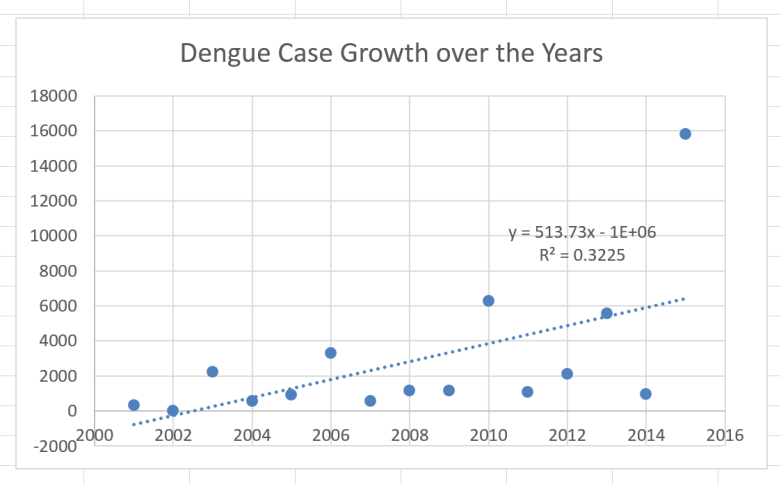
Diagram 2 shows the growth trend of Dengue over the years. In 1996 the dengue epidemic broke all records. In 2015 it broke all records once again. If we were to plot the number of cases over the years we see that the graph is steadily marching upwards.

If all other factors remain constant we should see about 6000 cases in 2016. 

dengue_years

Diagram 2: Dengue growth rate over the years.

This is a very simple analysis of dengue. There are lots of other variables that can be added (for example – growing population, temperature profiles, regional variance). But I wanted to show how even simple analysis can produce some interesting results.

Another important point I wanted to highlight was the lack of easily accessible data on diseases and epidemics. If we had better data then public health initiatives could be better targeted to combat such occurrences.

Quality of Life Reduced Question Set: Bristol Open Data

https://public.tableau.com/javascripts/api/viz_v1.jsThis visualisation operates upon a reduced set of questions from the Quality of Life indicators. This data has been provided by the Bristol City Council under the open data initiative (https://opendata.bristol.gov.uk/).

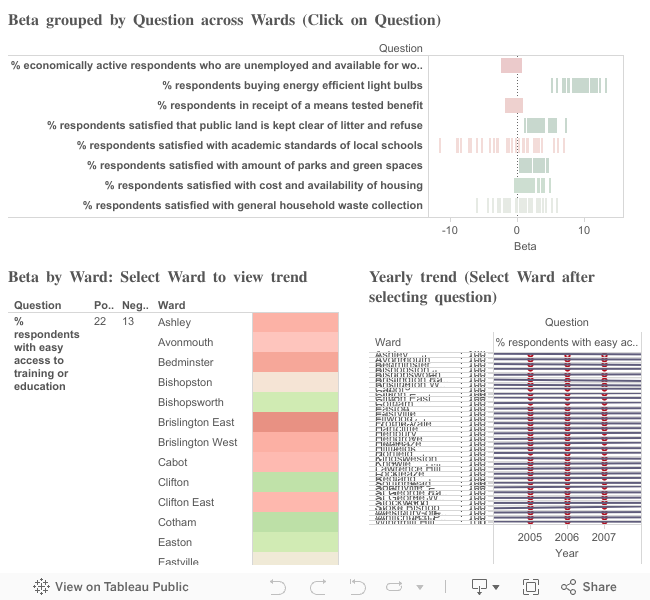
Using this view the reduced question set can be examined across all the wards as an average of beta for particular question across all wards in Bristol.

Click on a question to focus on it and to examine the beta value across all the wards. A count of wards with positive and negative beta values is also shown. These should correspond to the total green/red marks seen.
The click on a ward to examine the response over time and see the trend line (associated with beta).

Java and Apache Spark used to generate the csv data files.

Link: Dashboard

Criteria for beta calculation: minimum three years data should be available.

Reduced Question Set:

[codesyntax lang=”email”]

% respondents who usually buy fairtrade foods
% people in employment
% respondents book tickets online
Liveability indicator
% respondents who have problem from fly posting
% respondents who are carers 50 plus hours per week
% respondents who have chosen locally grown food to tackle climate change
% respondents who were victims of crime and reported  to the police
% respondents who have used the local tip or household recyling centre
% respondents in receipt of a means tested benefit
% respondents who say there is a problem withdrug dealing in their neighbourhood(includes does not apply/don't know)
% respondents who have been discriminated against or harassed because of ethnicity/race
% respondents who sometimes buy or consume locally grown food
% respondents satisfied with the availability of council/housing association housing
% respondents who are overweight and obese
% who agree that a directly elected mayor is improving the leadership of the city
% respondents who think that the appearance of their area has got better in the last two years
% respondents with problem of cars blocking local pavement
% respondents who find it difficult to get by financially
% respondents who feel locally, antisocial behaviour is a problem
% respondents who think shops have got better in the last two years
% respondents who think schools have got worse in the last two years
% respondents who disagree that the council provides value for money
% respondents who don't have the internet at home
% respondents who are underweight
% respondents who use internet banking
% respondents who agree they can influence decisions that affect public services they use
% respondents unable to use the internet
% respondents who apply for Council or Government services online
% respondents satisfied with the local tip or household recycling centre
% respondents who think drug misuse and drug dealing has got worse in the last two years
% respondents whose combined energy bill per quarter is £300-£399
% respondents satisfied that open public land is kept clear of litter and refuse
% respondents with a problem of abandoned supermarket trolleys in their neighbourhood
% respondents who feel they belong to neighbourhood
% respondents who took 3 or more return long haul flights in the past year
% respondents who are satisfied with the state of repair of their home
% respondents who have a car or van available for use by them or members of the household
% respondents who have volunteered for charity or community every month
% respondents who sometimes buy fairtrade foods
% respondents who say street litter is a problem
% respondents satisfied with their job
% respondents with easy access to a doctor
% respondents satisfied that public land is kept clear of litter and refuse
% economically active respondents who are unemployed and available for work
% respondents who did not take any return long haul flights in the past year
% respondents who have been discriminated against or harassed because of sexual orientation
% respondents who use a public computer
% respondents with parking issues
% respondents satisfied with amount of parks and green spaces
% respondents who live in council or housing association accommodation
% respondents who agree that people take responsibility for their children
% respondents who have been a victims of crime in the last 12 months
% respondents who cook at home using fresh and raw ingredients
% respondents who don't use dental services
% respondents who say graffiti is a problem
% respondents who have volunteered for charity or community at least once a month
% respondents with no educational or technical qualifications
% respondents who have problem from fly tipping
% respondents keen to learn the internet
% respondents who use the internet at work
% respondents who think shops have got worse in the last two years
% respondents who feel safe when outside in their neighbourhood after dark
% respondents who live in rented or tied accommodation
% respondents satisfied with the maintenance of footpaths

% respondents who have been discriminated against or harassed because of religion

% respondents who use the internet at home

% respondents who search the internet

% respondents who say discarded needles and syringes are a problem in their neighbourhood

% respondents who have noise from industrial commercial or construction sites

% respondents who smoke

% respondents who think parks and public spaces has got worse in the last two years
% respondents who think the area they live in will be better in five years time

% who feel police and local public services are successfully dealing with issues of crime and anti-social behaviour in their area
% respondents who are obese
% respondents who have someone use the internet for them
% respondents who think their area is a good place to bring up children
% respondents who use NHS dental services
% of respondents who have access to the internet and use it
% respondents who use digital technology to create content

% respondents who took 2 return long haul flights in the past year

% respondents satisfied with cost and availability of housing
% respondents who have their own garden
% respondents who say traffic congestion is a problem in their neighbourhood
% respondents who have been discriminated against or harassed because of gender
% respondents who shop online
% respondents who usually buy or consume locally grown food
% respondents who agree sexual harassment is an issue in Bristol
% respondents who have been discriminated against or harassed because of age
% respondents who say drug dealing is a problem in their neighbourhood
% respondents who think drunk and rowdy people in public places is a problem
% respondents who think job opportunities has got worse in the last two years
% respondents who use the internet when out and about
% respondents satisfied with jobs in the neighbourhood
% respondents who agree ethnic differences are respected in their neighbourhood
% respondents happy using the internet
% respondents who say drug dealing is a serious problem in their neighbourhood.
% respondents who agree that people treat other people with respect in their neighbourhood
% respondents who eat home cooked 4 times a week
% respondents unemployed
% respondents satisfied with the bus service
% respondents who feel safe when outside their neighbourhood during the day
% respondents satisfied with  local tips / household recycling centres
% respondents who say vandalism is a problem in their neighbourhood
% respondents who say personal safety is a problem in their neighbourhood
% who live in owned private or tied accommodation
% respondents who think drug misuse and drug dealing has got got better in the last two years
% respondents who live in households with a smoker
% respondents who think antisocial behaviour has got got better in the last two years
% respondents who think antisocial behaviour has got worse in the last two years
% respondents who code
% respondents who are dissatisfied with the way the council runs things
% respondents who say they have problem with personal safety in their neighbourhood(includes does not apply/don't know)
% respondents who feel safe indoors after dark
% respondents not interested in using the internet
% respondents who own their own homes
% respondents who eat food grown by themselves or by people they know
% respondents satisfied with academic standards of local schools
% respondents satisfied with markets
% respondents who have access to the internet
% respondents who took 1 return short haul flight in the past year
% respondents who have been discriminated against or harassed because of disability
% respondents who are satisfied with the way the council runs things
% respondents who took 1 return long haul flight in the past year
% respondents who say insensitive development is a problem in their neighbourhood
% respondents with easy access to childcare (adult survey)
% respondents satisfied with leisure facilities/services for children under 12 (adult survey)
% respondents satisfied with libraries
% respondents with easy access to training or education
% respondents who did not take any return short haul flights in the past year
% respondents satisfied with neighbourhood
% respondents who feel dog fouling is a problem in local area
% respondents who took 3 or more return short haul flights in the past year
% respondents who have noise from neighbours
% respondents who feel crime has got worse over last 3 years
% respondents who say neglected or derelict buildings or land is a problem in their neighbourhood
% respondents who think their neighbourhood has got worse over the last 2 years
% respondents who think job opportunities has got got better in the last two years
% respondents who say their neighbourhood is getting better
% respondents with noise from fireworks
% respondents who think the police and council succesfully respond to anti-social behaviour
% respondents who can't afford the internet
% respondents who are willing to call themselves disabled
% respondents who live in households with someone who smokes regularly within the home
% respondents whose combined energy bill per quarter is £400 or more
% respondents satisfied with health services
% respondents who agree people from different backgrounds get on well together
% respondents who don't have a garden or allotment
% respondents buying energy efficient light bulbs
% respondents satisfied with general household waste collection
% respondents who think drug use is a problem in their area

[/codesyntax]
https://public.tableau.com/javascripts/api/viz_v1.js

Question Set Reduced - Details

Javascript: Playing with Prototypes – II

Let us continue the discussion about Prototypes in Javascript and show the different ways in which inheritance can work. Inheritance is very important because whether you are trying to extend the JQuery framework or trying to add custom event sources in Node.JS you will need to extend an existing JS object.

Let us remember the most important mantra in JS – “nearly everything interesting is an object, even functions”

Objects are mutable, primitives (e.g. strings) are NOT!

Let us first introduce the example. There is a base object: Person which has two properties ‘id’ and ‘age’ and getter/setter methods for these. We want to create a child object: Student, which should inherit the id and age properties from Person and add its own read-only ‘student id’ property.

[codesyntax lang=”javascript”]

/*
Base object: Person
*/
function Person(id)
{
  this.id = 0;
  this.age = 0;
}

/*
Add set/get methods for Age and Id
*/
Person.prototype.setId = function(id)
{

  this.id = id;
};

Person.prototype.getId = function()
{
  return this.id;
};

Person.prototype.setAge = function(age)
{

  this.age = age;
};

Person.prototype.getAge = function()
{
  return this.age;
};


/*
Child object Student which should extend properties and methods from Person
*/
function Student(sid)
{
  this.sid = sid;

  /*
  Constructor for Person (to be safe)
  */
  Person.call(this);
  /*
  Student Id getter
  */
  Student.prototype.getSid = function()
  {
    return this.sid;
  }
}

[/codesyntax]


There are different ways (patterns) of implementing ‘inheritance’ based (Inheritance Methods):

  • Pattern 1: Student.prototype = Object.create(Student);
  • Pattern 2: Student.prototype = Object.create(Person.prototype);
  • Pattern 3: Student.prototype = new Person;

Below is the snippet of code we use to probe what happens in each of the three cases. Two instances of Student are created (s1 and s2). Then we examine the prototypes and assign values to some of the properties.

[codesyntax lang=”javascript”]

<Inheritance Method: one of the three options above>

var s1 = new Student(101);
var s2 = new Student(102);

console.log("S1",s1);
console.log("S2",s2);
console.log("Proto S1",Object.getPrototypeOf(s1));
console.log("Proto S2",Object.getPrototypeOf(s2));
if (Object.getPrototypeOf(s1) == Object.getPrototypeOf(s2)) {
  console.log("Compare prototypes:",true);
}

console.log("\n\n");

s1.setId(1);
s1.setAge(30);
console.log("S1",s1.getAge());

s2.setId(2);

console.log("Compare Id S1:S2",s1.getId(),s2.getId());

s2.setAge(20);
console.log("S2 set age 20");

console.log("S1 age",s1.getAge());
console.log("S2 age",s2.getAge());

[/codesyntax]


Let us look at what happens in each case:

1) Student.prototype = Object.create(Student);

Output:

[codesyntax lang=”php”]

S1: { sid: 101, id: 0, age: 0 }
S2: { sid: 102, id: 0, age: 0 }
Proto S1: { getSid: [Function] }
Proto S2: { getSid: [Function] }
Compare prototypes: true


/Users/azaharmachwe/node_code/NodeTest/thisTest.js:73
s1.setId(1);
^
TypeError: Object object has no method 'setId'
at Object.<anonymous> (/Users/azaharmachwe/node_code/NodeTest/thisTest.js:73:4)
at Module._compile (module.js:456:26)
at Object.Module._extensions..js (module.js:474:10)
at Module.load (module.js:356:32)
at Function.Module._load (module.js:312:12)
at Function.Module.runMain (module.js:497:10)
at startup (node.js:119:16)
at node.js:901:3

[/codesyntax]


The surprising result is that an exception is thrown. It seems there is no method ‘setId’ on the Student instance. This means that inheritance did not work. We can confirm this by looking at the prototype of S1 and S2 instance. Only the getter for student id defined in the Student object is present. We have not inherited any of the methods from Person.

But if we look at the list of attributes we see ‘id’ and ‘age’ present. So it seems the attributes were acquired somehow.

If we look at the way we define the Person object we actually add the ‘id’ and ‘age’ attributes to the instance (i.e. we use this.id) where as the accessor methods are added on the prototype. When we create an instance of Student as Student.prototype = Object.create(Student) we correctly set the attributes as they are defined at the instance level.

If the line in bold is removed then you will only see the Student level attribute (‘sid’).


2) Student.prototype = Object.create(Person.prototype);

Output:

[codesyntax lang=”php”]

S1: { sid: 101, id: 0, age: 0 }
S2: { sid: 102, id: 0, age: 0 }
Proto S1: { getSid: [Function] }
Proto S2: { getSid: [Function] }
Compare prototypes: true


S1 30
Compare Id S1:S2 1 2
S2 set age 20
S1 age 30
S2 age 20

[/codesyntax]

No errors this time.

So we see both S1 and S2 instances have the correct attributes (Person + Student) prototypes for both contain the getter defined in Student and both have the same prototype. Something more interesting is the fact that we can set ‘age’ and ‘id’ on them as well showing us that the attribute setters/getters have been inherited from Person.

But why can’t we see the get/set methods for ‘age’ and ‘id’ on the Student prototype? The reason is that with the call to Object.create with the Person.prototype parameter we chain the prototype of Person with that of Student. To see the get/set methods for ‘age’ and ‘id’ that the Student instance is using add the following line to the probe commands:

console.log(“>>”,Student.prototype.__proto__);

This proves that the object is inheriting these methods at the prototype level and not at the object level. This is the recommended pattern for inheritance.

3) Student.prototype = new Person;

This is a method you may see in some examples out there. But this is not the recommended style. The reason is that in this case you are linking the prototype of Student with an instance of Person. Therefore you get all the instance variables of the super-type included in the sub-type.

Output:

[codesyntax lang=”php”]

S1: { sid: 101 }
S2: { sid: 102 }
Proto S1: { id: 0, age: 0, getSid: [Function] }
Proto S2: { id: 0, age: 0, getSid: [Function] }
Compare prototypes: true


S1 30
Compare Id S1:S2 1 2
S2 set age 20
S1 age 30
S2 age 20

[/codesyntax]

Note the presence of ‘id’ and ‘age’ attributes with default values in the prototypes of S1 and S2. If the attributes are array or object type (instead of a primitive type as in this case), we can get all kinds of weird, difficult to debug behaviours. This is the case with frameworks where a base object needs to be extended to add custom functionality. I came across this issue while trying to create a custom Node.JS event source.

Wrong way to extend: A Node.JS example

I have seen many Node.JS custom event emitter examples that use pattern number (3). The correct pattern to use is pattern (2). Let us see why.

The code below extends the Node.JS EventEmitter (in ‘events’ module) to create a custom event emitter. Then two instance of this custom event emitter are created. Different event handling callback functions for the two instances are also defined. This will allow us to clearly identify which instance handled the event.

In the end we cause the custom event to fire on both the instances.

[codesyntax lang=”javascript”]

var ev = require("events");

/*
Create a custom event emitter by extending the Node.JS event emitter
*/
function myeventemitter(id)
{
  this.id = id;
  ev.EventEmitter.call(this);
}
/*
Try different ways of extending
*/

myeventemitter.prototype = new ev.EventEmitter;

myeventemitter.prototype.fire = function()
{
  console.log('\nFire',this.id);
  this.emit('go',this.id);
}

/*
Initialise two instances of the custom event emitter
*/
var myee1 = new myeventemitter("A");
var myee2 = new myeventemitter("B");

/*
Define callbacks on the custom event ('go')
*/
myee1.on('go',function(id)
{
  console.log("My EE1: Go event received from",id);
});

myee2.on('go',function(id)
{
  console.log("My EE2: Go event received from",id);
});

/*
Cause the custom event to fire on both the custom event emitters
*/
myee1.fire();
myee2.fire();

/*
Dump the prototype of our custom event emitter
*/
console.log(myeventemitter.prototype);

[/codesyntax]

Note we are using pattern (3) to extend the EventEmitter:

myeventemitter.prototype = new ev.EventEmitter;

We expect that custom events fired on instance 1 will result in the event handling function on instance 1 being called. The same thing should happen for instance 2. Let us look at the actual output:

[codesyntax lang=”javascript”]

Fire A
My EE1: Go event received from A
My EE2: Go event received from A

Fire B
My EE1: Go event received from B
My EE2: Go event received from B
{ domain: null,
_events: { go: [ [Function], [Function] ] },
_maxListeners: 10,
fire: [Function] }

[/codesyntax]

This looks wrong! When we cause instance 1 to fire its custom event it actually triggers the event handling functions in both the instances! Same happens when we try with instance 2.

The reason as you may have already guessed is that when we use pattern (3) we actually attach the JSON object that holds the individual event handling functions to the prototype (variable name: _events). This can be seen in the above output.

Therefore both instances of the custom event emitter will have the same set of event handling functions registered because there is only one such set.

To correct this just switch the extension patter to (2):

[codesyntax lang=”javascript”]

Fire A
My EE1: Go event received from A

Fire B
My EE2: Go event received from B

{ fire: [Function] }

[/codesyntax]

The output now looks correct. Only the instance specific callback function is called and the prototype does not store the event handling functions. Therefore each instance of the custom event emitter has its own set for storing event handling functions.

Bristol Government: Open Data Initiative

Bristol City Council (BCC) is now publishing some of their data sets online as part of the Open Data initiative.
This is a VERY positive move and I too hope that this leads to the development of ‘new’ solutions to the city’s problems.
More information can be found here: https://opendata.bristol.gov.uk

The Tableau Viz below uses the Quality of Life Indicators data from across Bristol. This is available from the BCC website. The data set has a set of questions (about 540) asked across the different wards in Bristol (about 35) on a yearly basis starting from 2005 till 2013. Obviously data is not available across all the dimensions, for example the question:
“% respondents who travel for shopping by bus” for the Redland ward is available only from 2006-2010.

The raw data from the Open Data website was processed using Apache Spark’s Java Libraries. This was then dumped into a data file which was imported into Tableau.

Link: Dashboard

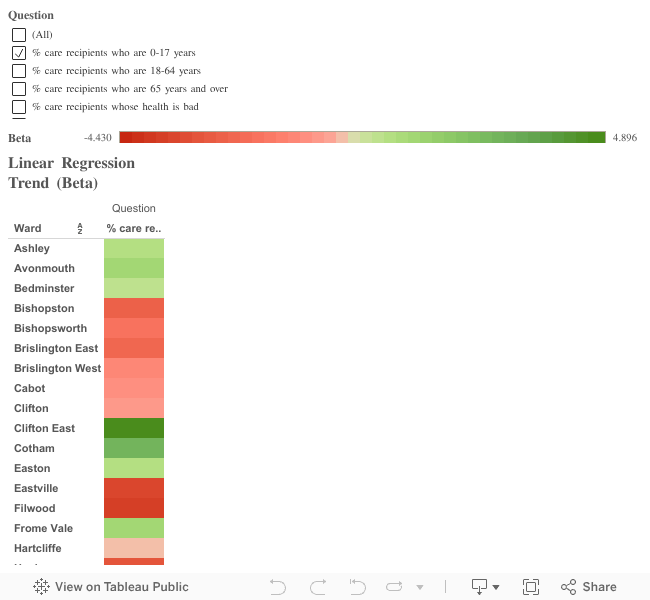
The heat map below plots the regression slope of the survey results over the years (beta) against the Questions and Wards.
Criteria for beta calculation: minimum three years data should be available.

https://public.tableau.com/javascripts/api/viz_v1.js

Heat Map Beta Ques/Ward

Horizontal Web-app Scaling with Nginx and Node.JS

One highly touted advantage of using Node.JS is that it makes applications easy to scale. This is true to an extent especially when it comes to web-apps.

A stateless request-response mechanism lends itself to parallelisation. This is as easy as spinning up another instance of the request handling process on the same or different machine.

Where state-full request-response is required (say to maintain session information) then to scale up the ‘state’ must be shared safely across different instances of the request handling processes. This separates out the ‘functional’ aspects of the request handling mechanism from the side-effect related code.

To tie in all the different web-app instances under a single public address and to load-balance across them we need a ‘reverse-proxy’. We will use Nginx for this.

Software needed:

  • Nginx (v 1.7.10)
  • Node.JS (v 0.10.12)

First let us setup the Nginx configuration:

[codesyntax lang=”javascript”]

events {
	worker_connections 768;
}

http {

	upstream localhost {
		server 127.0.0.1:18081;
		server 127.0.0.1:18082;
		server 127.0.0.1:18083;	
}
	server {
		listen 80;
		
		location / {
			proxy_pass http://localhost;
		}
	}
}

[/codesyntax]


More info about setting up and running Nginx – http://wiki.nginx.org/CommandLine

This configuration sets up the public address as localhost:80 with three private serving instances on the same machine at port: 18081, 18082 and 18083.

Let us also create a serving process in Node.JS using the Express framework:

[codesyntax lang=”javascript”]

var express = require("express");

var app = express();

var name = process.argv[2];
var PORT = process.argv[3] || 18080;

console.log("Server online: ",name,":",PORT);

app.get("/", function(request,response)
        {
           console.log("You have been served by: ",name,"on",PORT);

           response.write("Served by :"+name+" on "+PORT);
           response.end();
        });

app.listen(PORT);

[/codesyntax]


This takes in server name and port as the arguments.

We will spin up three instances of this serving process on the same machine with the  port numbers as in the Nginx config.

If we name the above as server.js then the instances can be spun up as:

node server.js <server_name> <port>

*Make sure you use the correct port (as provided in the Nginx config file).

Screen Shot 2015-03-22 at 01.51.15


Then just point your browser to localhost:80 and you should see:

Screen Shot 2015-03-22 at 01.56.33


Press refresh multiple times and you should see your request being served by different instances of web-app. Nginx by default uses ’round-robin’ load-balancing therefore you should see each of the instances being named one after the other as below (almost!).

Screen Shot 2015-03-22 at 01.56.45 Screen Shot 2015-03-22 at 01.58.15


Scaling out is as simple as spinning up a new instance and adding its IP and port to the Nginx configuration and reloading it.


Understanding the NodeJS EventLoop

The EventLoop is the secret sauce in any NodeJS based app.

It provides the ‘magical’ async behaviour and takes away the extra pain involved in explicit thread based parallelisation. On the flip side you have to account for the resulting single threaded JavaScript engine that processes the callbacks from the EventLoop. If you don’t then the traditional style of writing ‘blocking’ code can and will trip you over!

The LIBUV has an EventLoop which loops through the queue of events and executes the JS callback function (on a single thread as at any given time).

You can have multiple event sources (Event Emitters in NodeJS land) running in LIBUV on multiple threads (e.g. doing file I/O and socket I/O at the same time) that put events in the queue. But there is always ONE thread for executing JS therefore can only ‘handle’ one of those events at a time (i.e. execute the associated JS callback function).

Keeping this in mind let us look at a few such ‘natural’ errors where the code looks fine to the untrained eye but the expected output is not produced.

1) Wave bye bye to While Loops with Flags!

A common scenario is where we have while loops controlled by a flag variable for example. If you were wanting to read from console till the user types ‘exit’ then you would write something like this using blocking functions:

[codesyntax lang=”php”]

while (command != ‘exit’ ) 

//Do something with the command

command = reader.nextLine()

end while

[/codesyntax]

It will work because the loop will always be blocked till the nextLine() method executes and gives us a valid value for the command or throws an exception.

If you try and do the same in NodeJS using the async functions you might be tempted to re-write it as below. First we register a callback function which will trigger when the enter key is hit on the console. It will accept as a parameter the full line typed on the console. We promptly put this into the global command object and finish. After setting up the callback, we start an infinite loop waiting for ‘exit’. In case the command is undefined (null) we just loop again (‘burning rubber’ so as to say).

[codesyntax lang=”php”]

var command = null

//Register a callback function 

reader.on(‘data’, function (data) { command = data })

while (command != ‘exit’ ) 

if (command !=null)

//Do something with the command

command = null

end if

end while

[/codesyntax]

Unfortunately this code will never work. Any guesses what will be the output? If you guessed that it will go into an infinite loop with command always equal to ‘null’ you are correct!

The reason is very simple: JS code in NodeJS is processed by a single thread. In this case that single thread will be kept busy going through the while loop. Thus it will never get a chance to handle the console input event by executing the callback. Thus command will always stay ‘null’.

This can be fixed by removing the while loop.

[codesyntax lang=”php”]

var command = null

//Register a callback function 

reader.on(‘data’, function (data) 
	{ 
		command = data 
		if(command == 'exit')
		
			process.exit()
		
		end if
		
		/*
		Here we can either parse the command
		and perform the required action 
		 
	 OR 
		 
		 we can emit a custom event which all
		 the available command processors listen for 
		 but only the target command processor responds		
		*/
	
	})

[/codesyntax]

 2) Forget the For Loop (at least long running ones)

This next case is a very complex one because it is very hard to figure out whether its the for loop thats to blame. The symptoms may not show up all the time and they may not even show up in the output of your app. The symptoms can also change depending on things like the hardware configuration and configuration of database servers your code is interacting with (if any).

Let us take a simple example of inserting a fixed length array of data items into a database. In case the insert function is blocking the following code will work as expected.

[codesyntax lang=”php”]

for(var i=0; i<data.length; i++)
	database.insert(data[i])
end for

[/codesyntax]

In case the insert function is non-blocking (e.g. NodeJS) then we can experience all kinds of weird behaviour depending on the length of the array, such as incomplete insertions, sporadic exceptions and even instances where everything works as expected!

In case of the while loop example, the JS thread is blocked forever so no callbacks are processed. In case of for loops, the JS thread is blocked till the loop finishes running. This means in our example if we are using non-blocking insert the loop will execute rapidly without waiting for the insert to complete. Instead of blocking, the insert operation will generate an event on completion.

This is part of the reason why NodeJS applications can get a lot of work done without resorting to explicit thread management.

If the array is big enough we can end up flooding the receiver leading to buffer overflows along the way and resulting in dropped inserts. In some cases if the array is not that big the system may behave normally.

The question of how big an array can we deal with is also difficult to answer. It changes from case to case, as it depends on the hardware, the configuration of the target database (e.g. buffer sizes) and so on.

The solution involves getting rid of the long running for loop and using events and callbacks. This throttles the insert rate by making them sequential (i.e. making sure next insert is triggered only when the previous insert has completed)

[codesyntax lang=”php”]

var count = 0

//Callback function to add the next data item
function insertOnce()

	if(count>MAX_COUNT)
	
		/*
                 Exit process by closing any external connections (e.g. database)
                 and clearing any timers. Ending the process by force is another option
                 but it is not recommended
                */
                
	
	end

	database.insert(data[count], 
		
		function ()
	
		//Called once current data has been inserted
		
		emit_event('inserted')
		end
		
		)
		
	count++

end

//Call insertOnce on the inserted event
event_listener.on('inserted', insertOnce)

//Start the insertion by doing the first insert manually.
insertOnce()

[/codesyntax]

 3) Are we done yet?

 Blocking is not always a bad thing. It can be used to track progress because when a function returns you know it has completed its work one way or the other.

One way to achieve in NodeJS is to use some kind of a counter global variable that counts down to zero or up to a fixed value. Another way to do this is to set and clear timers in case you are not able to get a count value. This technique works well when you have to monitor the progress of a single stage of an operation (e.g. inserting data into a database as in our example above).

But what if we had multiple stages that we wanted to make sure execute in a synchronous manner. For example:

1) Load raw data into database

2) Calculate max/min values

3) Use max/min values to normalise raw data and insert into a new set of tables

There are some disadvantages with this approach:

1) Counters and timers add unwanted bulk to your code

2) Global variables are easy to override accidentally especially when using simple names like ‘count’

3) Your code begins to look like a house with permanent scaffolding around it

Furthermore once you detect that the one stage has finished, how do you proceed to the next stage?

Do you get into callback hell and just start with the next stage there and then, ending up with a single code file with all three stages nested within callbacks (Answer: No!)?

Do you try and break your stages into separate code files and use spawn/exec/fork to execute them (Answer: Yes)?

It is a rather dull answer but it makes sure you don’t have too much scaffolding in any one file.

Javascript: Playing with Prototypes – I

The popularity of Javascript (JS) has skyrocketed ever since it made the jump from the browser to the server-side (thank you Node.JS). Therefore a lot of the server-side work previously done in Java and other ‘core’ languages is now done in JS. This has resulted in a lot of Java developers (like me) taking a keen interest in JS.

Things get really weird when you try and map a ‘traditional’ OO language (like Java) to a ‘prototype’ based OO language like JS. Not to mention functions that are really objects and can be passed as parameters.

That is why I thought I would explore prototypes and functions in this post with some examples.

Some concepts:

1) Every function is an object! Let us see, with an example, the way JS treats functions.

[codesyntax lang=”javascript” lines=”normal”]
function Car(type) {
this.type = type;
//New function object is created
this.getType = function()
{
return this.type;
};
}

//Two new Car objects
var merc = new Car(“Merc”);
var bmw = new Car(“BMW”);
/*
* Functions should be defined once and reused
* but this proves that the two Car objects
* have their own instance of the getType function
*/
if(bmw.getType == merc.getType)
{
console.log(true);
}
else
{
//Output is false
console.log(false);
}
[/codesyntax]

The output of the above code is ‘false’ thereby proving the two functions are actually different ‘objects’.


2) Every function (as it is also an object) can have properties and methods. By default each function is created with a ‘prototype’ property which points to a special object that holds properties and methods that should be available to instances of the reference type.

What does this really mean? Let us change the previous example to understand what’s happening. Let us play with the prototype object and add a function to it which will be available to all the instances.

[codesyntax lang=”javascript” lines=”normal”]

function Car(type) {
   this.type = type;
}

Car.prototype.getType = function()
{
    return this.type;
}

//Two new Car objects
var merc = new Car("Merc");
var bmw = new Car("BMW");

/*
 * Functions should be defined once and reused
 * This proves that the two Car objects
 * have the same instance of the getType function
 */
if(bmw.getType == merc.getType)
{
    //Output is true
    console.log(true);
}
else
{
    console.log(false);
}

[/codesyntax]

We added the ‘getType’ function to the prototype object for the Car function. This makes it available to all instances of the Car function object. Therefore we can think of the prototype object as the core of a Function object. Methods and properties attached to this core are available to all the instances of the function Object.

This core object (i.e. the prototype) can be manipulated in different ways to support OO behaviour (e.g. Inheritance).


3) Methods and properties can be added to both the core or the instance. This enables method over-riding as shown in the example below.

[codesyntax lang=”javascript” lines=”normal”]

function Car() {
    
}

//Adding a property and function to the prototype
Car.prototype.type = "BLANK";

Car.prototype.getType = function()
{
    return this.type;
}

//Two new Car objects
var merc = new Car();
var bmw = new Car();

//Adding a property and a function to the INSTANCE (merc)
merc.type = "Merc S-Class";
merc.getType = function()
{
    return "I own a "+this.type;
}

//Output
console.log("Merc Type: ", merc.getType());
console.log("BMW Type: ", bmw.getType());
console.log("Merc Object: ",merc);
console.log("BMW Object: ",bmw);

[/codesyntax]


The output:

Merc Type:  I own a Merc S-Class

> This shows that the ‘getType’ on the instance is being called.

BMW Type:  BLANK

> This shows that the ‘getType’ on the prototype is being called.

Merc Object:  { type: ‘Merc S-Class’, getType: [Function] }

> This shows the ‘merc’ object structure in JSON format. We see the property and function on the instance.

BMW Object:  {}

> This shows the ‘bmw’ object structure in JSON format. We see there are no properties or functions attached to the instance.

Thoughts on Error Handling

Most code has natural boundaries as defined by classes, functions and remote interfaces.

The execution path for a program creates a chain of calls across these boundaries, tears it down as the calls complete and again builds it up as new calls are made.

All is well till one of the calls does not complete successfully. Then an exception is thrown which travels all the way up the chain and somewhere along the line it comes across your code. Or maybe it was a call to your code that does not complete successfully!

What to do when this happens? How to handle the exception?

Do you log it and carry on or do you stop the execution and bomb out or you could just carry on pretending nothing is wrong.

There is no single right answer to this question, just a set of good options that you get to pick from:

1) Log a warning message

This option is easy to understand and easier to forget while writing code. It should be combined with all the other options to give better visibility.

The key to effective logging is first choosing the right Logging API and then using the chosen Logging API correctly! It is a common feature of software to have to little or two much logging. Or the bad use of Error Levels where Level ERROR gives a trickle of messages where as Level INFO floods the logs with messages. Level WARN is often bypassed and Level DEBUG often misused to do ‘machine-gun’ logging.

For secure systems logging should be done carefully so as to not expose any information in an unencrypted log file (e.g. logging user credentials, database server access settings etc.).

Use Level ERROR for when you cannot continue with normal execution (e.g. required data files are missing or required data is not valid)

Use Level WARN for when you can continue but with limited functionality (e.g. not able to connect to remote services – waiting to retry)

Use Level INFO for when you want to inform the user about interesting events (like successfully established a connection or processed a certain number of records)

Use Level DEBUG for when you want to peek under the hood of the application (like logging properties used to initiate a connection or requests sent/response received – beware this is not very secure if logged to a general-access plain text file)

This option should be used no matter which of the other options is chosen. There is nothing as annoying as an application failing with just an error message and nothing in the logs or seeing an exception flash on the console a second before it closes.

2) Return a constant neutral value

In case of a problem we return a constant neutral value and carry on as if nothing happened. For example if we are supposed to return a Set of objects (either from our code or by calling another method) and we are unable to do that for some reason then you can return a blank Set with no items – this would be a constant Set variable which is returned as a neutral value.

For the code that calls this method, we absorb the exception propagation. The only way the calling code can detect any problems is if it treats the returned ‘neutral’ value as an ‘illegal value’. It can use one of the options presented here or ignore it and carry on.

Best Practice: If you are using a neutral constant return value(s) in case of an error make sure you do two things; log the error internally for your reference and make sure if it is an API method you document the fact. This will make sure anyone who calls your code knows the constant neutral value(s) and can treat them as illegal if required.

Another way to use a neutral constant value is to define a max and min range for the return value. In case the actual value is above the max or below the min value then replace it with the relevant constant value (MAX_VALUE or MIN_VALUE).

3) Substitute previous/next valid piece of data

In case of a problem we return the last known or next available valid value. This is fairly useful at the edge of your system where you are dealing with data streams or large quantities of data where it is required that all calls return valid data and not throw any exceptions or revert to constant values (for example a stream of currency data where one call to the remote service fails). You would want to also provide a neutral constant value as well in case there are issues at the beginning where no valid values are present.

For the calling code this provides no mechanism to detect any exceptions down the chain. So the called code that implements this behaviour absorbs all exceptions. That is why this is really useful for the edge of your system when dealing with other remote services, databases and files. If you use this technique make sure you log the fact that you are skipping some invalid values till you get a valid one or you have not been able to get a new valid value so you are re-using the previous one, that will make sure you can detect issues with the remote systems and inform the user (e.g. database login credentials not valid, remote service unavailable or few data file entries are corrupt) while making sure your internal code remains stable.

Also make sure you document this behaviour properly!

4) Return an error code response

This is fairly useful when building a remote or packaged API for external consumption especially when indicating internal errors which the user can do little about. Some examples include: an internal service is no longer responding, internal file I/O errors, issues related to memory management on the remote system etc.

Error codes make it easier for users to log trouble tickets with the help-desk.

Once with the help-desk the trouble ticket can then be routed based on the error code (e.g. does O&M Team just need to restart a failed service or is this a memory leak issue which needs to be passed on to the Dev Team).

We should be careful not to return error codes for issues that can be resolved by the user. In those cases a descriptive error message is the way to go.

As an example: assume you have a form which takes in personal details of the user and then uses one or more remote services to process that data.

– For form validations (email addresses, telephone numbers etc.) we should return a proper descriptive error message.

– For issues related to network connectivity (remote service not reachable) we should return a proper descriptive error message.

– For issues related to the remote service which the user cannot do anything about (as described earlier) the error code should be returned with link to the help-desk contact details and perhaps more information (maybe an auto generated trouble ticket id – see next section).

5) Call an error processing routine/service

This is one where we detect an error response and call an error processing routine or service. This is especially use full not just for complex rule-based logging but also for automatic error reporting, trouble ticket creation, service performance management, self-monitoring etc.

It is often useful to have a service that encapsulates error handling logic rather than have your catch block or return value checks peppered with if-else blocks.

In this case the error response or exception is passed on to a service or routine that encapsulates the error processing logic. Some of the things that such a service or routine might do:

– Decide which log file to log the error in

– Decide the level of the error and create self-monitoring events and/or change life-cycle state of the system (restart, soft-shutdown etc.)

– Interface with trouble ticketing systems (e.g. when you get a major exception in Windows 7 OS it offers to send details to Microsoft)

– Interface with performance monitoring systems to report the health of the service

6) Shutdown (Fail-fast)

This means that the system is shutdown or made un-available as soon as any exception of significance is detected.

This behaviour is often required from critical pieces of software which should not work in a degraded state (so called mission critical software). For example you don’t want the auto-pilot of an A380 to work when it is getting internal errors while performing I/O. You want to kill that instance and switch over to a secondary system or warn the pilot and immediately transfer control to manual.

This is also very important for systems that deal with sensitive data such as online-banking applications (it is better to be not available to process online payments than to provide unreliable service). Users might accept a ‘Site Down’ notice but they will definitely NOT accept incorrect processing of their online payment instructions.

From the example above, because we failed fast and made the banking web-site unavailable we did not allow the impact of the error to spread to the user’s financial transaction.


Java: Getting a webpage using java.net

There is an easy way to get a web page as a HTML string. In fact there are two basic ways to do this using the basic java.net package. Why would we need this?

Some use-cases include:

  • Getting information from a web-page for text aggregation (say from a news site)
  • Creating a ‘page filter’ which pre-processes web-pages to strip out unsafe content

For both the examples we will use the basic java.net.URL and java.net.URLConnection entities in java.net package.


Type 1: Encapsulated Side-effects

The first example opens up the URL connection and obtains an InputStream from it. A BufferedReader wraps the InputStream from the URL which is then read into a StringBuilder. Then we return the String containing the HTML page source (if all goes well).

The code listing:


java.net.1

Few points to remember:

– Always use a StringBuilder instead of the concat ‘+’ operator, Strings are immutable which means every time you call ‘+’ a new String object is born. StringBuilder uses a character array.

– Always make sure to have proper exception handling and a finally block which closes the InputStream

This code encapsulates the ‘side-effect’ of reading from a remote URL and returns a String data.

 Type 2: Exposed Side-effects

The second example is very simple. It is a sub-set of the code shown in the previous section.

In this second example we simply open the URL connection and obtain an InputStream from it which we return to the calling program. The responsibility of using the InputStream to get the page source is left to the calling function. This is especially useful if you want to work directly with an InputStream instead of a String representation. One such example is when using a parser to parse the page source.

The big disadvantage of using this method is that it exposes the side-effect related code to the main application. For example if the Internet connection goes down or the server goes down while the InputStream is being read the calling application will encounter an error and therefore behave unpredictably.

java.net.2

The way to get the best of both worlds (encapsulated side-effects and providing an InputStream to a calling function) is to use Example 1 and return a String object which can then be converted into a ‘byte stream’.